Click on the feature names in the list below to
see more information and an animated example of it
in action.
|
SL |
Sign Wizard Letter
|
| SS |
Sign Wizard Scribe |
| SA |
Sign Wizard Advantage |
| SG |
Sign Wizard Grand |
| SP |
Sign Wizard Pro |
| NW |
Neon Wizard Std |
| N+ |
Neon Wizard Plus |
| NP |
Neon Wizard Pro |
| |
|
Fonts and Text
|
| |
Direct Text Entry

This feature enables you to enter text directly in the layout, as opposed to using a separate dialog box. All of the text attributes are displayed and can be easily adjusted at any time.
Direct text entry saves time since you can see the text in your layout at all times. Even after you have made changes to the text characteristics, such as extend or italicize, you can go back and edit the text directly on screen.
|
SL |
SS |
SA |
SG |
SP |
NW |
N+ |
NP |
Text Editing Property Bar
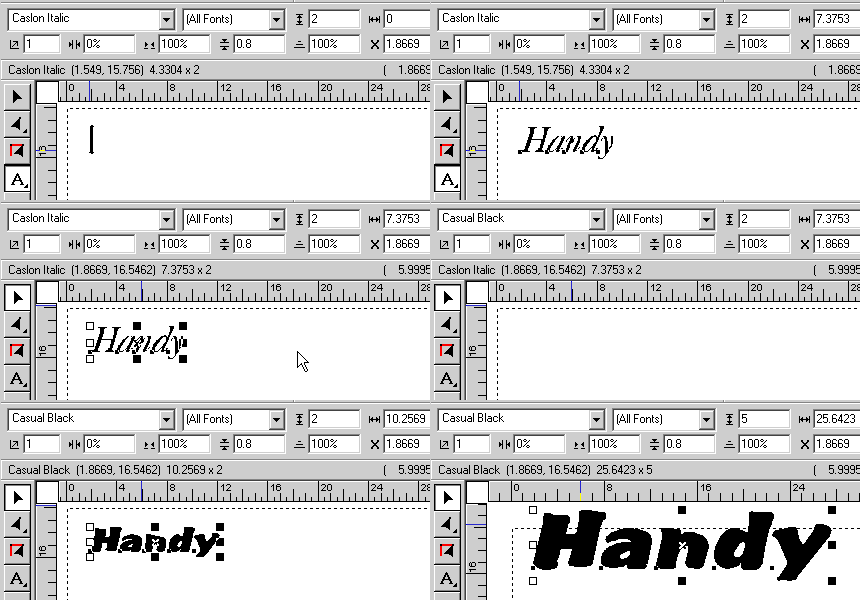
The extremely handy text property bar means the most common changes to your text are just a click away. While most changes can be done entirely with the mouse, sometimes you need to use specific values, such as a height. This is where you do that, and this bar is always there, whenever you have text selected.
We've had this feature since 1995, long before Adobe and others saw its merits.
|
SL |
SS |
SA |
SG |
SP |
NW |
N+ |
NP |
Auto Connecting Script Fonts
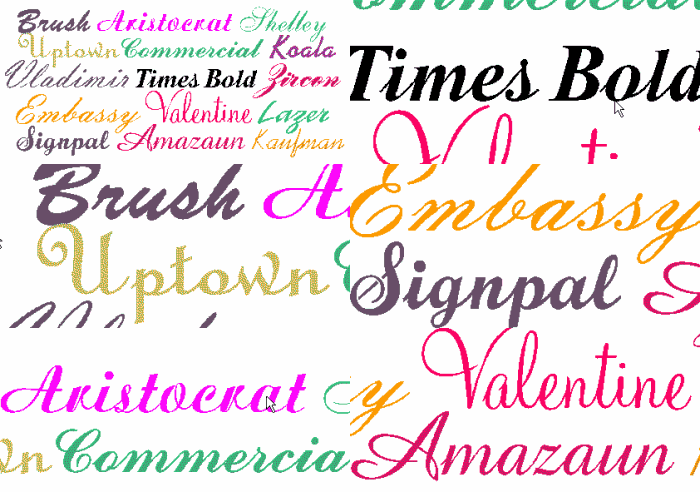
Sign Wizard and Neon Wizard have 15 connecting script fonts.
These specially designed fonts cover a wide range of styles from the casual looks of Brush Script and Lazer to the elegant styles of Zircon and Shelley to the ever popular Commercial Script.
|
SL |
SS |
SA |
SG |
SP |
NW |
N+ |
NP |
Individual Letter Spacing
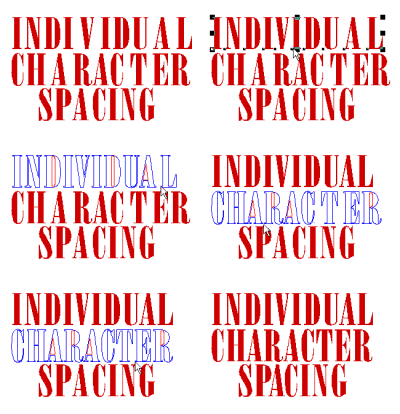
You can fine tune the spacing, or kerning, between individual letters without using a special tool. This makes it very quick and easy to create the perfect spacing between letters in a large sign.
This is now previewed in full color!
|
SL |
SS |
SA |
SG |
SP |
NW |
N+ |
NP |
Interactive Letter Spacing
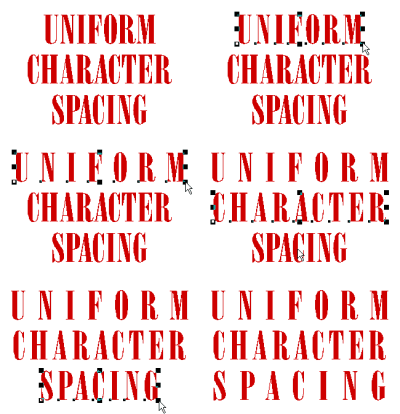
You can adjust the kerning of an entire line of text with a simple drag of the letter spacing handle, which is located on the lower left and lower right of the text objects.
This is now previewed in full color!
|
SL |
SS |
SA |
SG |
SP |
NW |
N+ |
NP |
Interactive Line Spacing
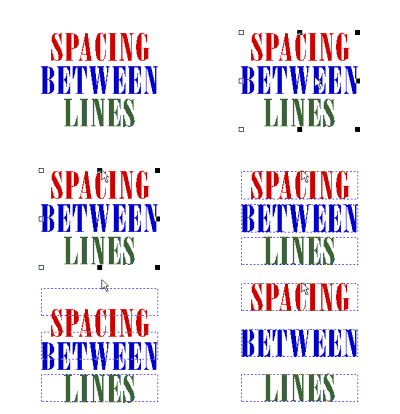
Adjust the spacing between lines interactively with the line spacing tool, which is available by using Shift when dragging a group of lines up or down.
|
SL |
SS |
SA |
SG |
SP |
NW |
N+ |
NP |
Interactive Rotating
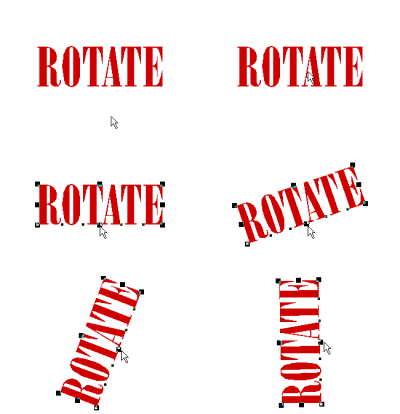
You can rotate text and graphics without using a special tool - the lower middle handle is the rotation tool. The angle of rotation is always shown in the property bar.
This is now previewed in full color!
|
SL |
SS |
SA |
SG |
SP |
NW |
N+ |
NP |
Interactive Scaling

Scale objects with just a drag of the mouse, and view it in real time, so you never have to guess if the size is right. The exact dimensions will be displayed in the property bar.
This is now previewed in full color!
|
SL |
SS |
SA |
SG |
SP |
NW |
N+ |
NP |
Interactive Slanting

You can quickly and easily slant, or italicize, text by simply dragging the top middle handle left or right. The angle of the slant is shown in the property bar.
This is now previewed in full color!
|
SL |
SS |
SA |
SG |
SP |
NW |
N+ |
NP |
Interactive Text on an Arc
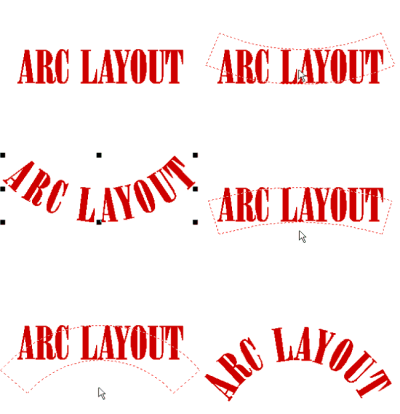
Creating text in an arc is a simple matter of holding the SHIFT key while dragging the middle bottom handle into the arc shape, either up or down.
|
SL |
SS |
SA |
SG |
SP |
NW |
N+ |
NP |
Interactive Word Spacing
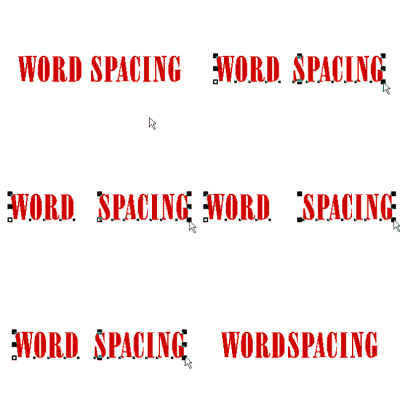
Interactive word spacing is a very handy way to adjust the kerning for the entire line of text at once.
|
SL |
SS |
SA |
SG |
SP |
NW |
N+ |
NP |
Real Time Spell Checking
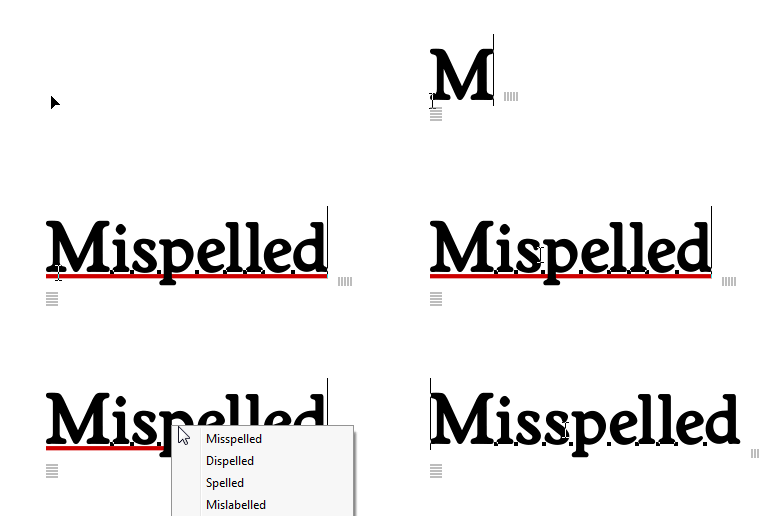
With Real Time Spell Checking, you always know if a word is misspelled without having to remember to run a spell check.
|
SL |
SS |
SA |
SG |
SP |
NW |
N+ |
NP |
WYSIWYG Font List
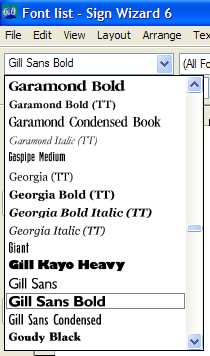
The font list shows exactly what the font looks like before you choose it! This is called WYSIWYG, "what you see is what you get." The complete font list contains 400 high quality signmaking fonts.
|
SL |
SS |
SA |
SG |
SP |
NW |
N+ |
NP |
Text Notes
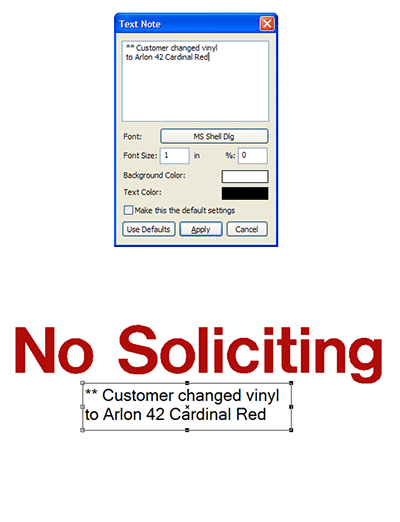
When you want to add notes to your layouts, perhaps for the production or installation department, use the new Text Notes feature. This will let you jot down the note and position it in your layout.
Using the Layers palette, you can then specify to print the notes with a proof copy, but not cut the notes as part of the actual job.
|
|
|
SA |
SG |
SP |
NW |
N+ |
NP |
Change Case

The ability to change the case of a line of text saves editing time and lets you see what the different options look like in a hurry. This feature lets you change from all lower case to ALL CAPS to First Letter Caps or to SMALL CAPS.
You may toggle through the four options by pressing Alt+C on the keyboard or you can use the Change Case function in the Text Menu. This is another easy to use text editing feature that helps you be creative and productive at the same time.
|
|
|
SA |
SG |
SP |
|
N+ |
NP |
Connecting Text
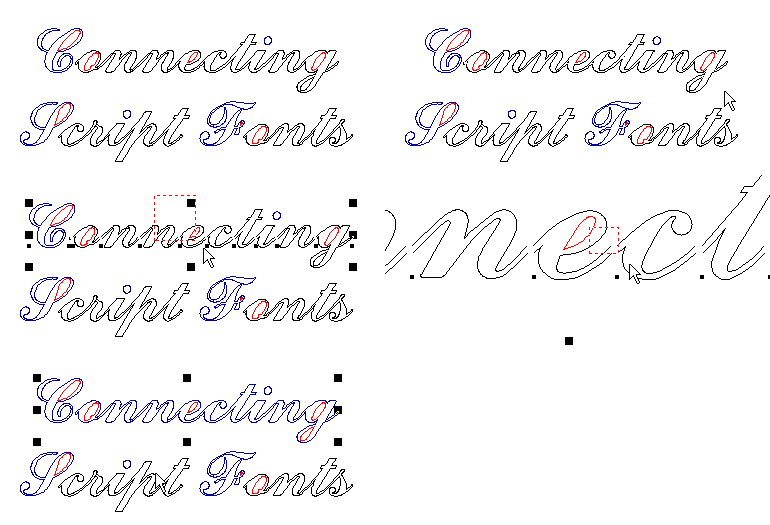
Connecting script fonts for vinyl signs give you beautiful custom looking lettering every time - automatically. This unique feature in Sign Wizard uses specially designed fonts to create text with perfect transitions between all the lower case letters.
All that you have to do is select one of the connecting script fonts, type in your text, then choose the Connect feature. All of the lower case characters will be perfectly connected and can then be cut out of vinyl with no breaks between letters.
|
SL |
SS |
SA |
SG |
SP |
|
|
|
Font Wizard
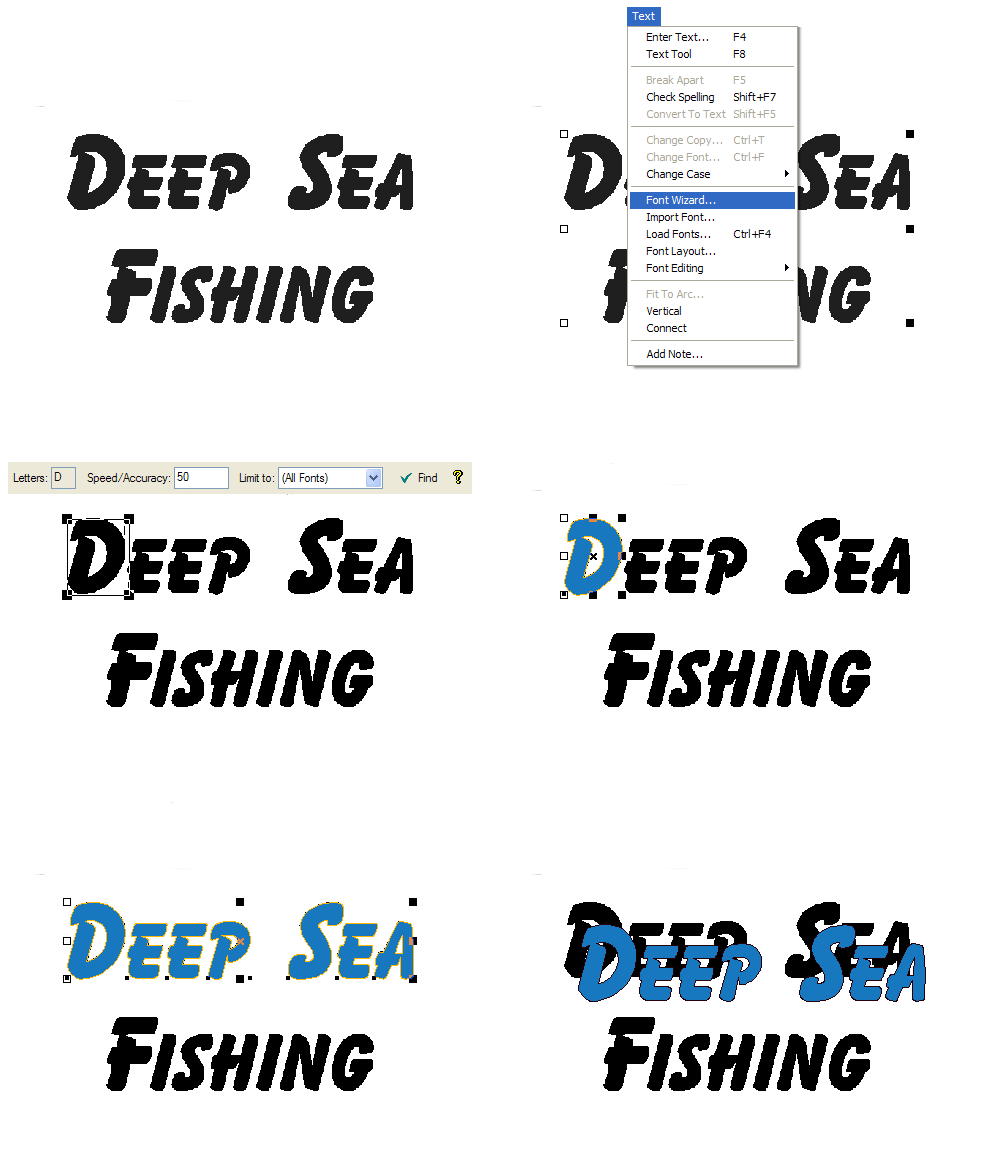
This huge time saving feature matches the font of scanned letters to a Sign Wizard font. So instead of vectorizing small text from a business card, just use Font Wizard to match the font, and then enter the text the easy way!
This "Deep Sea Fishing" example starts with a scanned bitmap. The first step is to select a character and type it in the Letters box - in our example, "D." Font Wizard then scans your font library for a match, and gives the top three results. It then places the font character on top of the bitmap so you can continue typing the rest of the text in a perfectly smooth vector format.
|
|
|
SA |
SG |
SP |
|
|
NP |
Vertical Text

Aligning text vertically is one simple click of the mouse. All the text editing functions used for horizontal text editing - scaling, adjusting the spacing uniformly between characters, adjusting the spacing between two characters, slanting to the right and left, extending and condensing, heightening and rotating - are also available for vertical text.
|
|
|
|
SG |
SP |
|
N+ |
NP |
Neon Script Connecting Font

All versions of Neon Wizard come with a single tube connecting font called Neon Script. The lower case characters can be easily connected, giving you a clean and flowing single tube script.
|
|
|
|
|
|
NW |
N+ |
NP |
Paragraph Text: Inline Letter Scaling, Rotation, Fill Colors

With Paragraph Text, you can now change the fill color, stroke color, rotation and scale without breaking the text apart into letters.
|
|
|
SA |
SG |
SP |
|
|
|
Paragraph Text: Simple Wrap Mode
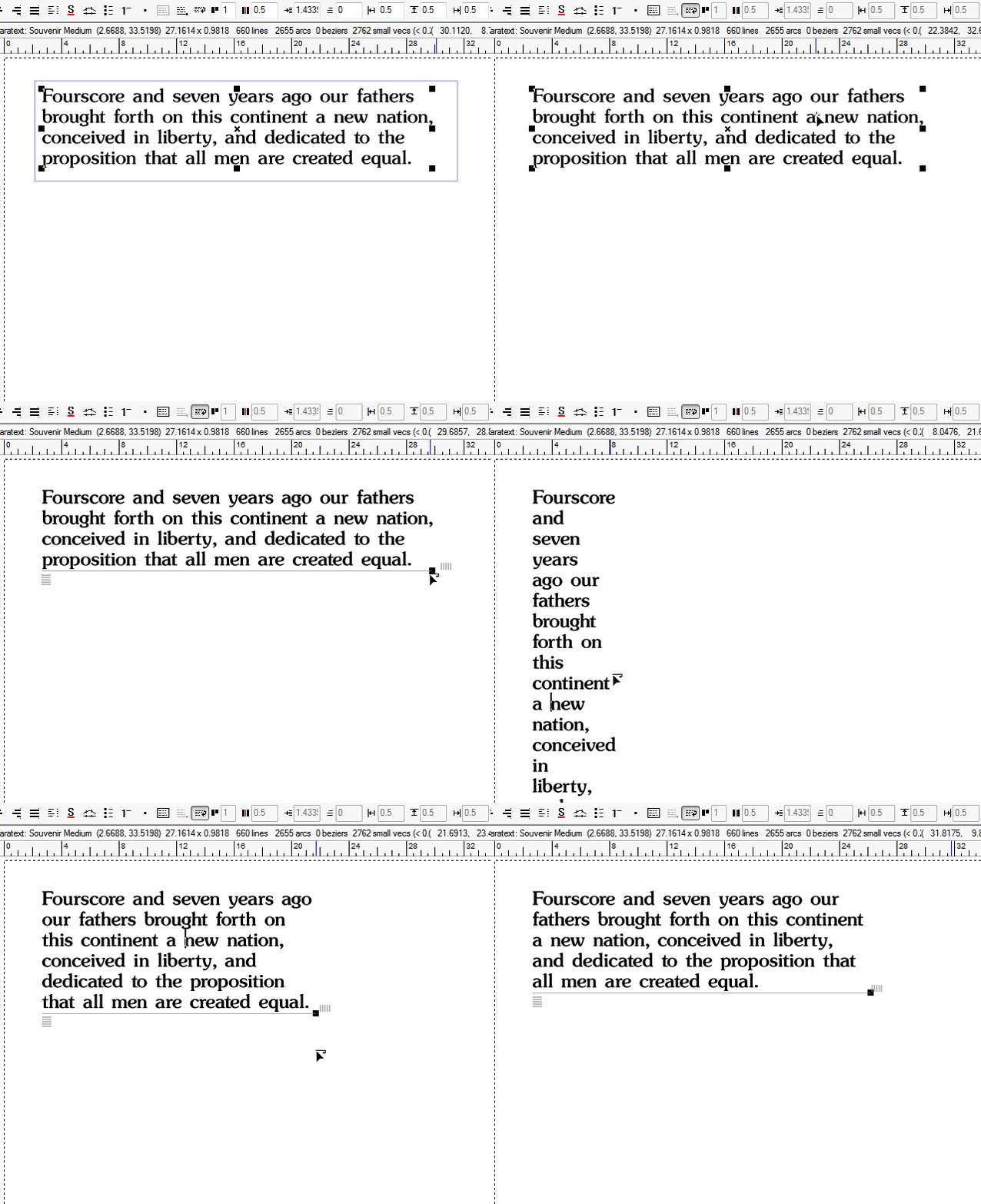
In Simple Wrap Mode, a horizontal line at the bottom of the text lets you quickly and easily define with the wrap width of the paragraph, without concern for the height of the paragraph.
|
|
|
SA |
SG |
SP |
|
|
|
Convert TrueType fonts to Sign Wizard Fonts
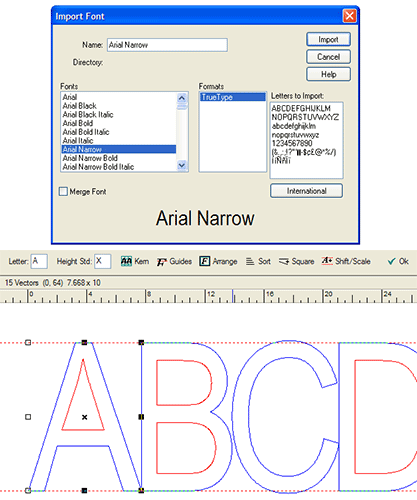
Here is a very unique set of features to Sign Wizard - the ability to create high quality, native Sign Wizard fonts from your TrueType font libraries. All the tools you need are here - smoothing, standardizing height, squaring up, creating kerning tables, standardizing serifs, and properly sorting the font.
Although our total font library of 400 fonts will most likely cover the font you need, there is always the case of needing an obscure TrueType font. And if this font is of poor quality and needs to be cut at a large size, the ability to make a high quality Sign Wizard font is invaluable.
|
|
|
|
SG |
SP |
|
|
|
Design Custom Fonts
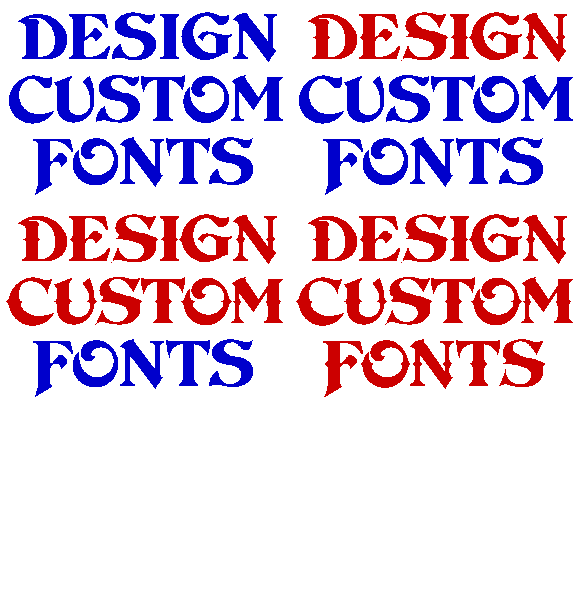
Sign Wizard lets you stylize existing fonts and create your own custom fonts.
In the Text menu you can use Import Font to convert any of the True Type fonts on your computer to Sign Wizard fonts. You can stylize the characters, as illustrated above, and vector edit as needed. Click on Spacing Table and then on Normal Automatic Kerning before saving the converted font. You can open existing Sign Wizard fonts and make global changes to all the characters - like making the stroke thicker. You can also make your own custom fonts by creating and entering characters one at a time.
|
|
|
|
SG |
SP |
|
|
|
Paragraph Text: Automatic Bullets
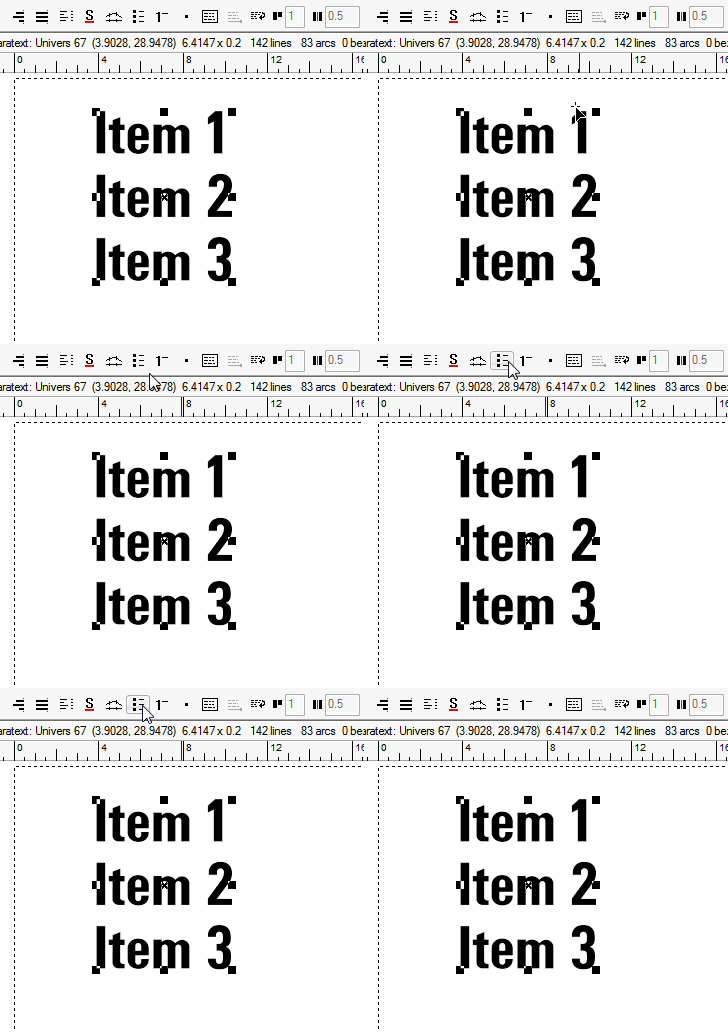
Automatic bullets in the Paragraph Text Tool makes it a snap to make a stylish list of items.
|
|
|
|
SG |
SP |
|
|
|
Paragraph Text: Automatic Numbering
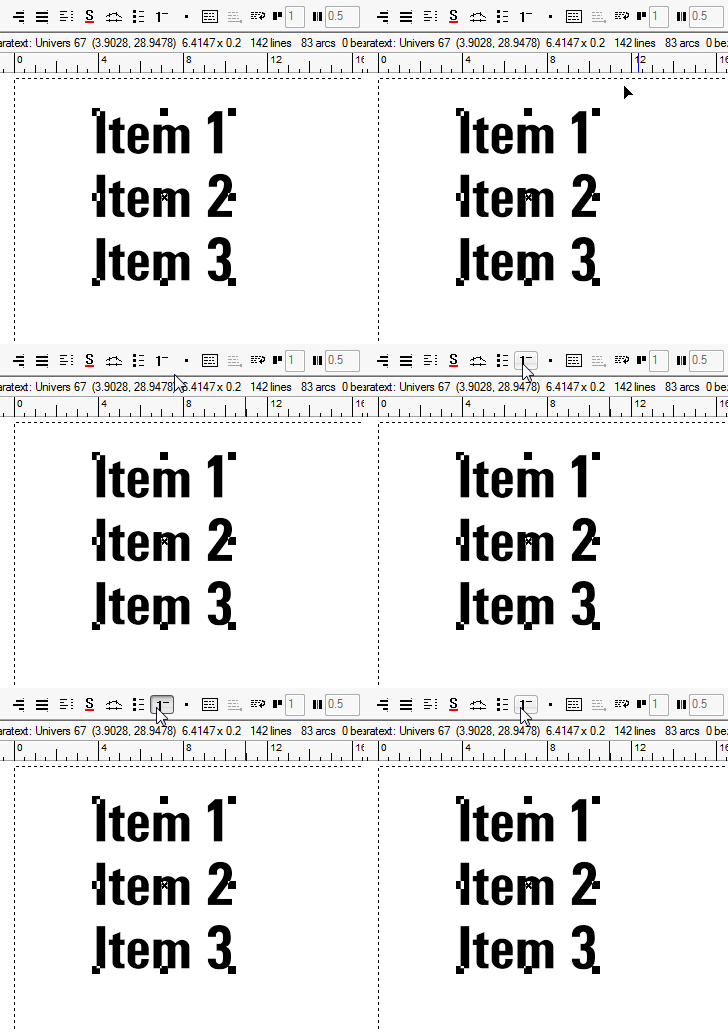
Automatic numbering in the Paragraph Text Tool makes it a snap to make a stylish numbered list of items.
|
|
|
|
SG |
SP |
|
|
|
Paragraph Text: Auto Weld

This handy option when using Paragraph Text means you don't have to weld the text because it happens automatically whenever the text is changed, and you still retain full text editing capability.
|
|
|
|
SG |
SP |
|
|
|
Paragraph Text: Fully Justified
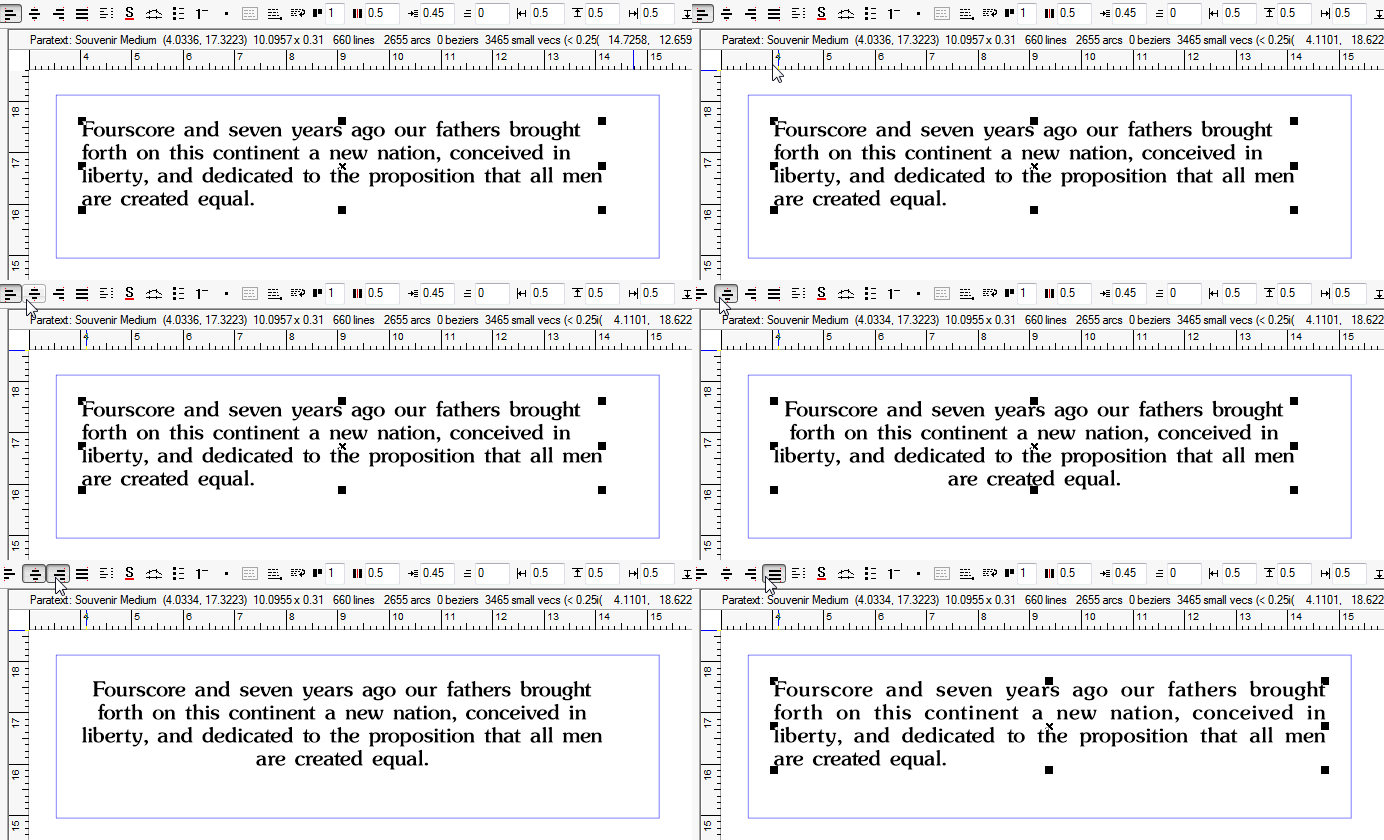
With Paragraph Text you can now use full justification for straight left and right edges of paragraphs.
|
|
|
|
SG |
SP |
|
|
|
Paragraph Text: Menu Board Support
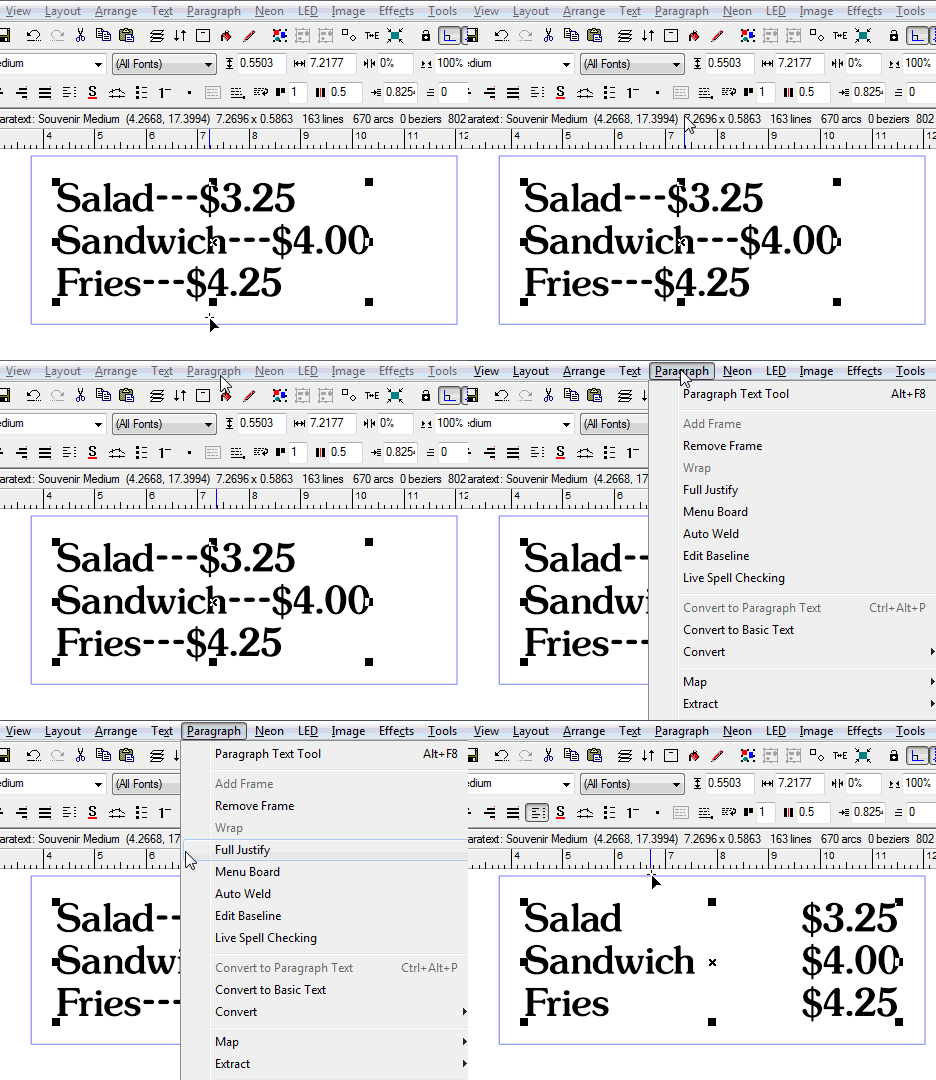
With support for menu boards, you can simply enter three dashes (---) to indicate that the following text should justify right, and even align periods if present.
|
|
|
|
SG |
SP |
|
|
|
Paragraph Text: Multiple Columns
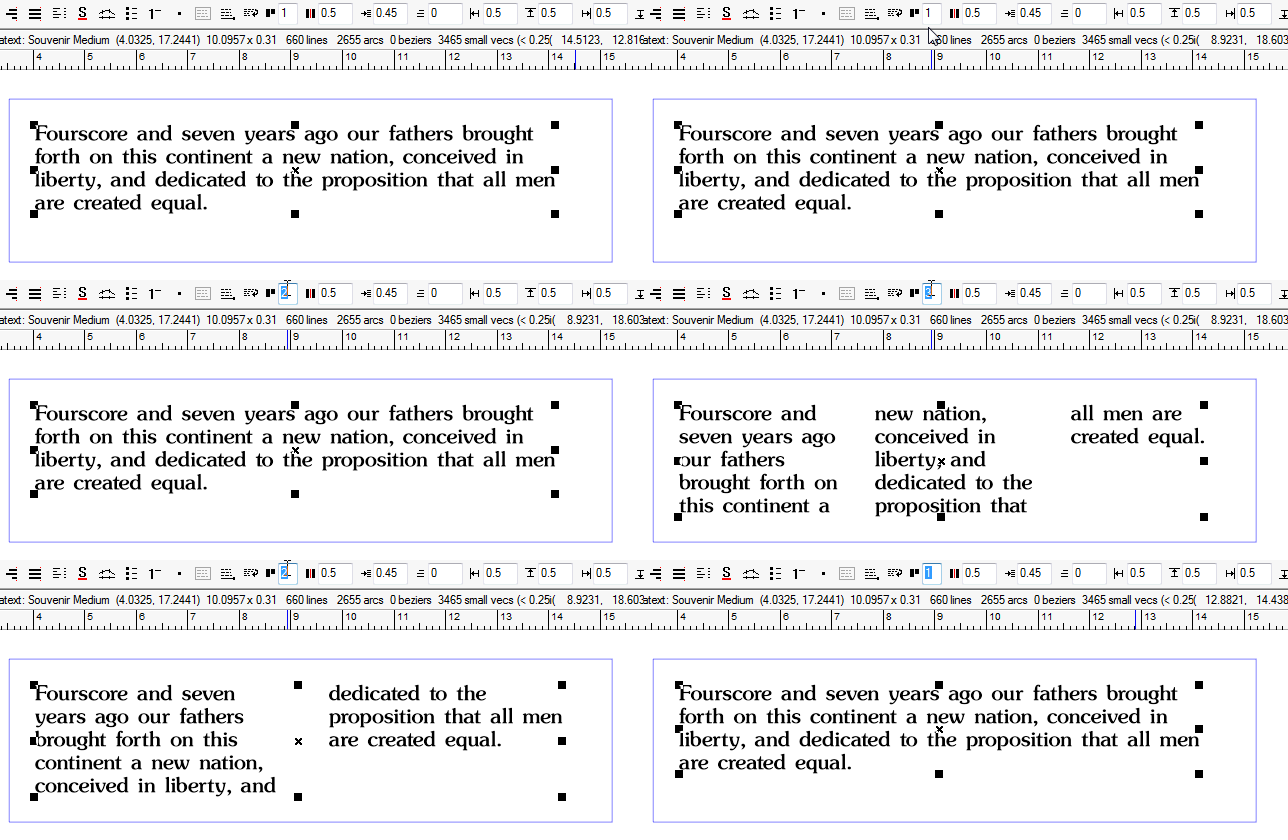
Easily flow text into two or columns
|
|
|
|
SG |
SP |
|
|
|
Paragraph Text: Text Frames

Easily format text into rectangular frames.
|
|
|
|
SG |
SP |
|
|
|
Paragraph Text: Map to Circle with Live Editing
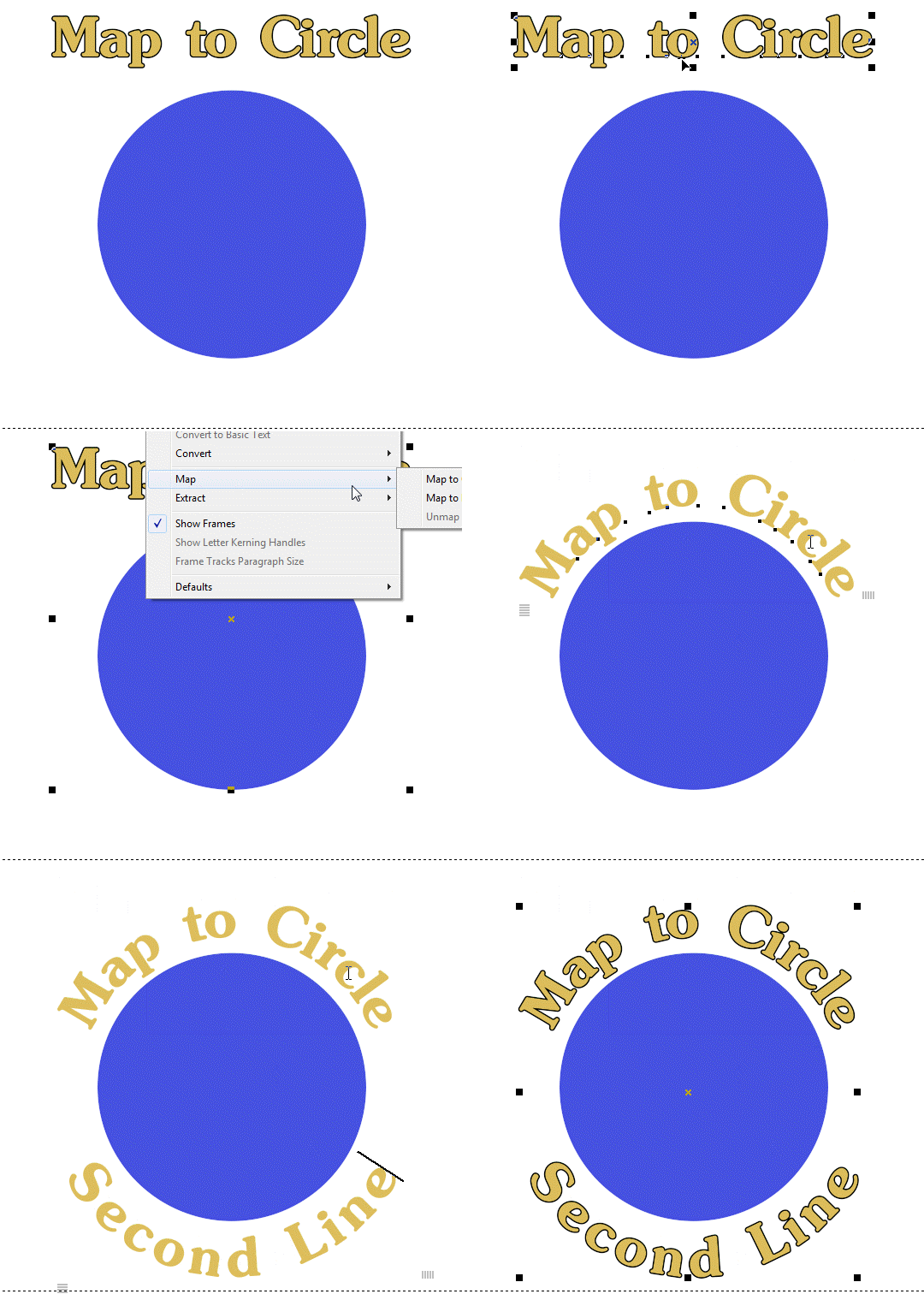
The Map to Circle feature lets you map text to a circle, intelligently handling a second line. This is similar to Text on Arc, but in this case the circle remains in the layout.
|
|
|
|
|
SP |
|
|
|
Paragraph Text: Map to Path with Live Editing
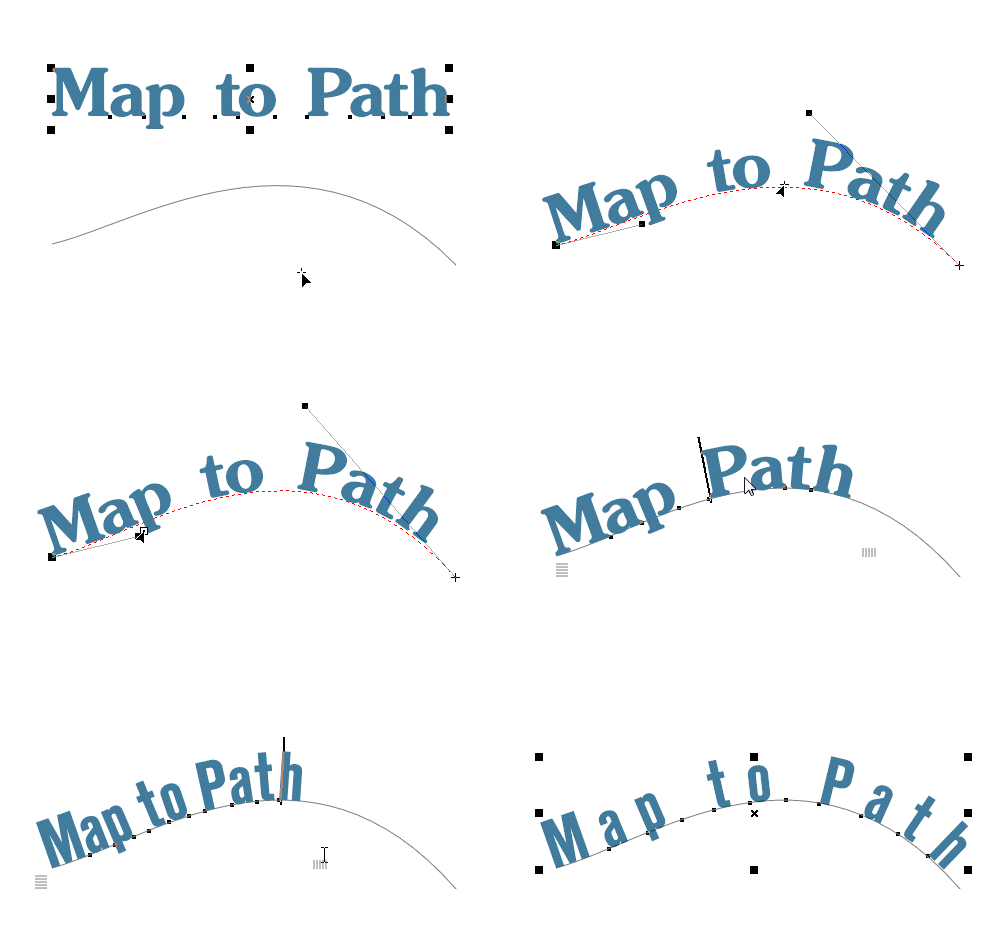
The Map to Path feature lets you map Paragraph Text to the vector path of any object.
|
|
|
|
|
SP |
|
|
|
Paragraph Text: Text on Arc with Live Editing
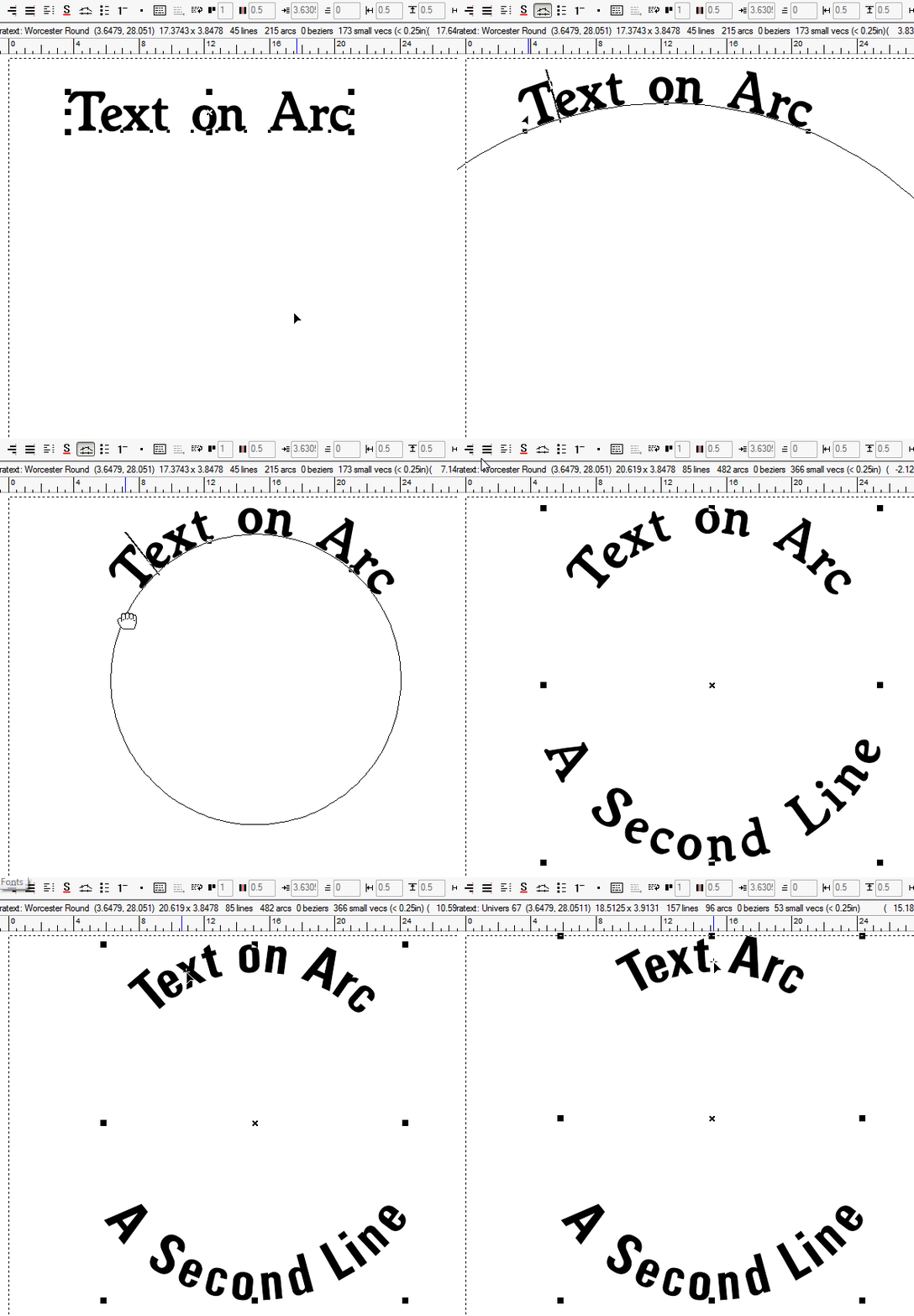
|
|
|
|
|
SP |
|
|
|
Paragraph Text: Text on Path with Live Editing

The improved Text on Path feature for Paragraph Text lets you retain full live editing, as if it was a straight baseline.
|
|
|
|
|
SP |
|
|
|
Design Tools
|
| |
Adjusting depth order
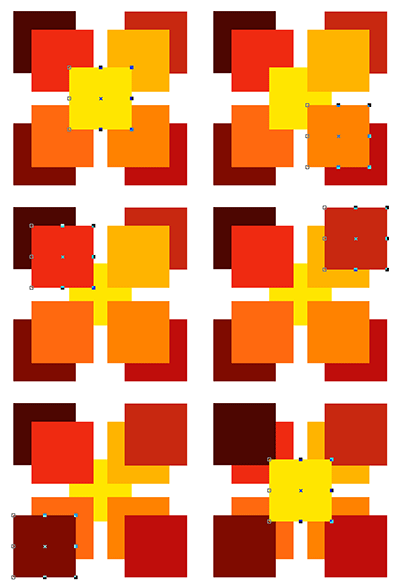
Ordering certain objects to be above or below other objects is an important design tool, and we have made it easy. Simply use the Page Up key to move an object on top and the Page Down key to move an object to the bottom. To move an object one level up, use the "+" key, and to move it one level down, use the "-" key.
These are standard conventions that you will be comfortable with from using other graphics programs.
|
SL |
SS |
SA |
SG |
SP |
NW |
N+ |
NP |
Advanced, More Efficient Drawing Engine
|
SL |
SS |
SA |
SG |
SP |
NW |
N+ |
NP |
Alignment
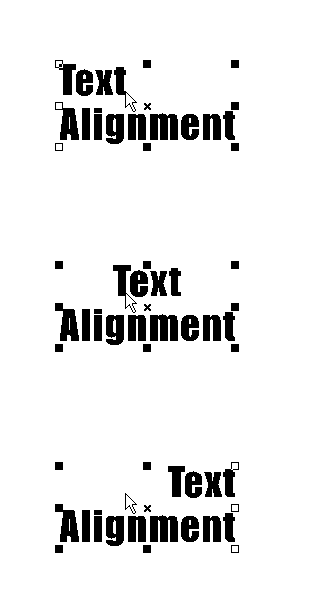
There are a number of alignment and centering tools for text and graphics to quickly get the design you want. For lines of text, you can align left, center, or right. The choice of alignment will determine the control point options and where the text will snap to guidelines or a grid.
For a group of objects, you can align them to the left, right, top, or bottom edge of the group. You can also align a group of objects or any individual object relative to the layout, such as vertical or horizontal center, or center of the layout.
These alignment and centering tools are excellent design aids, especially when working with shapes and graphics or designing custom logos.
|
SL |
SS |
SA |
SG |
SP |
NW |
N+ |
NP |
Align Two Objects without Guidelines with the Alt Key
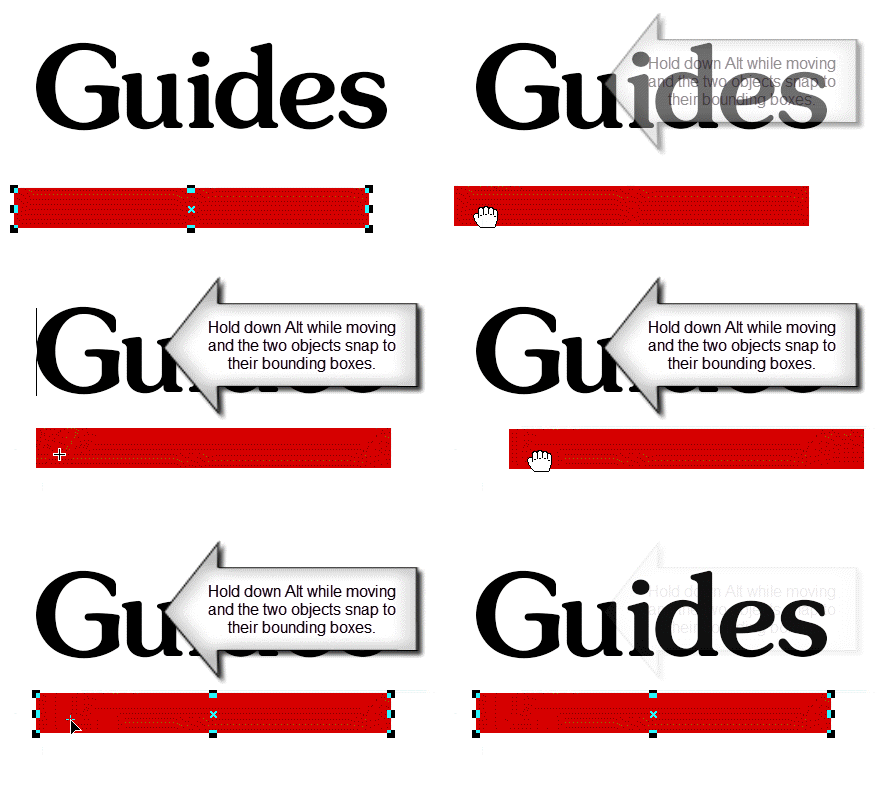
When you're moving a graphic and you need to align it with another graphic, there's a new, quicker way to do this, by simply holding down the Alt key when an edge of the graphic you're moving comes near the edge of another graphic in the layout.
|
SL |
SS |
SA |
SG |
SP |
NW |
N+ |
NP |
Alt Select Mode
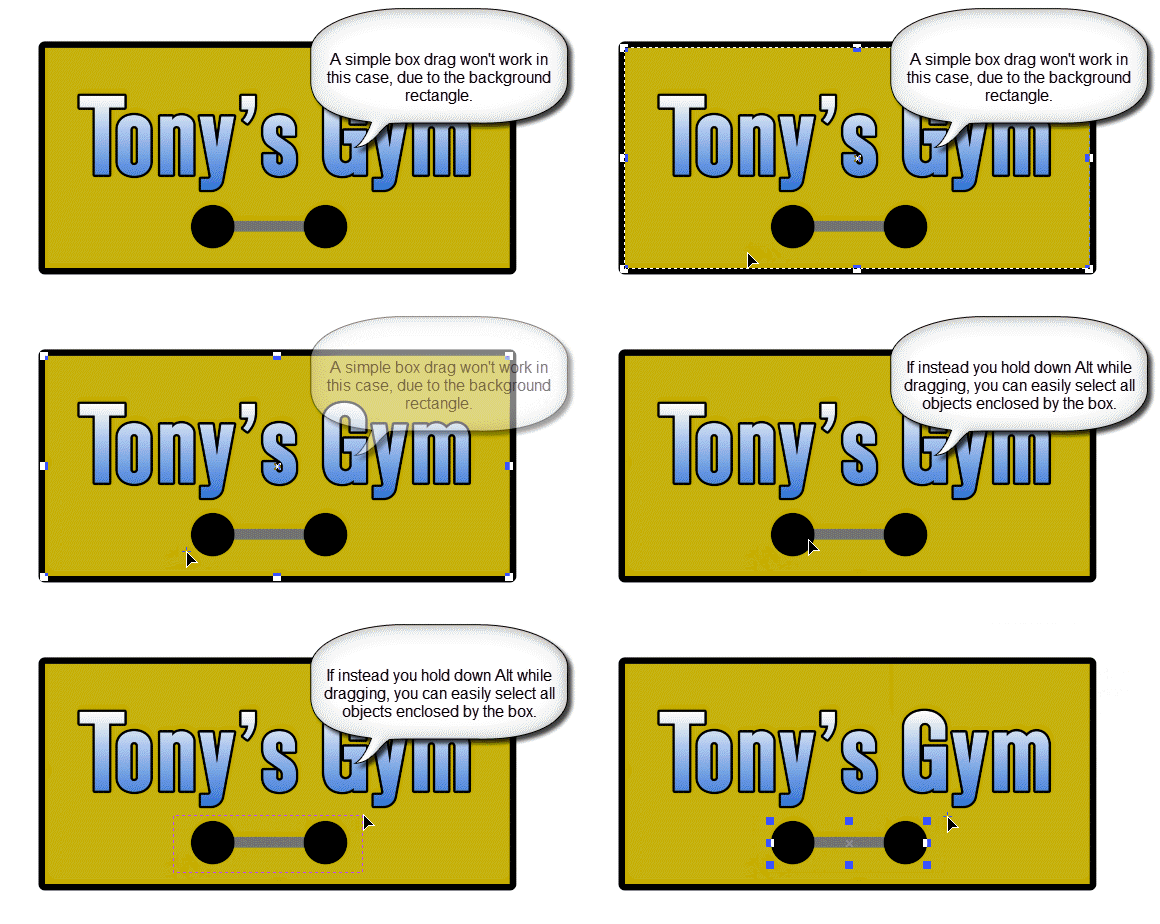
A great help when working with complex layouts is the new Alt select mode. Simply hold down Alt when selecting or group with a box and no matter where the cursor is, only objects that are enclosed by the box will be selected or grouped.
|
SL |
SS |
SA |
SG |
SP |
NW |
N+ |
NP |
Anchor Points
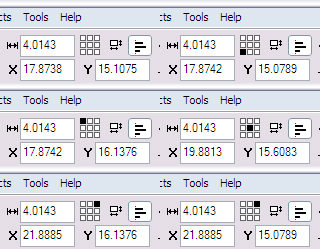
This is very handy for making precise numeric placements of graphics. You can now specify which of the 9 handles should be used as the reference point for the X and Y position values.
|
SL |
SS |
SA |
SG |
SP |
NW |
N+ |
NP |
Arrow Tool
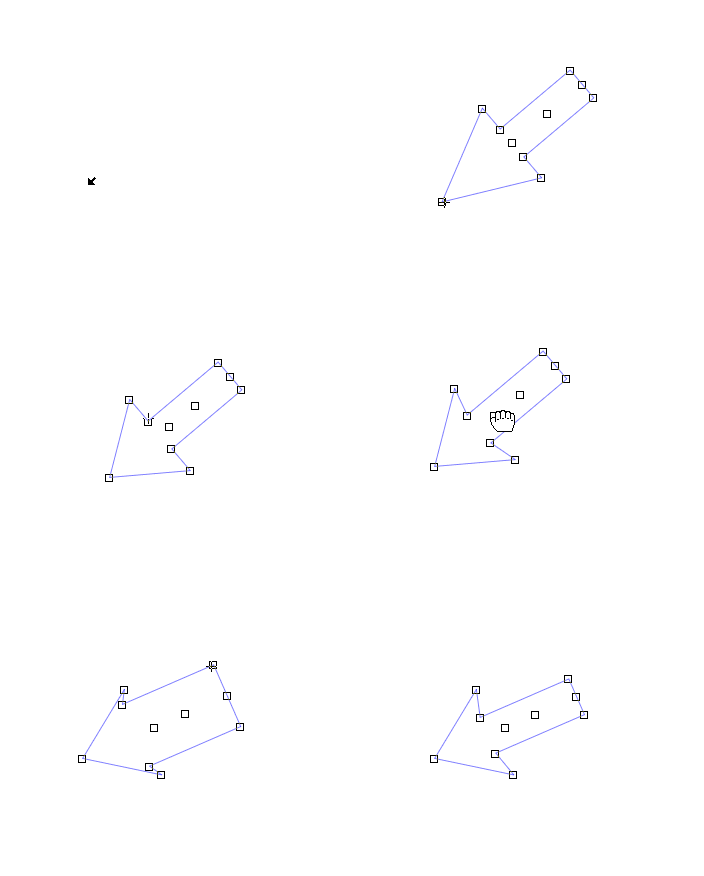
This handy tool lets you easily design arrows, giving you complete control over the shape.
For Version 7, the behavior of the handles has been improved to be more intuitive.
|
SL |
SS |
SA |
SG |
SP |
NW |
N+ |
NP |
Auto Square
|
SL |
SS |
SA |
SG |
SP |
NW |
N+ |
NP |
Break Into Outer Loops
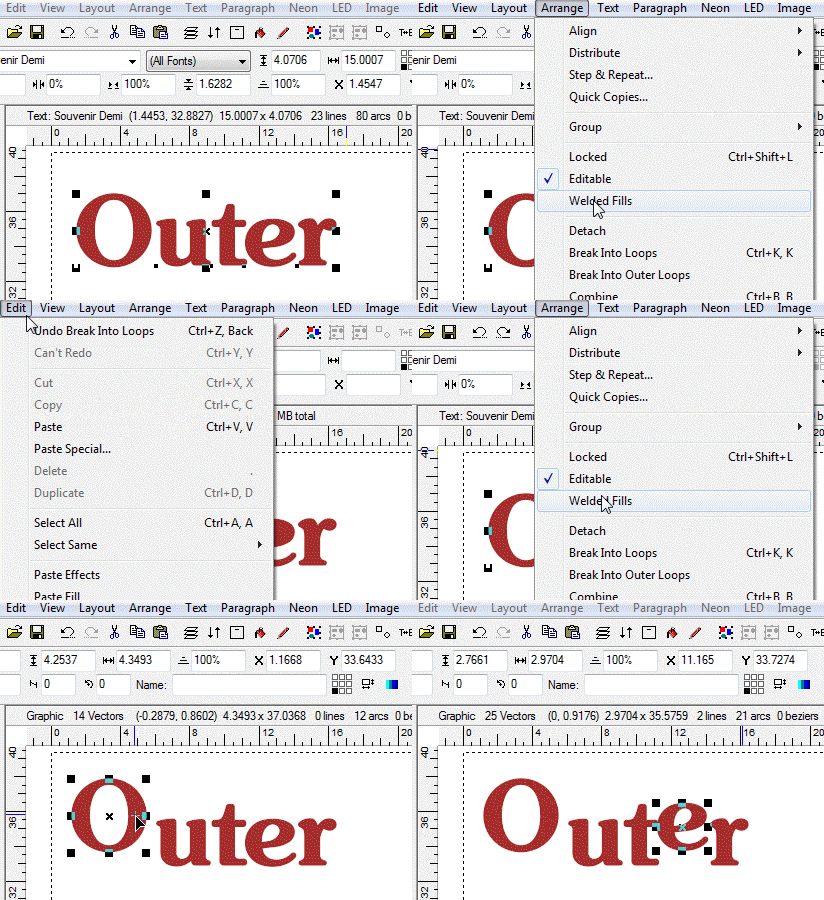
This command is similar to Break Into Loops, except it's smart and will recognize when an inner loop should be retained - usually with font letters.
|
SL |
SS |
SA |
SG |
SP |
NW |
N+ |
NP |
Color Management

Several standard color palettes are available with colors from popular vinyl suppliers. The color palette can be placed anywhere on the screen or as part of the top, right, bottom, or left toolbars.
If you want to create custom colors, you may create them with the Color Management dialog box shown here. You can even create an entirely new palette corresponding to the vinyl that you carry in stock.
|
SL |
SS |
SA |
SG |
SP |
NW |
N+ |
NP |
Color Palette Navigator

This feature of the Color Tab lists a color palette in a tall list, with a global navigation strip to its right, making finding the right color within the larger palette a snap - just click on the hue you want and the main list scrolls to that part of the palette.
|
SL |
SS |
SA |
SG |
SP |
NW |
N+ |
NP |
Common Shapes
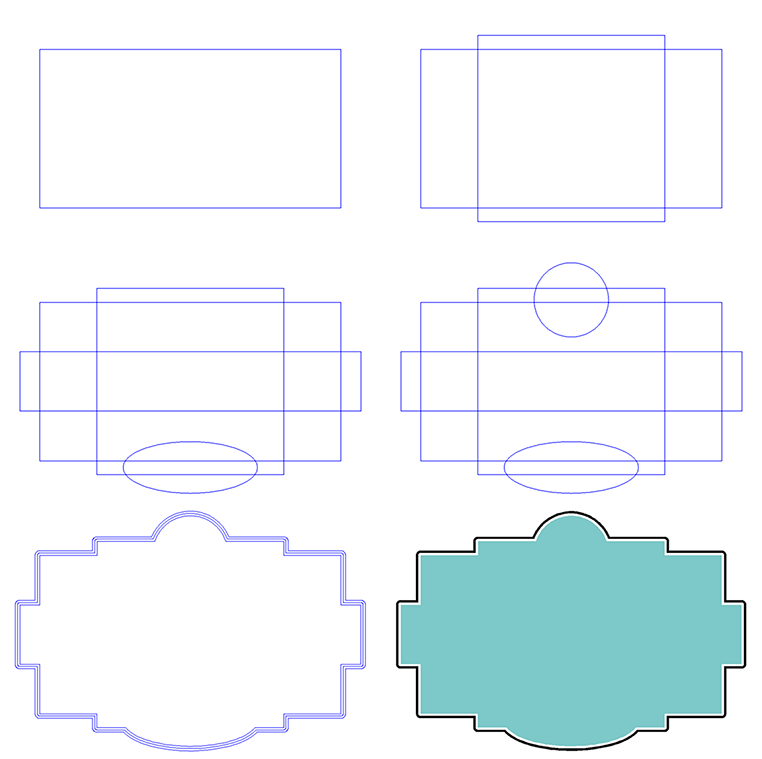
Creating simple shapes is just a click and drag of the mouse away! In one easy step you can draw a square, rectangle, circle or ellipse. All of these are available from one fly-out icon in the toolbar.
We also have the option of drawing a Rounded Rectangle. This feature replicates any changes you make to the radius of one corner to all the corners.
This example draws several shapes, Welds them together, adds an Outline, and adds Colors to create a border.
|
SL |
SS |
SA |
SG |
SP |
NW |
N+ |
NP |
Distribute

Another useful design tool, Distribute is used to equally space objects of a group vertically or horizontally. Not to be confused with the Alignment tools, Distribute simply evenly spaces the objects along an axis.
|
SL |
SS |
SA |
SG |
SP |
NW |
N+ |
NP |
Faster screen refresh
|
SL |
SS |
SA |
SG |
SP |
NW |
N+ |
NP |
Full Color Animated Transformations
|
SL |
SS |
SA |
SG |
SP |
NW |
N+ |
NP |
Grids
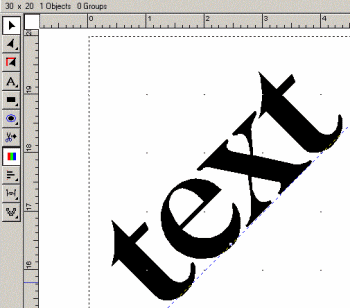
A Grid can be put in the layout area at a user specified interval, such as one inch or one centimeter, which can be used to help layout and positioning. You can specify objects to snap to the grid, similar to how guidelines operate.?
|
SL |
SS |
SA |
SG |
SP |
NW |
N+ |
NP |
History Window
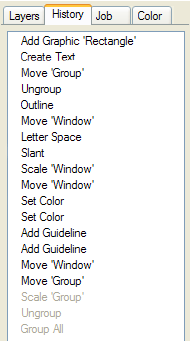
The History Window shows all the actions performed on the layout since it was opened. They are named, so it's easy to Undo back to the exact spot you want to, without performing each undo separately. Using the Redo feature, you can then skip back ahead to the current state. The actions that are grayed out can be re-done.
|
SL |
SS |
SA |
SG |
SP |
NW |
N+ |
NP |
Mirror
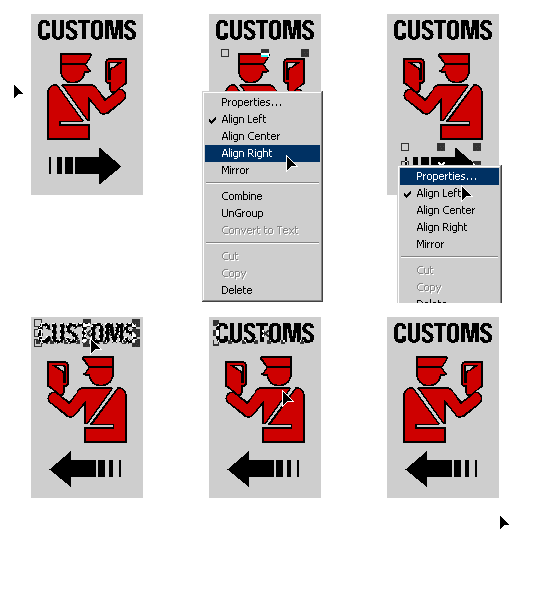
A simple and convenient design tool, Mirror lets you reverse an object or line of text. You may mirror vertically or horizonally, and there is a keyboard shortcut to make it even faster.
|
SL |
SS |
SA |
SG |
SP |
NW |
N+ |
NP |
Nested Groups
|
SL |
SS |
SA |
SG |
SP |
NW |
N+ |
NP |
Redo
|
SL |
SS |
SA |
SG |
SP |
NW |
N+ |
NP |
Rounded Rectangle
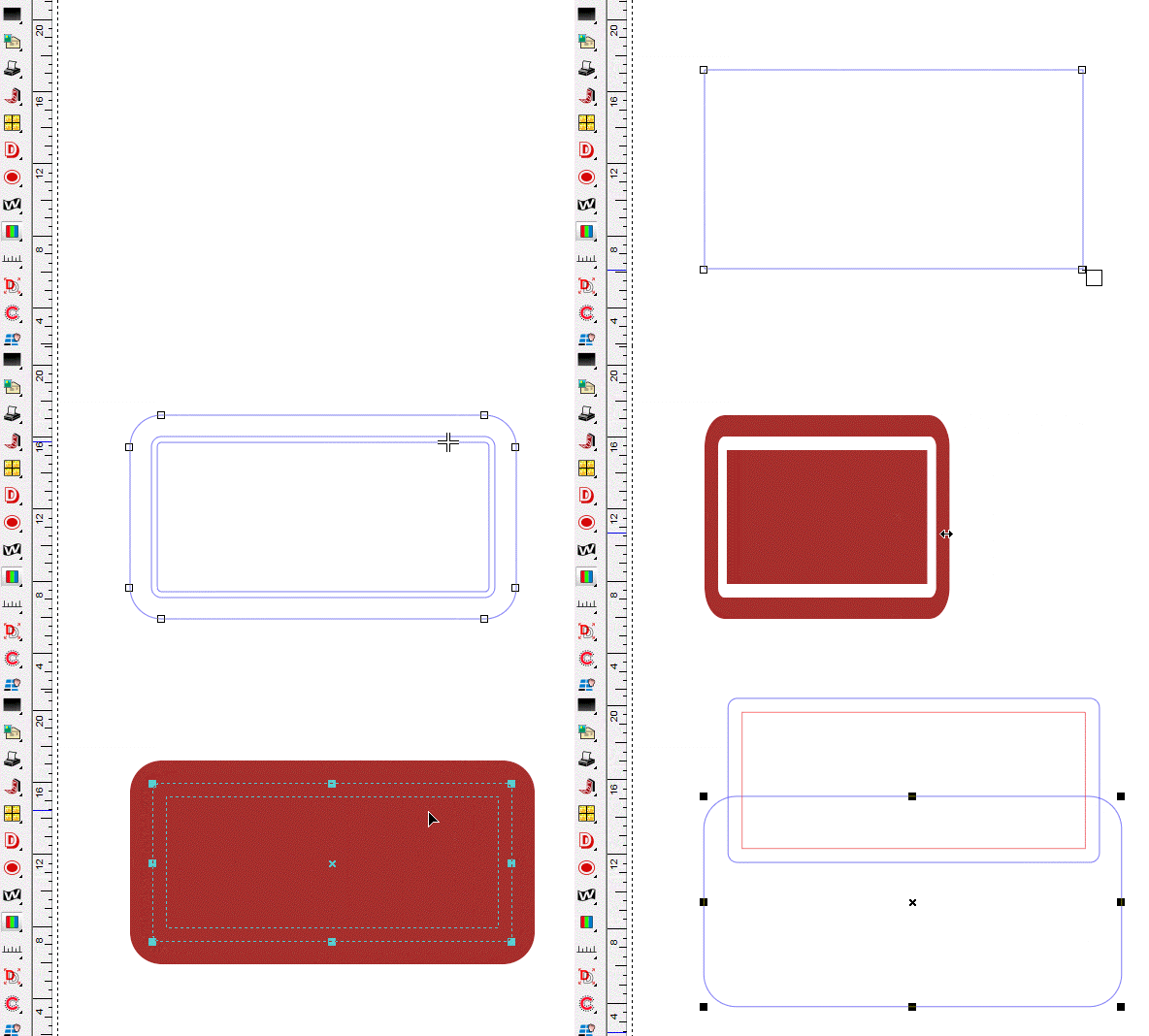
Rounded Rectangle adds a button to extract the two rectangles into two separate graphics.
Also, no matter how you change the aspect ratio, the corners will now be normalized to perfect radii automatically.
|
SL |
SS |
SA |
SG |
SP |
NW |
N+ |
NP |
Rulers
|
SL |
SS |
SA |
SG |
SP |
NW |
N+ |
NP |
Snap a Guideline to an Object with Ctrl Key
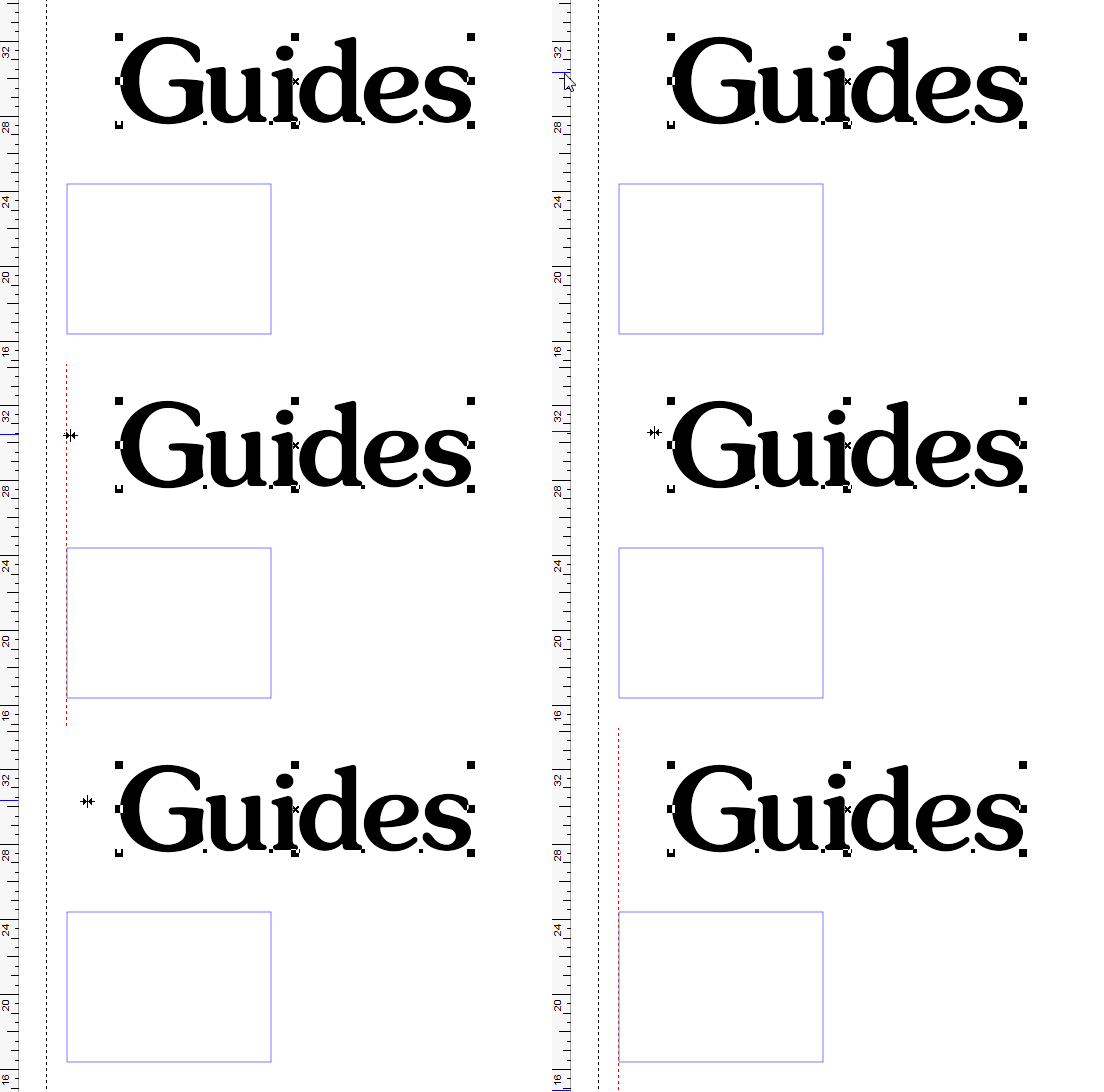
Guidelines are enhanced with the ability to snap a guideline to an object instead of the reverse. The Ctrl key enables this option.
|
SL |
SS |
SA |
SG |
SP |
NW |
N+ |
NP |
Snap to Guidelines
|
SL |
SS |
SA |
SG |
SP |
NW |
N+ |
NP |
Step and Repeat
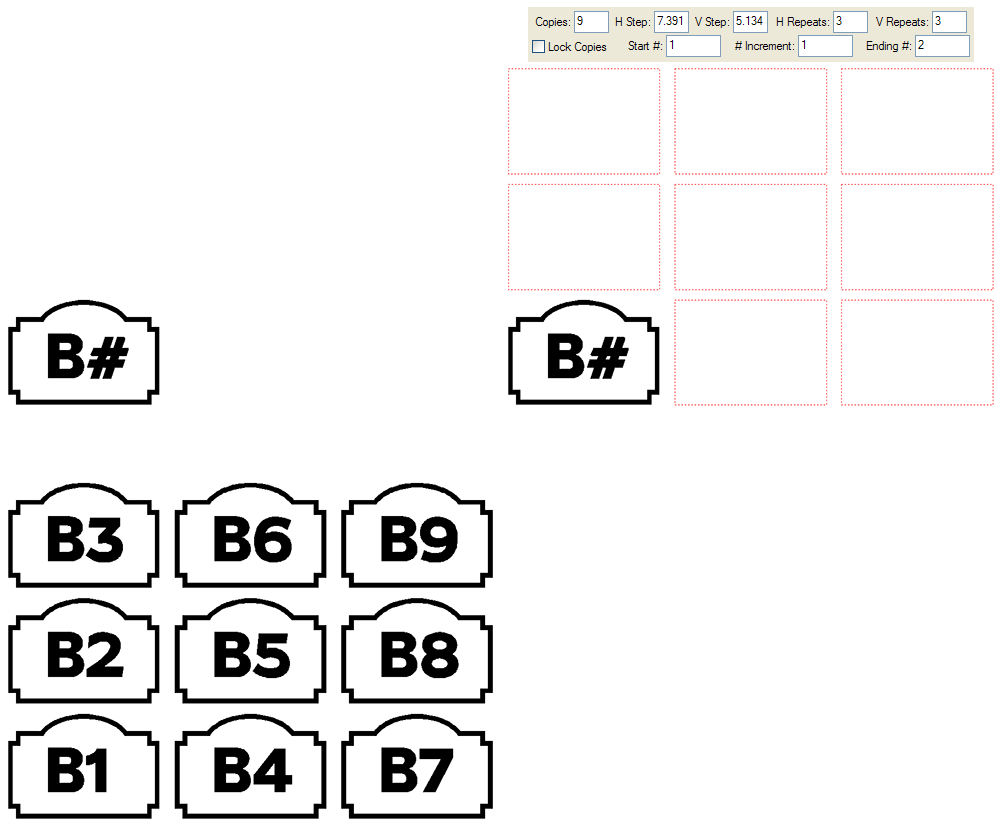
Step and Repeat is used to make multiple copies of an object in the vertical and/or horizontal directions at a specified distance apart. This feature is especially useful in making custom logos, borders, and layouts of the same object for mass production.
Please also see Step and Repeat in the Plot Manager.
Step and Repeat for version 6 now features an intuitive graphic display of the proposed layout, as well as a property bar. You can also create a sequence of numbers, as in this example for motel room numbers.
|
SL |
SS |
SA |
SG |
SP |
NW |
N+ |
NP |
Streamlined User Interface

The user interface for version 6 has been greatly streamlined. Property bars are used extensively to speed the design process and minimize pop dialog boxes that can obstruct the screen.
Property Bars appear at the top of the screen when you are working in a certain mode, such as Vector Editing, or in a certain feature, such as Shadows. The property Bar shown here is for bitmap editing.
|
SL |
SS |
SA |
SG |
SP |
NW |
N+ |
NP |
Adobe Type1 and OpenType font support
|
|
|
SA |
SG |
SP |
NW |
N+ |
NP |
Border Tool
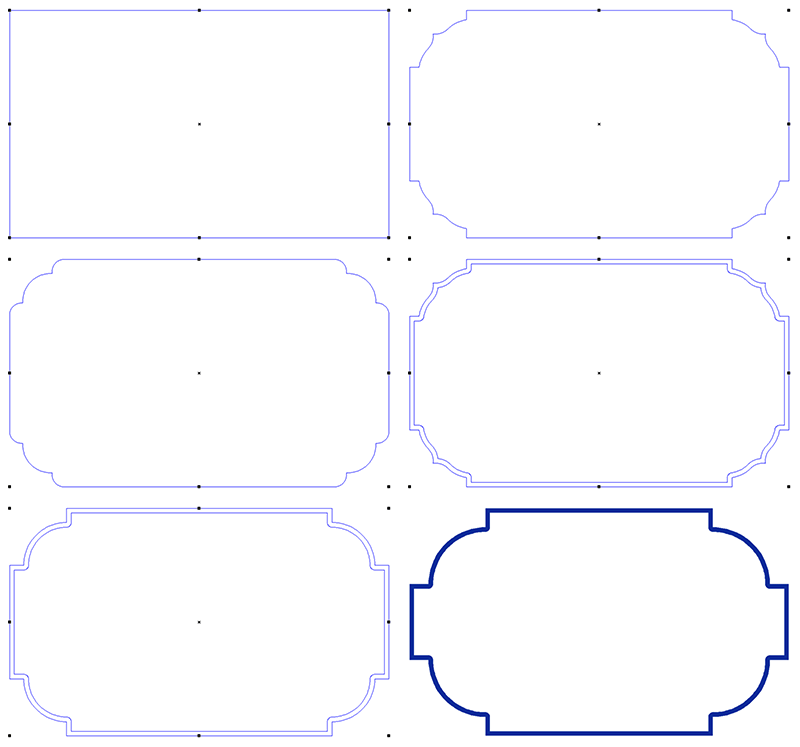
The Border Tool enables you to design custom borders with unique and saveable corners. It uses a property bar to manage the design and editing of the borders in version 6. These examples show how you can change the size and shape of the corners and add thickness to your borders.
|
|
|
SA |
SG |
SP |
NW |
N+ |
NP |
High Quality Anti Aliased Drawing Mode
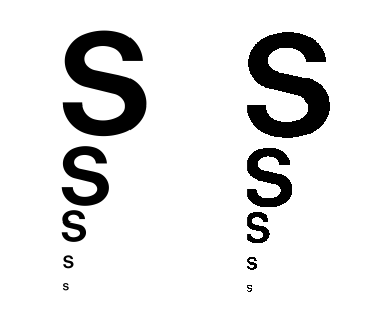
This great new feature gives you vastly improved screen rendering quality, enhancing your design process and effectively increasing your screen resolution by at least 50%, because you don't have to zoom in to details nearly as often.
|
|
|
SA |
SG |
SP |
NW |
N+ |
NP |
Layers
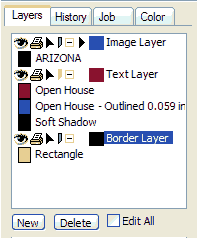
Layers allow you to better organize the elements of your design. You can drag graphics between layers, and rearrange layers to suit your needs. You can also lock layers from editing, and hide them from the screen and from being printing.
|
|
|
SA |
SG |
SP |
NW |
N+ |
NP |
Measure Tool
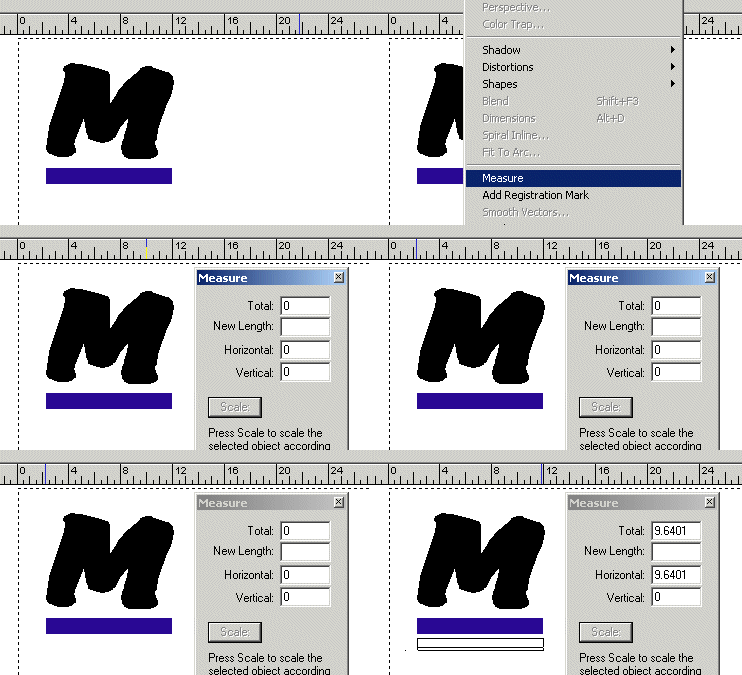
The Measure Tool is used to measure the distance between any two points in the design.
For 6, a property bar is used.
|
|
|
SA |
SG |
SP |
NW |
N+ |
NP |
Move to Layer
|
|
|
SA |
SG |
SP |
NW |
N+ |
NP |
Stack
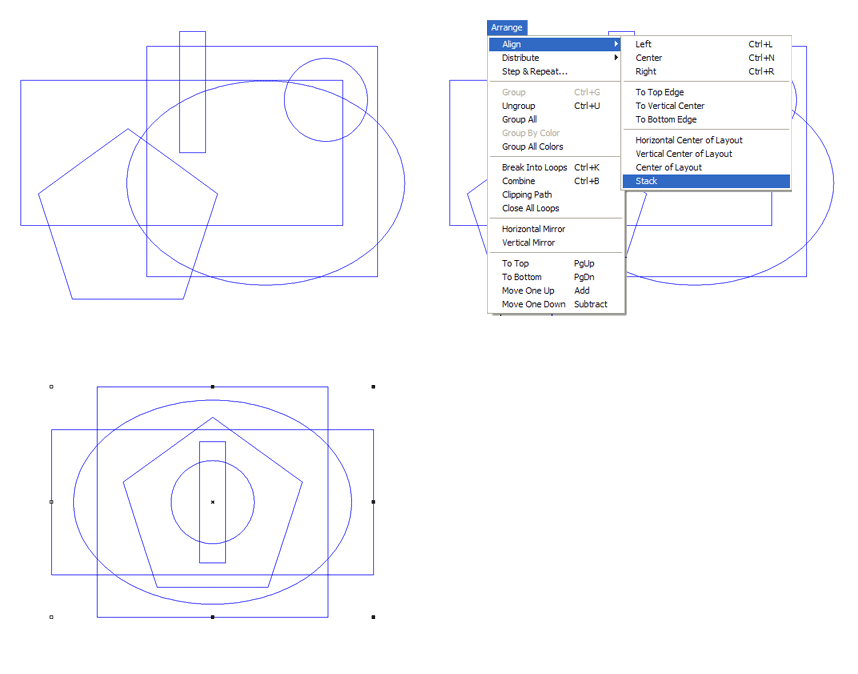
This feature stacks multiple objects on top of each other, aligned at the exact center.
|
|
|
SA |
SG |
SP |
NW |
N+ |
NP |
Text Notes enhanced with Title and Fields
|
|
|
SA |
SG |
SP |
NW |
N+ |
NP |
Automatic Vectorizing
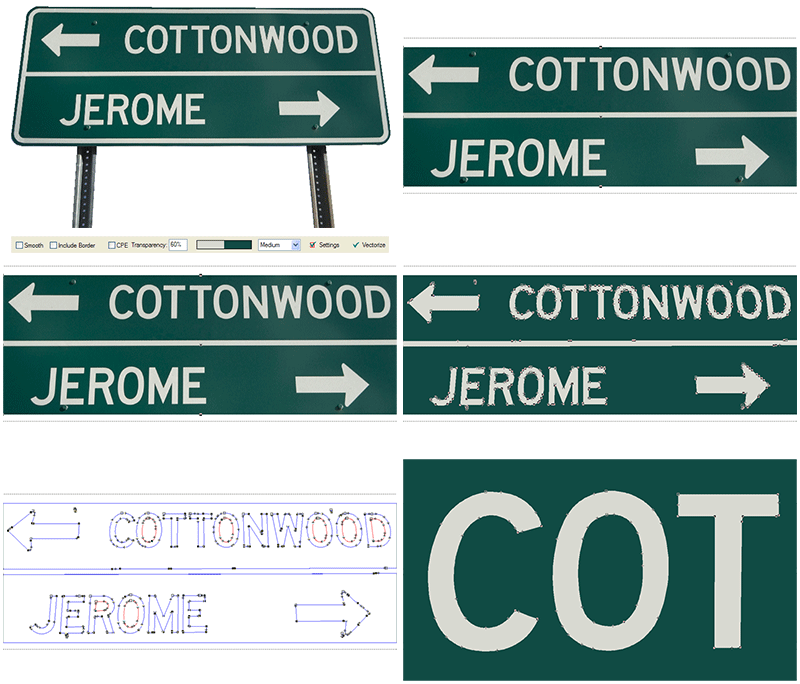
Vectorizing is the process of converting a bitmap image to a vector image so that it can be plotted or cut out of vinyl or other material. We provide a number of features and options to make this process fast and accurate, including different settings to use for different kinds of artwork.
Vectorizing and the associated vector editing tools are important capabilities in our higher end programs that will save you time and money when dealing with custom logos and graphics.
Please also see Color Vectorizing.
In 6, a property bar is used so that no part of your scanned image is obscured.
|
|
|
SA |
SG |
SP |
|
N+ |
NP |
High Color Toolbox with Custom Icon Sizes
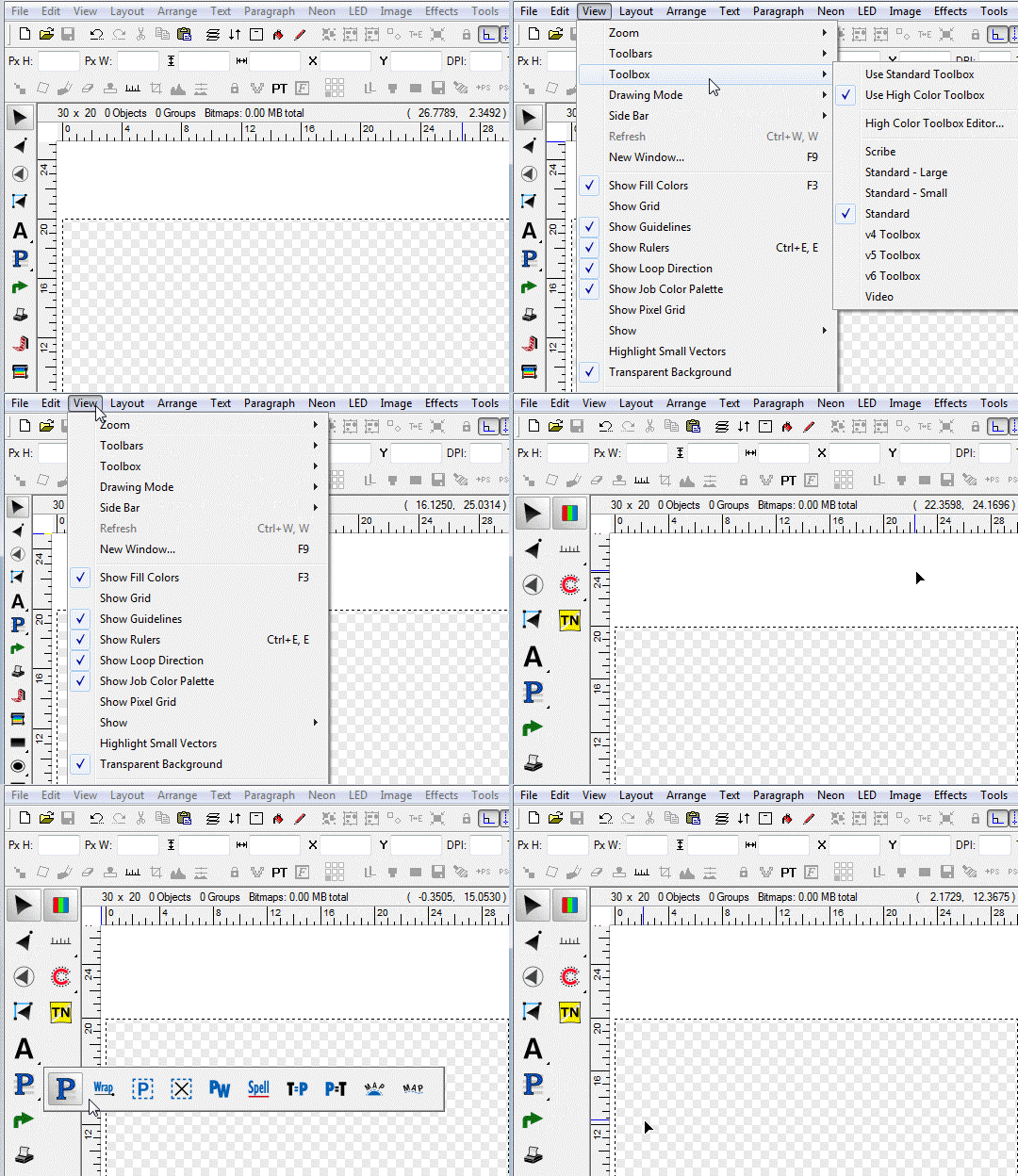
The new High Color Toolbox has been designed to be easier to customize as well as give you the option to pick any icon size you wish. If you prefer smaller icons to have more per screen, or wish you could have larger icons, you now have your choice!
|
SL |
SS |
SA |
SG |
SP |
|
|
|
TWAIN Support
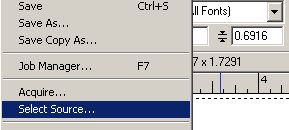
Compatibility with the TWAIN scanning interface means that you can call your scanning software directly from Sign Wizard or Neon Wizard through the Acquire function. After scanning, the image will come straight into the program from your scanning software - you don't have to save and then open any files. This provides a big time saver since you don't have to leave your signmaking program to import custom artwork.
|
|
|
SA |
SG |
SP |
|
N+ |
NP |
Clipart Library
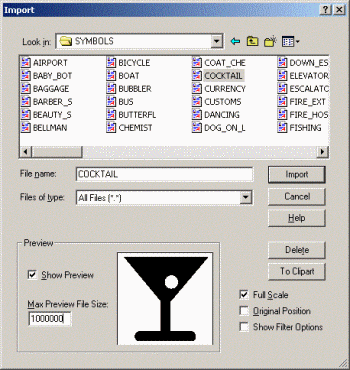
The Clipart Library contains almost 500 items, arranged in the following categories: Arrows, Borders, Business, Hands, Hospital, Phones, Safety, Symbols, and Tools.
Sign Wizard and Neon Wizard can also import clipart in a variety of file formats if you require an image that is not present in our library. This dialog box shows a preview image of your clipart, and also lets you move an external file directly into your Clipart directory for future usage.
|
|
SS |
SA |
SG |
SP |
|
|
|
Dimensioning

Dimensioning is fast, easy and precise ? it doesn?t get any easier than this.
Click on the Dimension tool or on Dimensions in the Tools menu. As you move the cursor around the screen, guidelines will appear momentarily as you move past each of the horizontal and vertical lines in the layout. Click when the correct guideline appears, drag the mouse to the second guideline and click again. Then move the mouse where you want the numbers to appear. You can change the size of the numbers and the arrowheads with a single click of the mouse. You can also display the numbers in feet, inches, fractions or decimals.
|
|
|
|
SG |
SP |
|
N+ |
NP |
Hot Keys can be used without Control, Shift or Alt
|
|
|
|
SG |
SP |
|
N+ |
NP |
Polygon/Star Tool
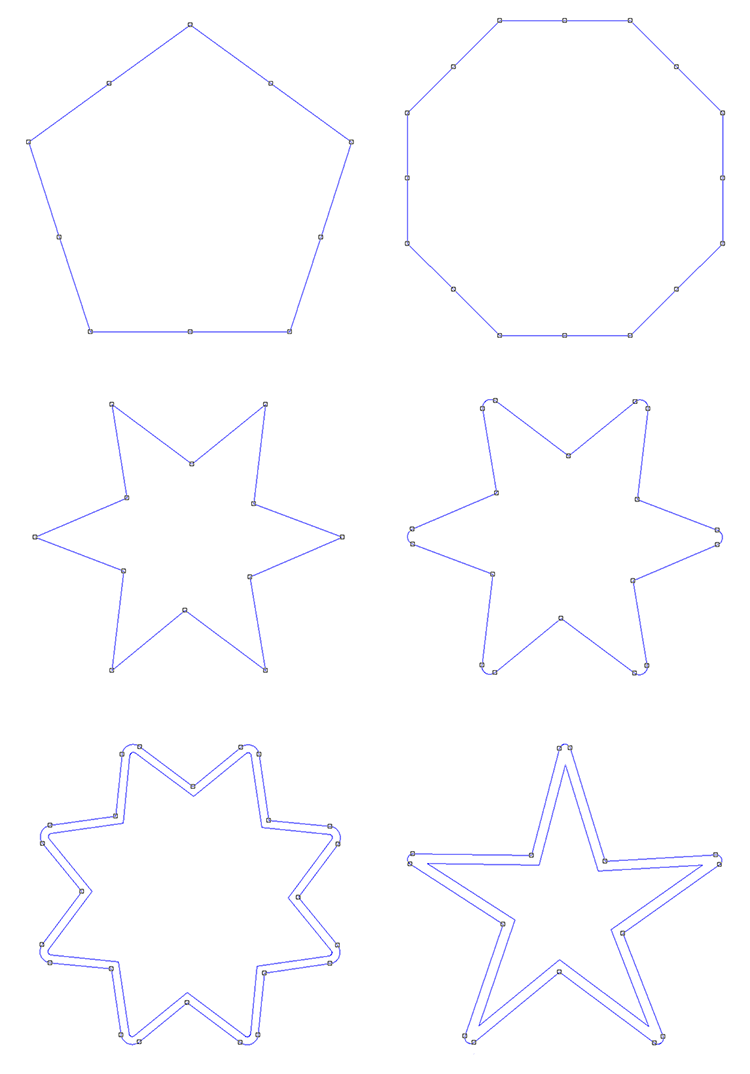
With this tool you can create a polygon or a star with a number of different shapes and styles. There are editable nodes on each side and on each endpoint of the polygon or star that will replicate to all sides. You may also round the endpoints, add any number of sides, even create an inline. This is the ultimate Shapes tool!
|
|
|
|
SG |
SP |
|
N+ |
NP |
Styles
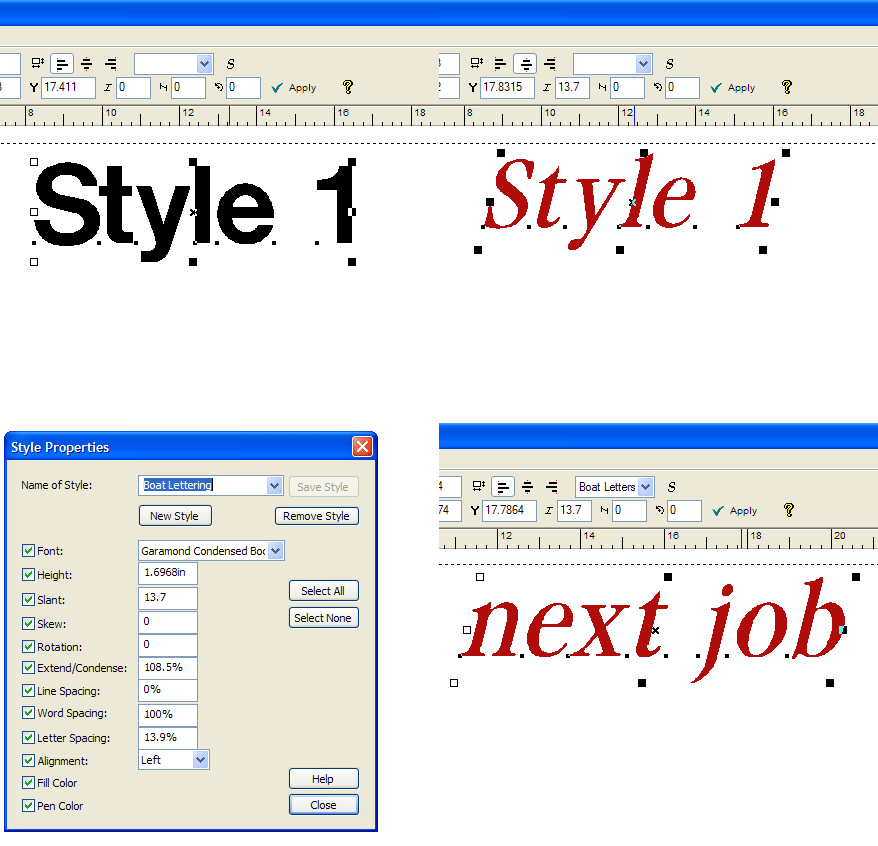
Styles offer a way to save various properties of text or graphics so that you can apply them over and over in the future. If you have a customer who repeatedly orders highly customized lettering, just save the text properties (such as height, color, letter spacing, slant, etc) as a Style. Now you won't have to reinvent the job every time!
In this example, the user creates a Style called Boat Lettering, which contains specific properties of a client's lettering specification. Now he's ready for the next job, when he can simply apply the Style to any text.
|
|
|
|
SG |
SP |
|
N+ |
NP |
Sign Blanks
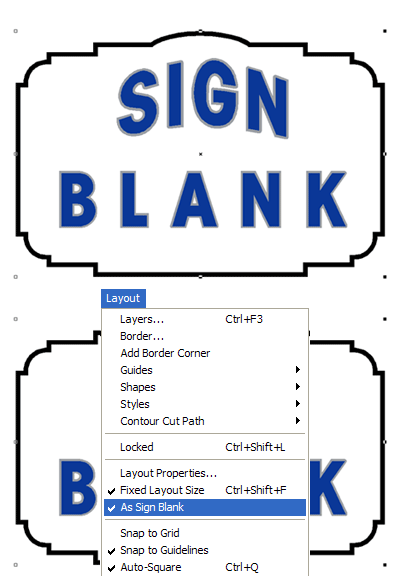
Sign Blanks are special design elements that make working with shapes and borders much easier. When you designate a sign blank, everything inside it is automatically part of a group. And then when you go to Plot your design, just select the sign blank and everything inside it will be sent to the Plot Manager.
|
|
|
SA |
SG |
SP |
|
|
|
Color Vectorizing

Color vectorizing enables you to scan a color image, separate the colors, and convert it into vectors. Unique bitmap processing and vector editing features make Sign Wizard's color vectorizing reliable, fast, and simple.
This feature provides a whole new set of capabilities for your shop. Now you can bring in color graphics and logos without the hassle. The color vectorizing capability builds on our 10+ years of experience with black and white vectorizing.
|
|
|
|
|
SP |
|
|
NP |
Height and Slant Options in Soft Shadow

You can now change the height and slant of soft shadows.
|
|
|
|
|
SP |
|
|
NP |
Color Trap
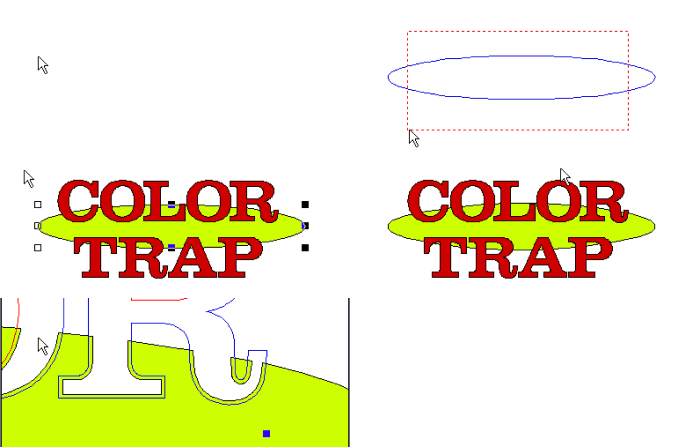
For screen printing and backlighted vinyl signs, color trapping is simple and fast.
Color trapping for screen printing jobs insures that any misregistration does not result in gaps between adjacent colors. For vinyl signs, color trapping is used for backlighted jobs to avoid gaps between colors that will get wider as the vinyl shrinks with time.
To use the Color Trap feature, make a group of two adjacent colors which must overlap and select Color Trap in the Tools menu. Set the Trap Amount. Select Spread if you want the upper color to overlap into the lower color or Choke if you want the lower color to overlap into the upper color.
|
|
|
|
|
SP |
|
|
|
Effects
|
| |
Contour Outline
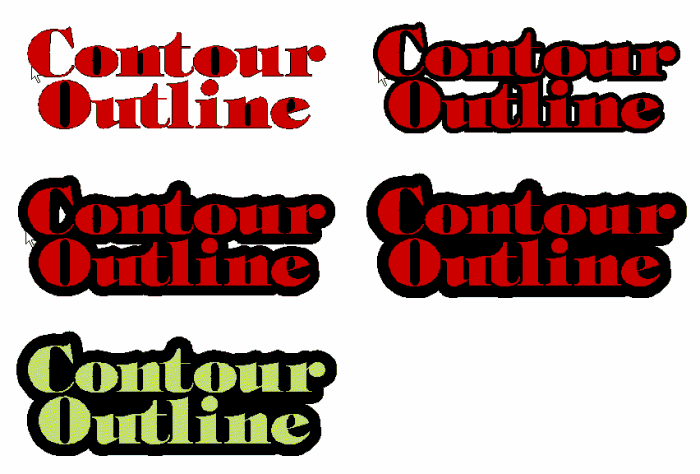
This variation on the Outline feature enables you to create one smooth outline around the outside of any design in one simple and fast operation.
This is an interactive effect, meaning that you can see a preview of the countour outline as you create it graphically. You can also enter numeric measurements if you need to be very precise.
Version 6 uses a property bar for streamlined operation.
|
SL |
SS |
SA |
SG |
SP |
NW |
N+ |
NP |
Common Weld
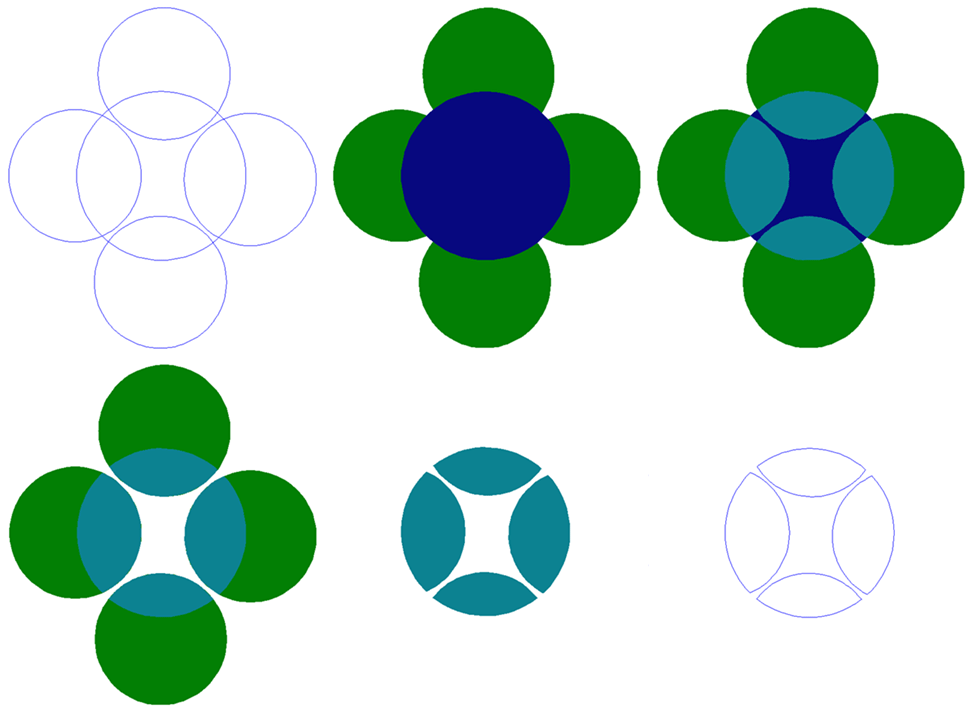
This variation on weld preserves only the shapes that are in common between the various graphics to be welded. It is kind of like the opposite of Weld, where the overlapping areas are retained instead of removed.
The example shows overlapping circles that are colored to help demonstrate the effect. The aqua colored portion is the overlapping portion that is retained in the Common Weld operation.
|
|
SS |
SA |
SG |
SP |
NW |
N+ |
NP |
Inline/Outline

Inline/Outline creates an inlined or outlined path from lettering and graphics. This classic Effect has been improved in version 6 with an optional second outline and a property bar to help manage the options. As with other Effects, you can define the Inline or Outline graphically and/or numerically.
|
SL |
SS |
SA |
SG |
SP |
|
N+ |
NP |
Weld

Welding combines two or more objects or lines of text together where they overlap. This feature has very broad use in creating custom graphics and logos. To use this tool, all you have to do is overlap the text or graphics and click on the Weld tool.
In this example, we have entered a line of text using a serif font, reduced the character spacing, grouped the text together, and then clicked on the Weld tool.
|
|
SS |
SA |
SG |
SP |
NW |
N+ |
NP |
Knife
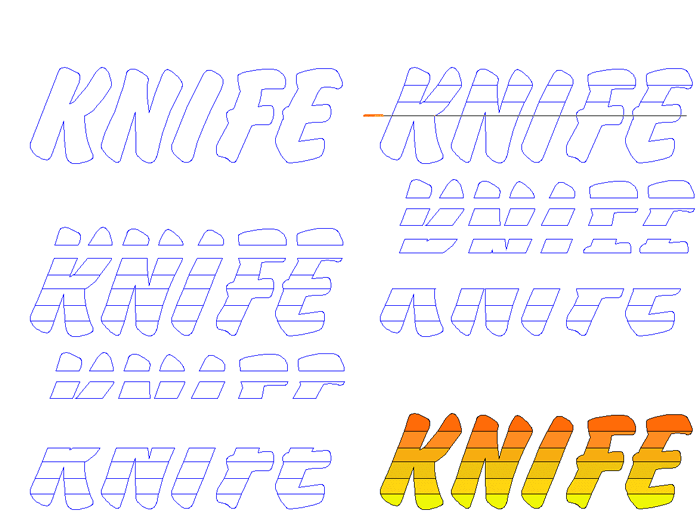
The Knife tool is a great feature that enables you to slice any vector graphic into as many pieces as you want. You can adjust the cut to have zero width, a gap or an overlap of whatever amount you specify. The above example shows a series of horizontal cuts, but you can make the knife cut at any angle. To use this feature, simply select the Knife tool, click where you want the knife to start, and then drag it across the image you are cutting.
Version 6 uses a property bar for streamlined operation.
|
|
SS |
SA |
SG |
SP |
|
N+ |
NP |
Warp

Warp is a handy way to create a virtually unlimited number of distortions on your text or graphics. It can be automatically reapplied when changing fonts or editing text when used with Paragraph Text.
|
|
|
|
SG |
SP |
NW |
N+ |
NP |
Cast Shadow

Another of the many shadows available, Cast Shadow lets you create striking shadows graphically or numerically. This shadow simulates the sun casting a shadow on the ground behind the lettering or graphic. The original object will cut through sections of the shadow so that there are no overlapping pieces of vinyl. The dialog box allows you to enter the height and angle numerically if the design requires this level of precision.
Version 6 uses a property bar for streamlined operation.
|
|
|
|
SG |
SP |
|
N+ |
NP |
Drop Shadow

Dramatic drop shadows can easily be created graphically or numerically, and you always have an interactive preview to show you exactly what the shadow looks like.
Here you can see that there are options for the position of the shadow, an outline on the text, and the colors.
Version 6 uses a property bar for streamlined operation.
|
|
|
|
SG |
SP |
|
N+ |
NP |
Text on a Path

This feature allows you to fit a line of text to a complex path defined by one or more Bezier curves. It is also a Dynamic Effect, meaning that you can edit any of the text properties at any time.
|
|
|
|
SG |
SP |
|
N+ |
NP |
Clipping Paths

Clipping paths are a more generalized and powerful alternative to the Photomask feature. Clipping paths let you create clipping masks with both vector and bitmap graphics, and can be used in conjunction with Contour Cut for print and cut applications. Photomask is still available, and enhanced, but a Photomask is initially created a bit differently now.
This example shows a person being cut from a background using the following tools: On-Screen Digitizing, Clipping Path, and Feather. Then a new background is added behind the original image.
|
|
|
|
|
SP |
|
|
NP |
Cookie Cutter
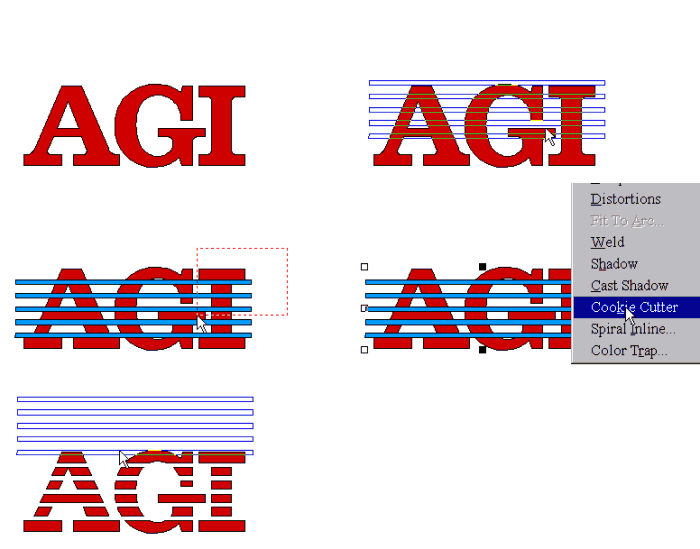
Cookie cut text and graphics to create a wide variety of interesting designs.
Select a graphic to be cut and a second graphic to be the cutter. Color each graphic with different colors and make them into a group. There must be only two graphics in the group with the cutter on top. (If the cutter is below the object, click on Pg Up with the cutter selected before making the group.) Click on Cookie Cutter in the Tool menu. When the operation is completed, select the cutter and move it to one side which will leave the cookie cut design.
Version 6 uses a property bar for streamlined operation.
|
|
|
|
SG |
SP |
|
|
|
Cookie Cutter Outline
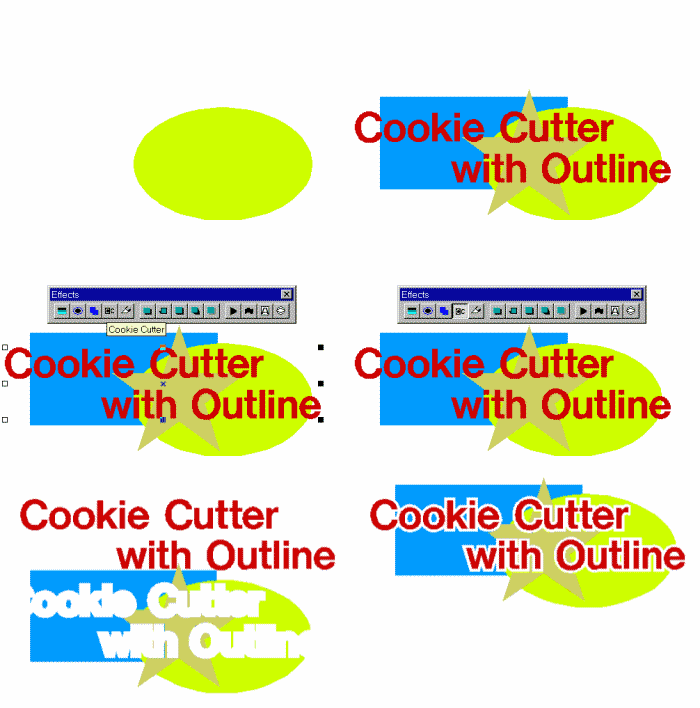
Cookie cut text and graphics to create a wide variety of interesting designs.
Select any vector graphic object to be the Cookie Cutter. Position it on top of any number of other vector graphic objects. Click on Cookie Cutter. A small dialog box will appear where you can enter an outline numerically or you can click and drag on any vector in the Cookie Cutter and graphically adjust the outline amount. Any objects that are below the cutter will be cut and any objects on top of the cutter will not be cut. Coloring all the objects will show which are above and which are below the cutter. If the box labeled Remain Active is checked, the cutter will continue to be available to cut the same shape until you click on Remain Active again to disable it.
Version 6 uses a property bar for streamlined operation.
|
|
|
|
SG |
SP |
|
|
|
Cylinder
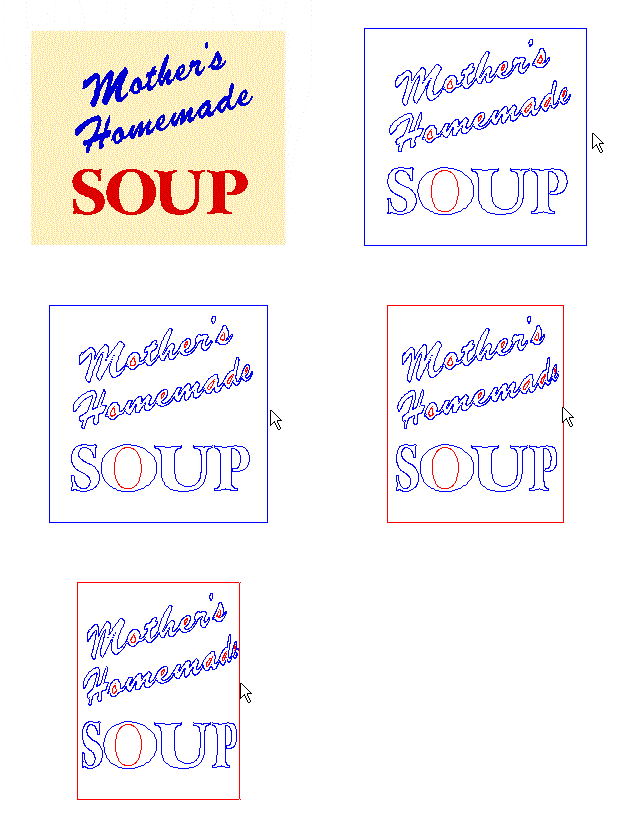
The cylinder distortion creates the effect of wrapping your text around a cylinder.
The Cylinder tool for 6 has support for dynamic effects, which preserves text properties even after applying the effect.
|
|
|
|
SG |
SP |
|
|
|
Extruded Shadow

Create dramatic three dimensional designs.
Select the text or graphic to be shadowed. Click on the Shadow tool in the toolbox or on Shadow in the Tools menu. Select Extruded Shadow in the Shadow dialog box. With the cursor positioned away from the design, click and drag the right mouse button to move the shadow into the desired position and release the left mouse button. Move the cursor close to the top of the design. Click and drag the left mouse button away from the design to set the amount of the outline. Click on Done to complete the Shadow function.
|
|
|
|
|
SP |
|
|
NP |
Perspective
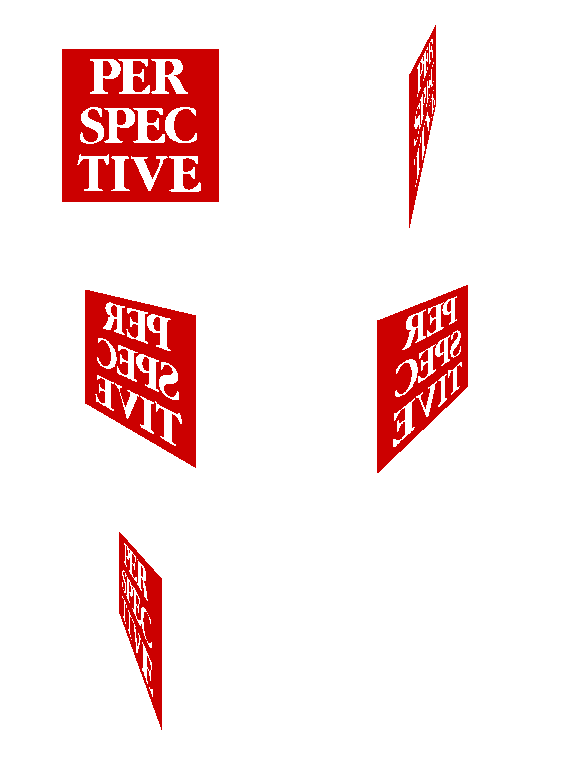
The Perspective feature can be used to create dramatic 3D designs.
The horizon line can be above the object, below the object (as in this example), or within the vertical dimensions of the object. The distance between the viewer and the object can be changed to enhance or reduce the 3D effect. Select an object by clicking on it. Then click on the Perspective tool in the toolbox or click on Perspective in the Tools menu. Adjust the Height, Angle and Distance and then click on Ok.
This tool includes support for Dynamic Effects.
|
|
|
|
SG |
SP |
|
|
|
Perspective Shadow

It's easy to create a perspective shadow - just drag the shadow and then set the distance the shadow should be from the face.
|
|
|
|
|
SP |
|
|
NP |
Relief Shadow

Create Relief Shadows and add outlines graphically.
To create a Relief Shadow, select the design to be shadowed. Click on the Shadow tool in the toolbox or Shadow in the Tool menu. With the cursor positioned away from the design, click and drag the right mouse button to move the shadow to the desired position and release the left mouse button. Move the cursor close to the top of the design. Click and drag the left mouse button away from the design to set the amount of the outline. Click on Ok to complete the shadow function. When an offset is used with Relief Shadow, it appears as a gap between the characters and the shadow as shown. (If the sign is to be back lighted, use Relief Shadow rather than Drop Shadow.)
Version 6 uses a property bar for streamlined operation.
|
|
|
|
SG |
SP |
|
|
|
Soft Shadow
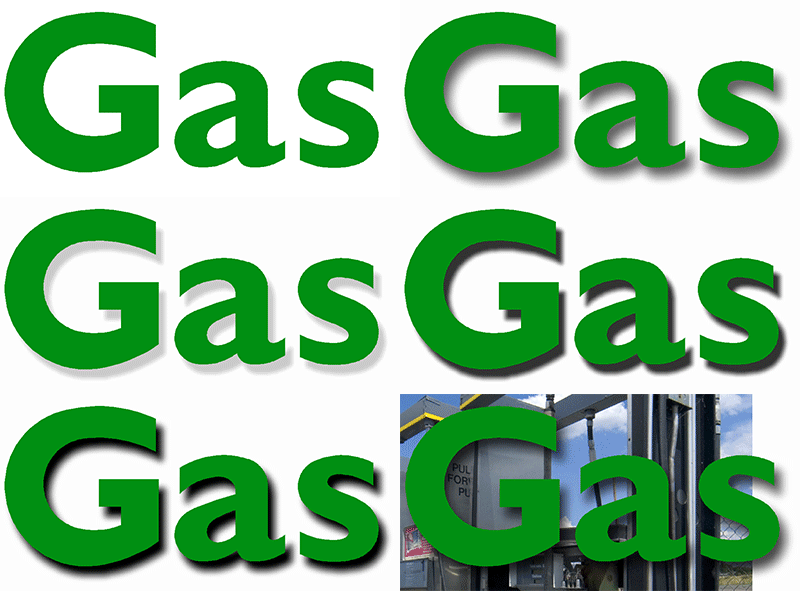
The Soft Shadow has a wide number of uses, and is ideal for designs that will be color printed.
The Soft Shadow feature in version 6 has been totally redesigned. It creates a very realistic shadow effect that's ideal for creating dimensionality for printed signs.
You can see a variety of shadow effects, created by altering the opacity and the softness of the shadow.
The final image shows the shadow on top of a picture to illustrate how the opacity reveals what is underneath.
|
|
|
|
|
SP |
|
|
NP |
Sphere
|
|
|
|
SG |
SP |
|
|
|
Dynamic Outline
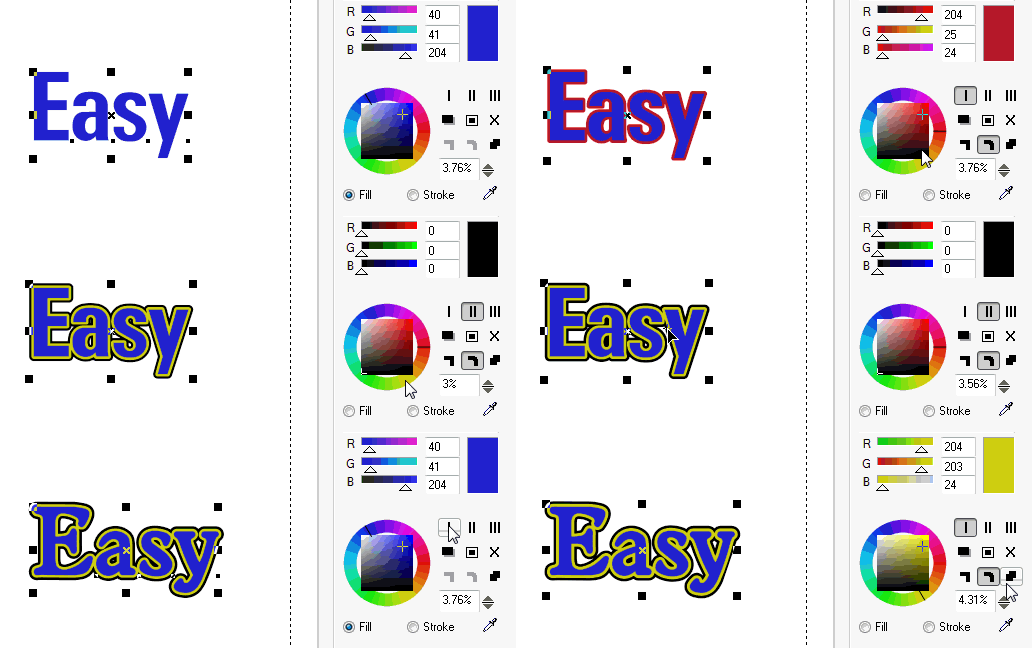
The next generation outline tool lets you configure an outline and then edit your graphics in any way, while retaining the outline. You can configure up to three outlines, including detached outlines.
|
|
|
|
|
SP |
|
|
|
Dynamic Shadow
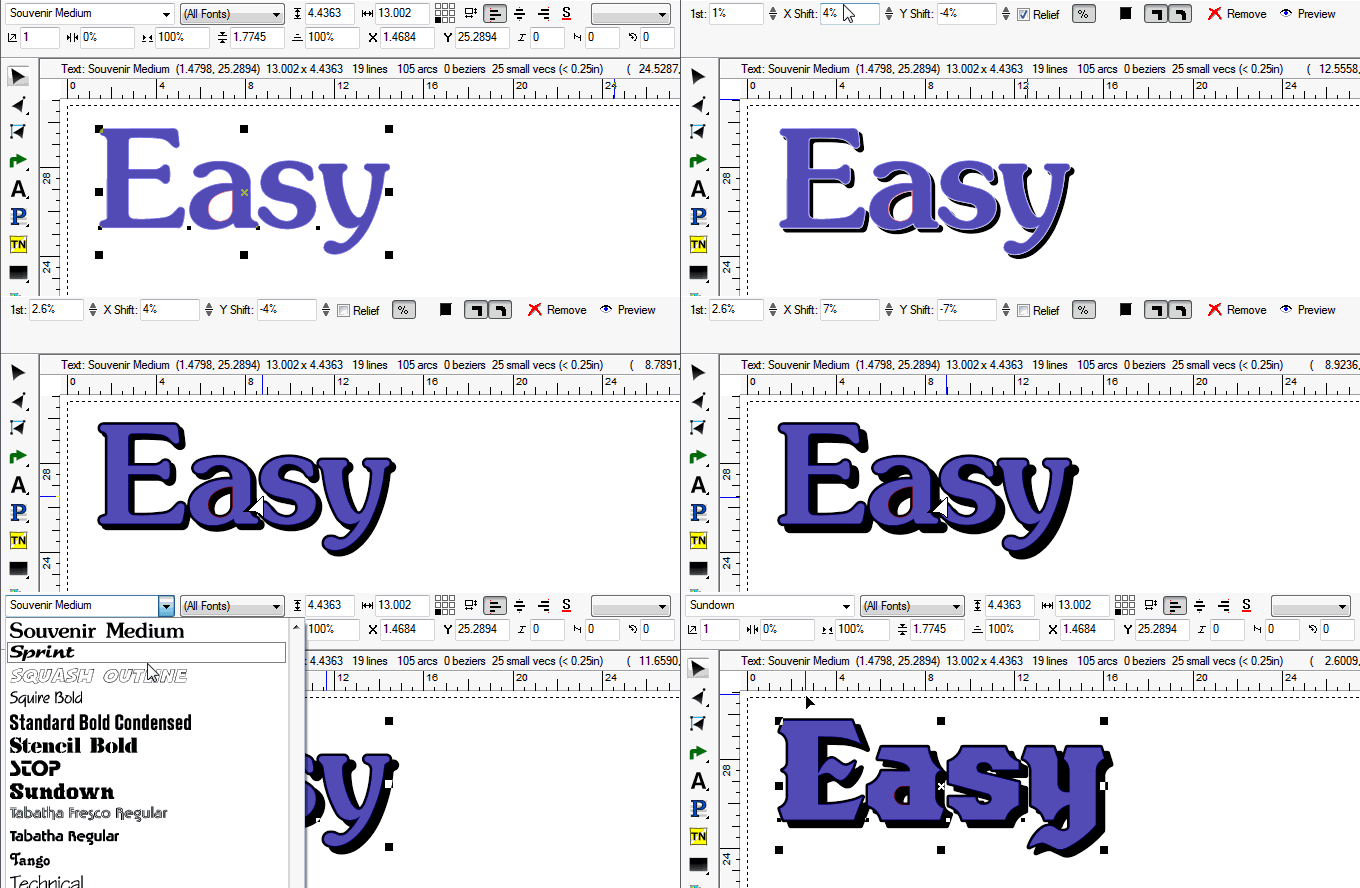
The next generation shadow tool lets you configure a flat shadow and then edit your graphics in any way, while retaining the shadow automatically. You can configure up to three outlines, including detached outlines.
|
|
|
|
|
SP |
|
|
|
Easy Bevel
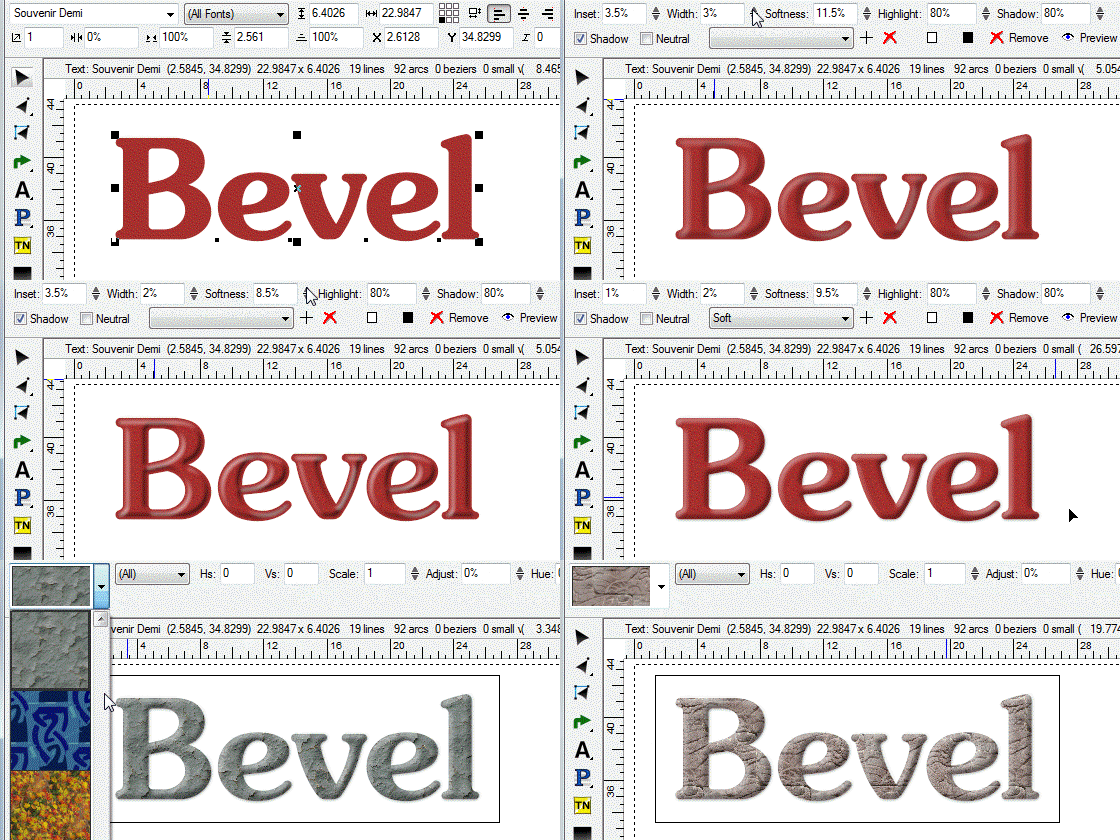
Easy Bevel is a great way to add dimension to your letters, while retaining full scalability of the text. It even works with Image Fills!
|
|
|
|
|
SP |
|
|
|
Effects Library

The new Effects Library is a major new design power tool. You pick and choose from various effects, or elect to use complete effects as is, with a simple double-click from the list. Once applied to your graphic or text, you still have full control over the settings of each effect. For example, you can still adjust the outline amount or the gradient colors.
|
|
|
|
|
SP |
|
|
|
Feather
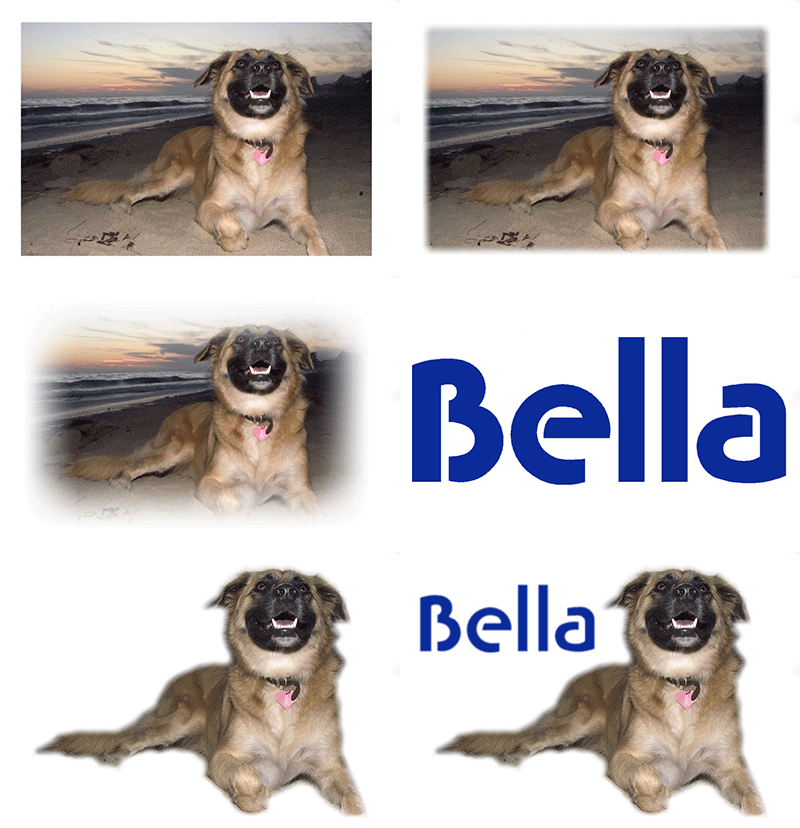
This feature allows you to create a soft transition for the edge of any vector or bitmap graphic, which is very handy for creating a softer overall feel for the design. You can combine this with other new bitmap manipulation features to create stunning designs! This example shows how you can add feathering to an image and to text, together in the same layout.
|
|
|
|
|
SP |
|
|
|
Gradient Blends
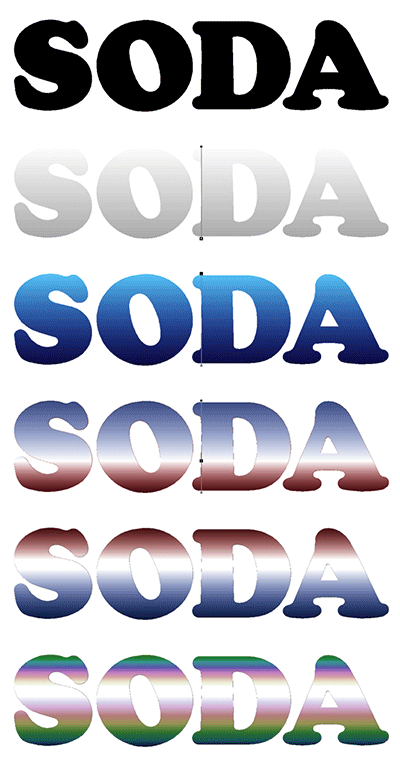
Create dramatic color blends graphically, using Linear, Elliptical or Circular patterns.
Version 7 now adds presets and a reflection option, giving you even more flexibility.
|
|
|
|
|
SP |
|
|
|
Transparency
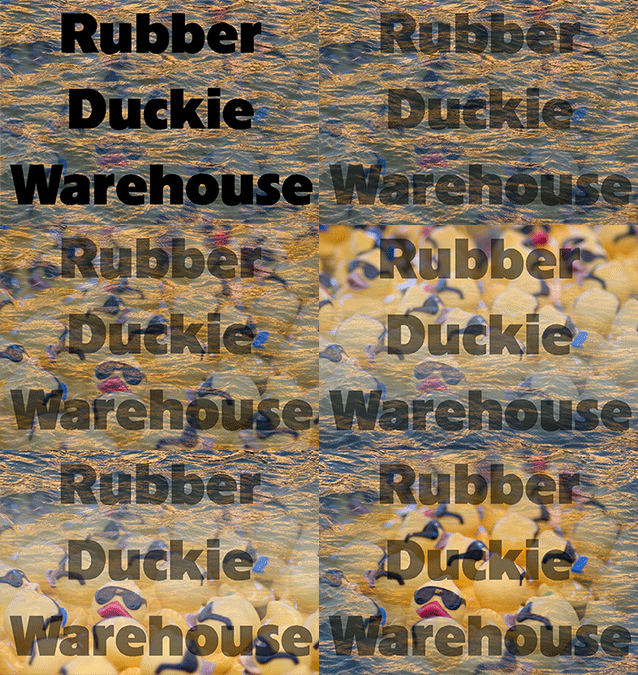
Transparency applies to both bitmap and vector objects, allowing you to see through to the background in variable amounts. The "Rubber Duckie Warehouse" example shows how two images and text can be manipulated with transparency for various effects. You have a choice between a flat transparancy amount, or you can vary it in a linear, circular, or elliptical shape.
|
|
|
|
|
SP |
|
|
|
Vector Graphics Tools
|
| |
Adjustable tangency indicator
|
SL |
SS |
SA |
SG |
SP |
NW |
N+ |
NP |
Bezier Tool
|
SL |
SS |
SA |
SG |
SP |
NW |
N+ |
NP |
Improved AI/EPS importing
|
SL |
SS |
SA |
SG |
SP |
NW |
N+ |
NP |
Improved AI filter: Versions 1.1, 3 through 6
|
SL |
SS |
SA |
SG |
SP |
NW |
N+ |
NP |
Node Edit: Insert/Delete/Move/Break/Join
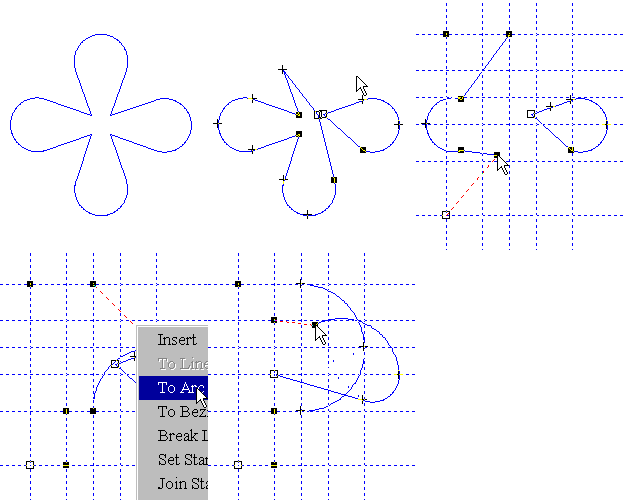
Editing vectors is fast and intuitive without any unnecessary steps.
Changing a flower into a letter is not a typical sign designing task, but it shows how easy and versatile the vector editing tools are. This example is taken from one of the tutorial lessons.
|
SL |
SS |
SA |
SG |
SP |
NW |
N+ |
NP |
Optimize Vectors
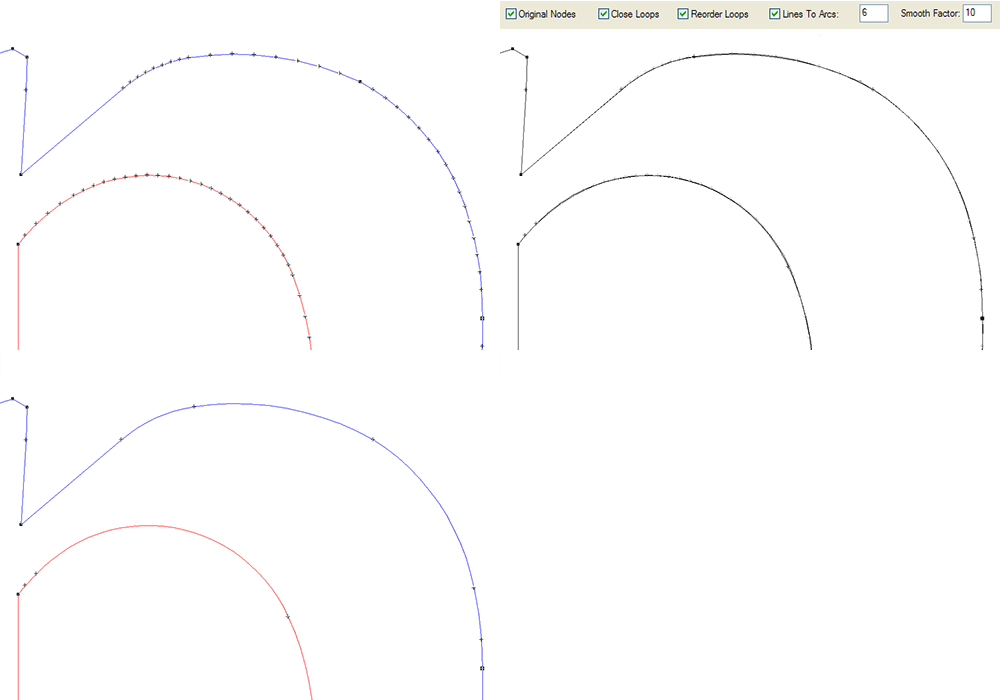
Optimize Vectors is a must-use feature for imported files and vectorized files to ensure good, clean data. Optimize Vectors has replaced and improved upon the Smooth Vectors command.
This one feature enables you to reduce the number of vectors, close loops, and reorder loops. It will also convert chords into arcs and lines for better and faster operation in the program.
A property bar is used, and you can now see the OLD path superimposed with the new smoother path to ensure that there is not too much deviation with the settings you've used.
|
SL |
SS |
SA |
SG |
SP |
NW |
N+ |
NP |
PDF Import and Export
|
SL |
SS |
SA |
SG |
SP |
NW |
N+ |
NP |
Sharp Corner Tool
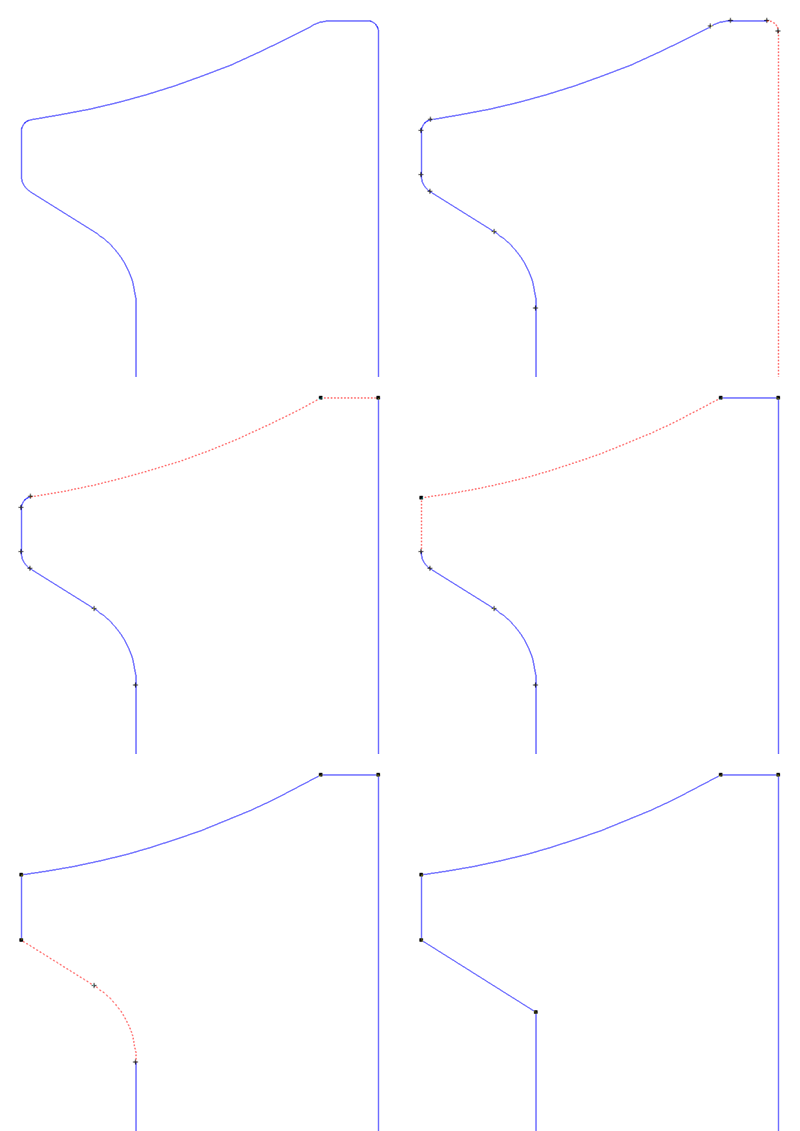
This handy tool will turn a radiused corner into a sharp corner, by deleting the arc and extending the two adjacent vectors so they meet, or joining with the straight lines if the projections won't intersect.
|
SL |
SS |
SA |
SG |
SP |
NW |
N+ |
NP |
Vector Filters: DXF,EPS,AI,EMF,more
|
SL |
SS |
SA |
SG |
SP |
NW |
N+ |
NP |
On Screen Digitizing

If the quality of a bitmap image is less than ideal, On-Screen Digitizing may be more cost effective than automatic vectorizing for converting bitmap images to vector images because it eliminates vector editing time.
Scan or import a bitmap image. Click on the On-Screen Digitizing tool. Start on any inner loop, preferably a corner, and proceed counterclockwise around the loop selecting lines, arcs and Beziers as needed from the dialog bar to follow the shape of the design. When the inner loops are completed, proceed clockwise around the outer loop(s). Switch to the Vector Edit tool, if needed, to fine tune the vectors so they match the design as closely as possible.
For 6, we've redesigned the bezier tool to work much like the tools in other popular graphics programs, making it much easier for designers familiar with other programs to design graphics in our software.
|
|
SS |
SA |
SG |
SP |
NW |
N+ |
NP |
Loop Mirror
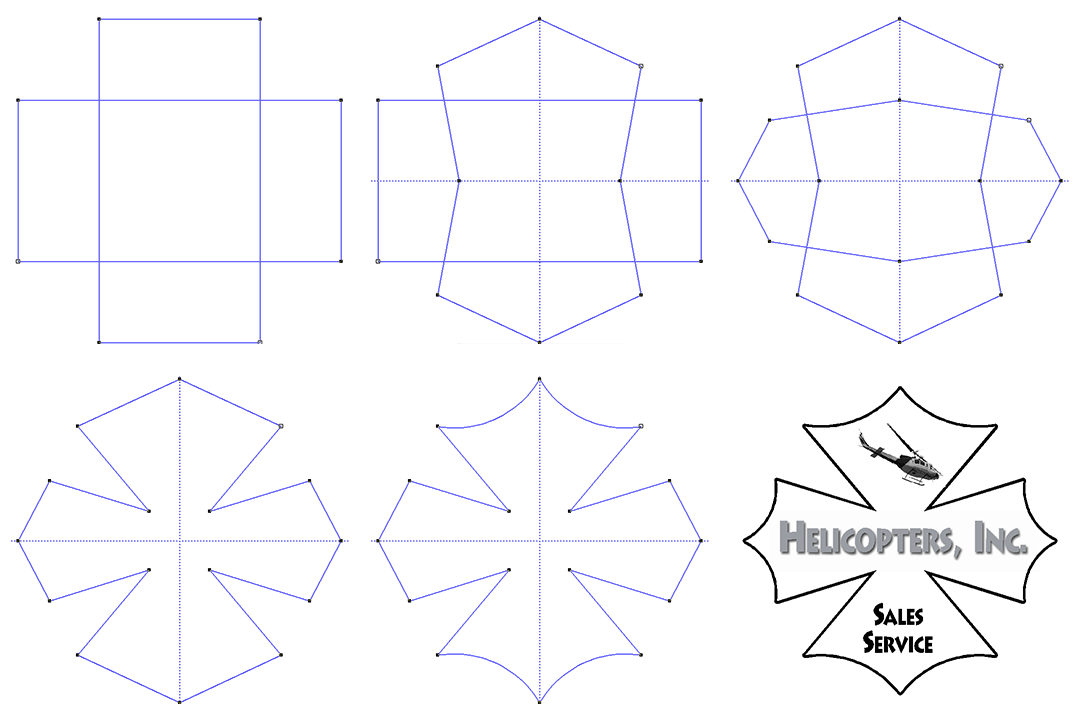
Loop Mirror is a great vector editing feature that lets you edit a loop with a vertical and/or horizontal axis "mirror." This means that any change you make on one side of the axis will be duplicated on the other. Use this to make symmetrical designs, borders, and shapes. The example starts with two rectangles, adds the loop mirror axes, edits each rectangle, then welds them together and edits some more. The final frame adds an outline, a graphic, and some text with a soft shadow.
|
|
|
|
|
SP |
|
|
|
Image Manipulation Tools
|
| |
Bitmap Filters: BMP, JPEG, TIFF, more
|
SL |
SS |
SA |
SG |
SP |
NW |
N+ |
NP |
Export Original Bitmap
|
SL |
SS |
SA |
SG |
SP |
NW |
N+ |
NP |
Interactive Bitmap Rotate Tool
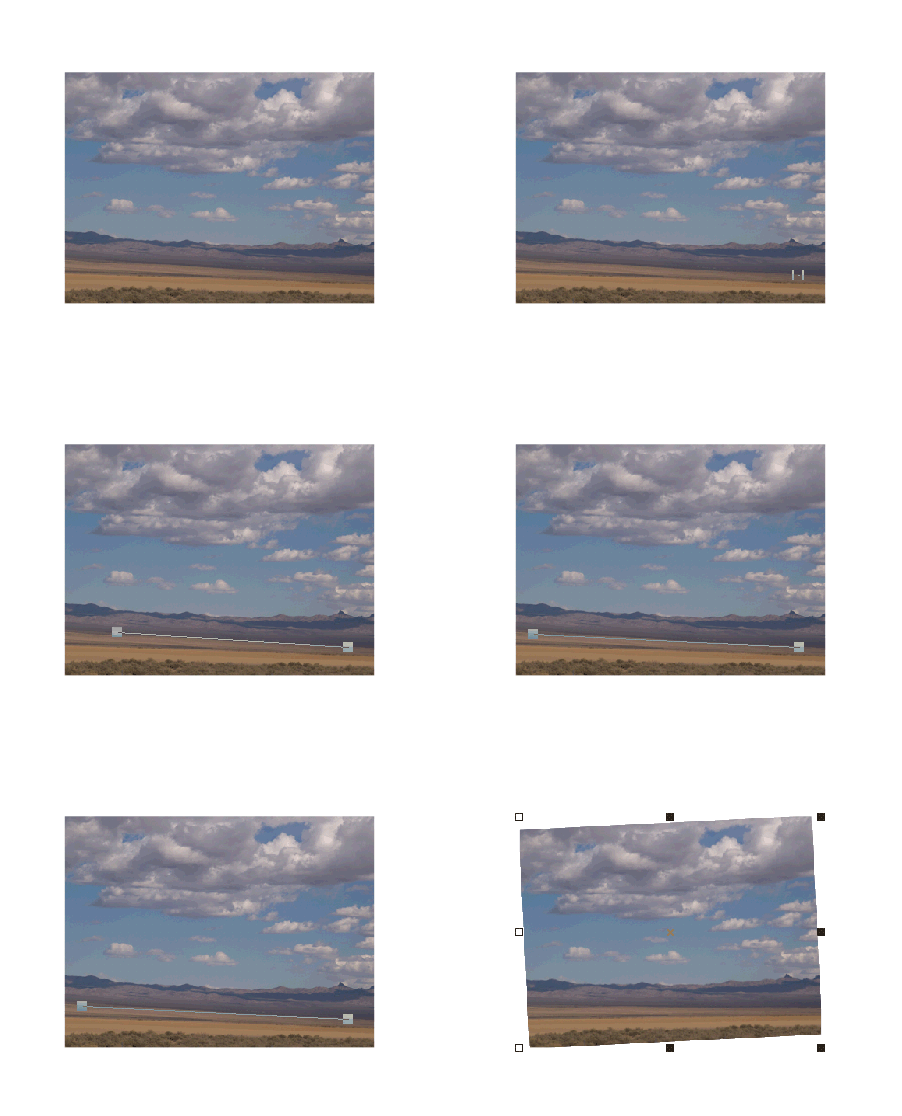
This tool is very handy for rotating an image that is slightly skewed. You simply drag a line along the horizon to define the angle to rotate.
|
|
|
SA |
SG |
SP |
NW |
N+ |
NP |
Adjust Bitmap Brightness
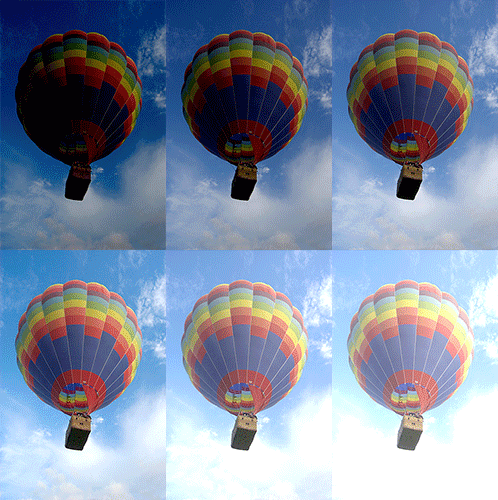
The image brightness can be edited in the Image Property Bar. A negative number makes the image appear darker and a positive value makes the image appear brighter.
|
|
|
SA |
SG |
SP |
|
N+ |
NP |
Adjust Bitmap Contrast
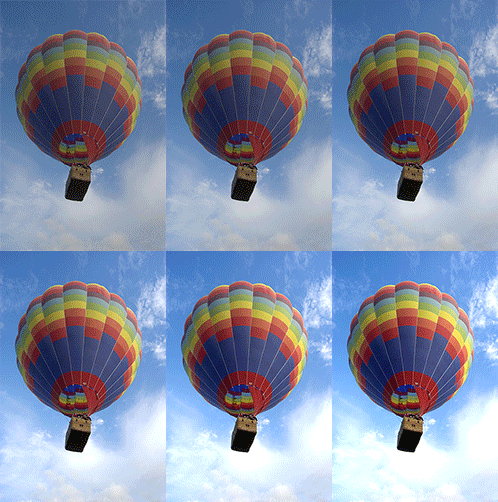
The contrast of an image can be adjusted right in the Image Property Bar. Lowering the contrast makes the image have more mid-tones, while increasing contrast makes the image have more extreme light and dark tones.
|
|
|
SA |
SG |
SP |
|
N+ |
NP |
Adjust Bitmap Saturation
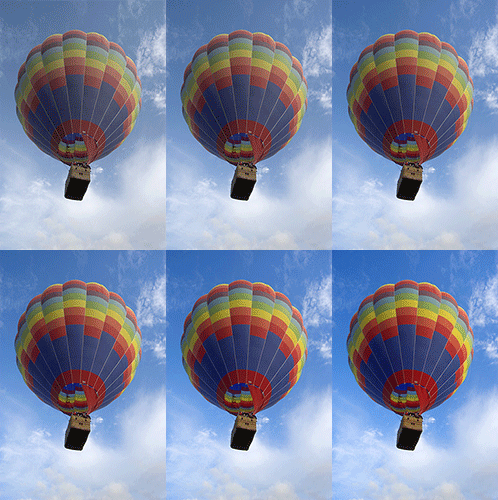
The image saturation can be edited in the Image Property Bar. A negative number makes the image appear less saturated and a positive value makes the image appear more saturated.
|
|
|
SA |
SG |
SP |
|
N+ |
NP |
Crop Bitmap
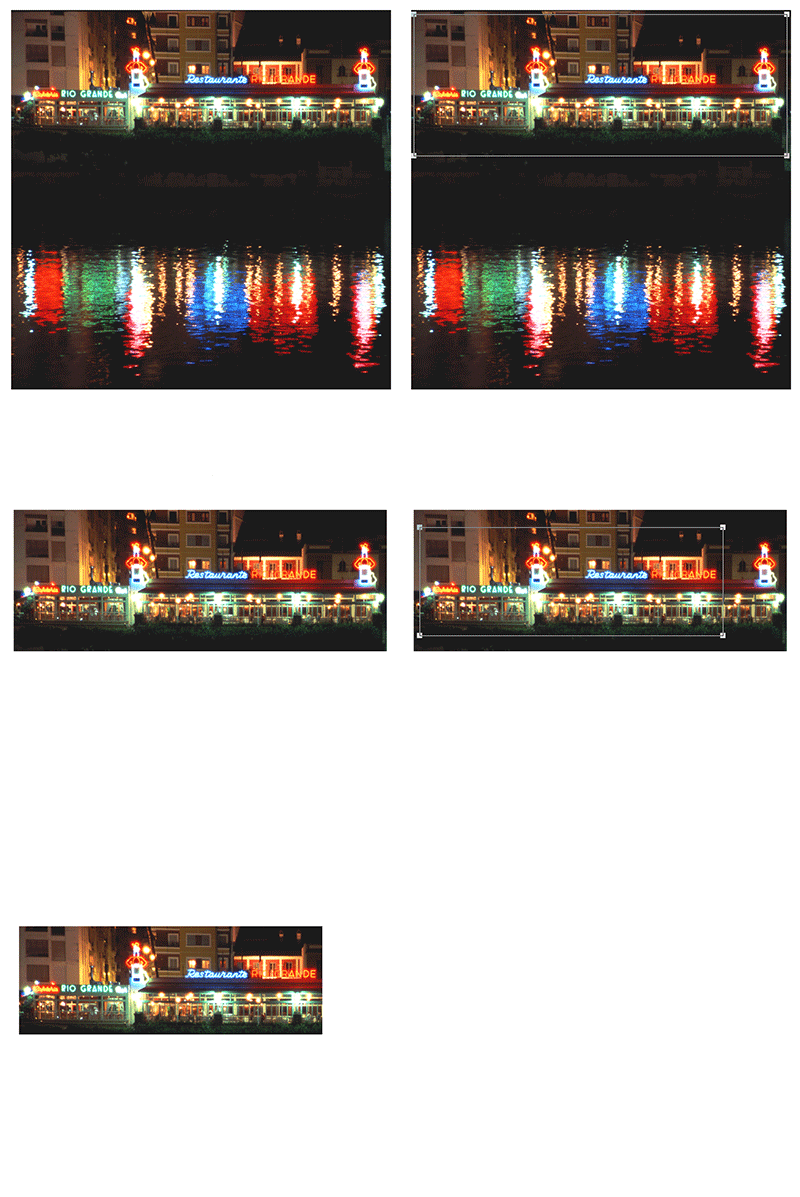
This handy tool lets you crop a bitmap into a smaller image. When you select the tool from the Image Property Bar, it will appear on the screen as a rectangle with four editable corners. Simply edit the shape and then double click the mouse to crop out the unwanted areas.
|
|
|
|
SG |
SP |
|
N+ |
NP |
Brush Tool

The Brush tool lets you add color like a real brush, with controls for opacity, coverage and brush size.
|
|
|
|
SG |
SP |
|
|
|
Clone Stamp Tool
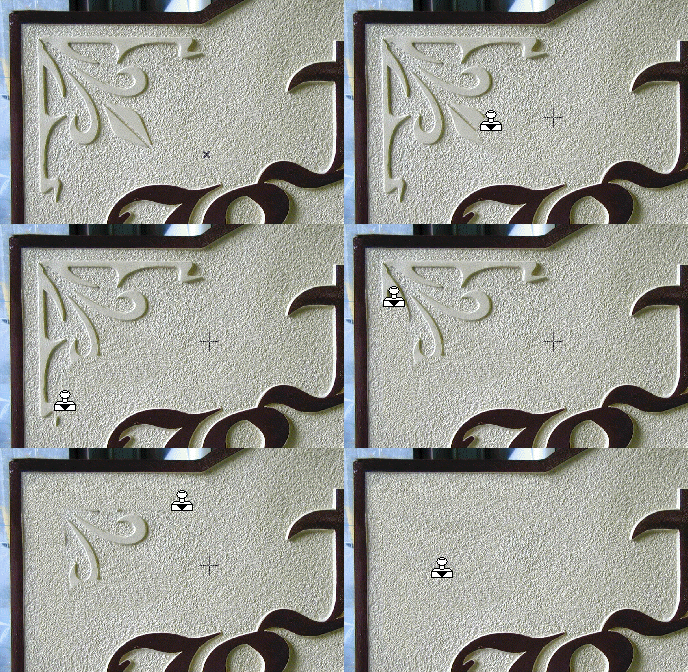
The new Clone Stamp Tool makes it easy to erase existing elements from the original sign site. This example uses the Fixed option, which keeps the source area stationary. With that option disabled, it works similarly to Photoshop's clone tool.
|
|
|
|
SG |
SP |
|
|
|
Eraser Tool
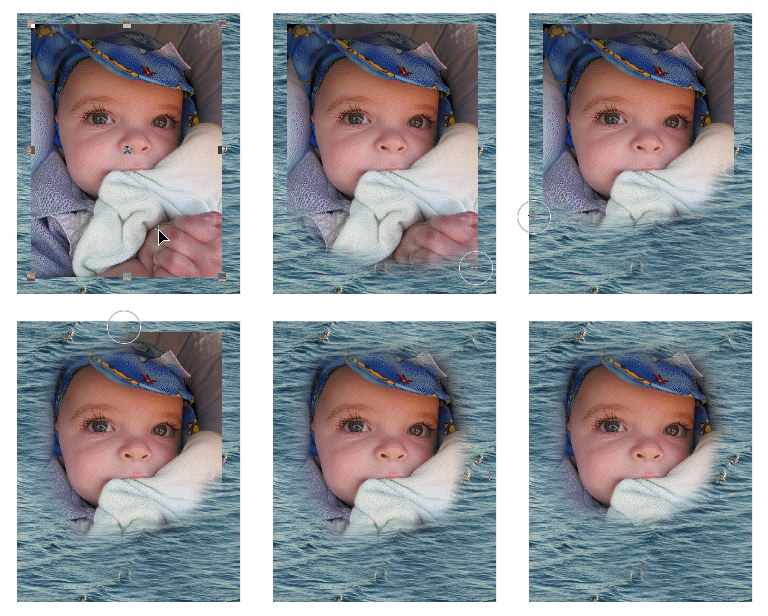
The new Eraser tool can be used to manually blend two images or one image with the background without leaving Sign Wizard. It works similar to Photoshop, so the learning curve is minimal.
|
|
|
|
SG |
SP |
|
|
|
Flip Image vertically or horizontally
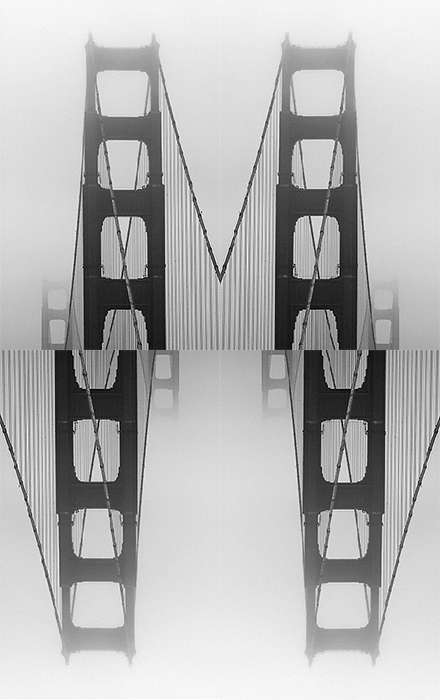
It's a snap to flip a bitmap vertically or horizontally. Just select the bitmap, then click on the appopriate Flio icon in the Image Property Bar.
|
|
|
|
SG |
SP |
|
|
|
Image Fills
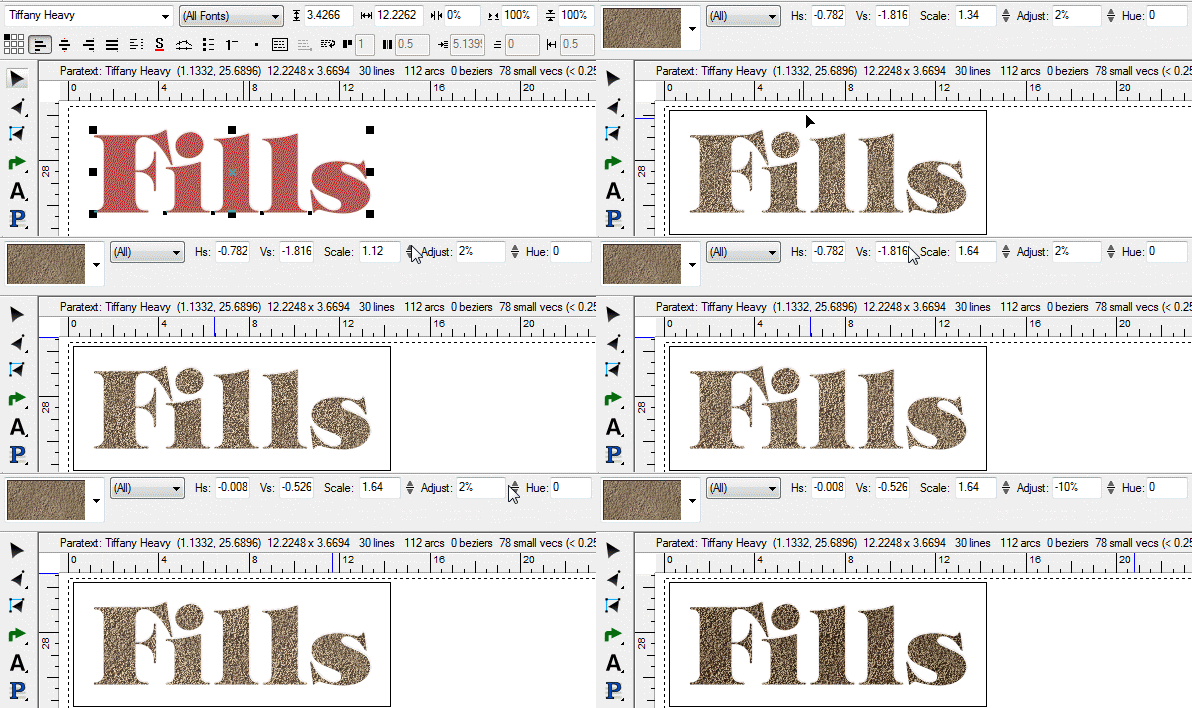
Create text with high impact using our own image fill library, or add your own fills.
|
|
|
|
SG |
SP |
|
|
|
Image Adjustments: Contrast, Saturation, Brightness, Hue
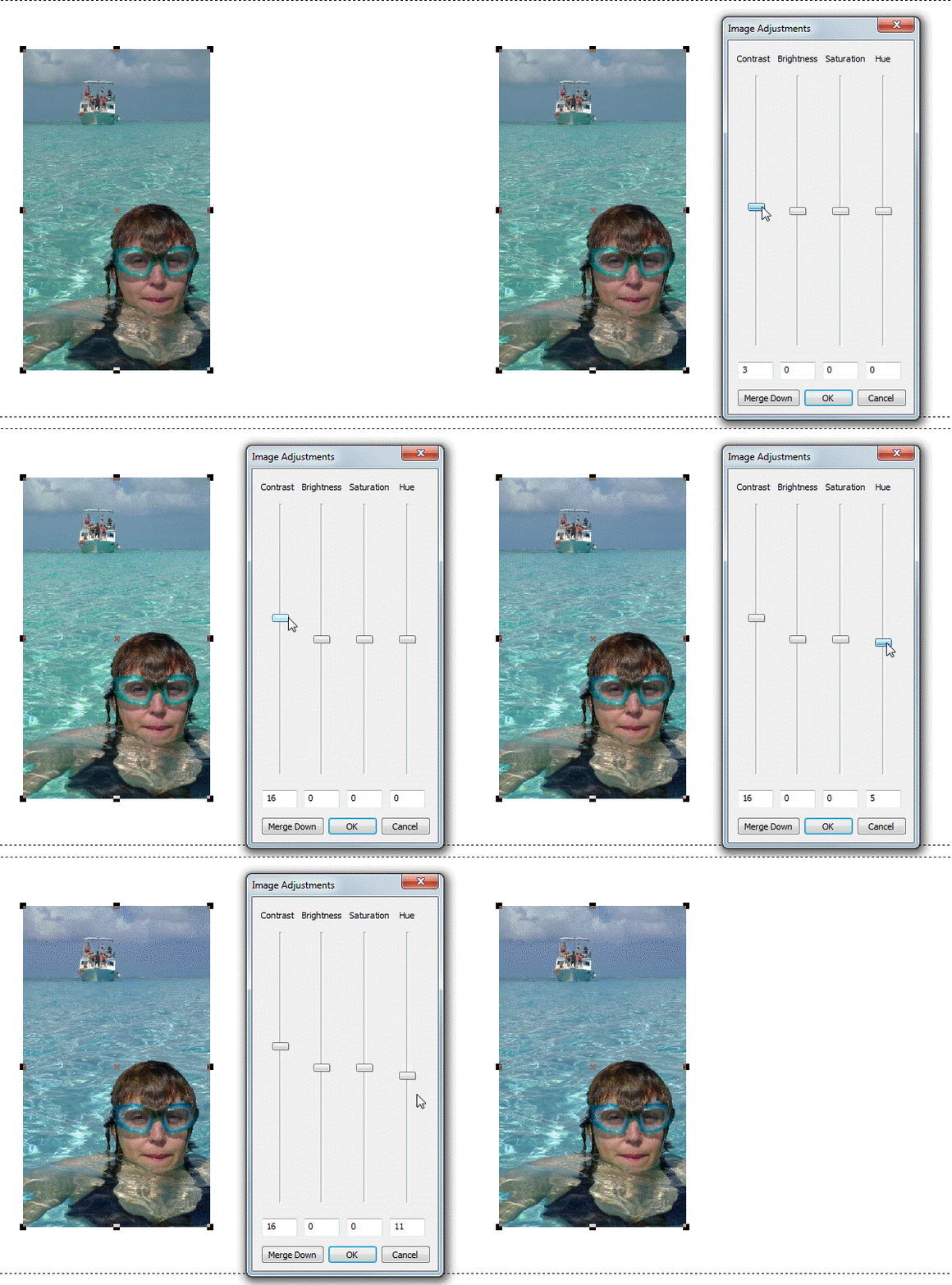
In Version 7, these bitmap changes are made in a special dialog box. Normally these are properties of the bitmap, but you can make them permanent with the Merge Down button.
|
|
|
|
|
SP |
|
|
|
Image Levels
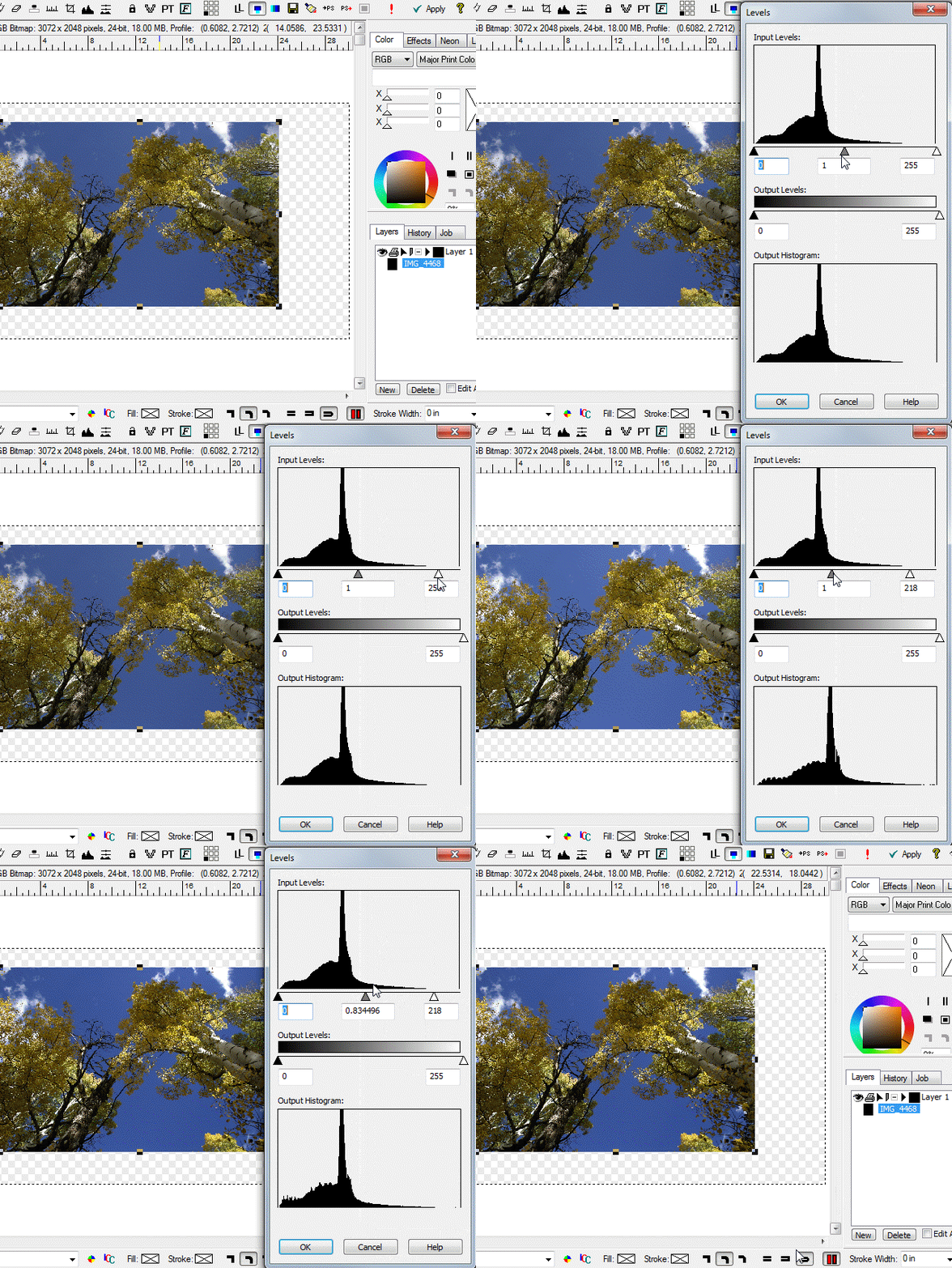
The Image Levels dialog box lets you adjust bitmap image Levels, similar to Photoshop.
|
|
|
|
|
SP |
|
|
|
Cutting/Plotting and Printing
|
| |
All popular plotters/cutters supported
|
SL |
SS |
SA |
SG |
SP |
NW |
N+ |
NP |
All Windows printers supported
|
SL |
SS |
SA |
SG |
SP |
NW |
N+ |
NP |
Horizontal and Vertical Paneling
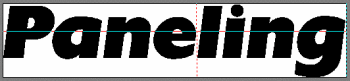
When a design is larger than the vertical media size, or longer than supported by the plotter, then it will be paneled into sections for output. Vertical paneling is very common, and occurs when the design is taller than the usable height of the material. Horizontal paneling occurs when the plotter has a Page Size limit, and the design is wider than this limit. For some large jobs, the design will be paneled in both directions, resulting in four or more distinct panels that need to be aligned and reassembled for installation. Paneling is automatic in the Plot Manager, depending on the settings in the Setup dialog box and the overall size of the design.
This image shows a job paneled in both directions, as indicated by the vertical and horizontal lines in the design. You may also set the size of overlap (if any) between the panels. The exact location of the panel lines can be adjusted, as long as the new position is within the maximum limit. In this example, the horizontal panel line was moved to the left between the "e" and "l" so as not to cut a letter into two pieces.
|
SL |
SS |
SA |
SG |
SP |
NW |
N+ |
NP |
Mirror, Scale, Rotate (Plot Manager)
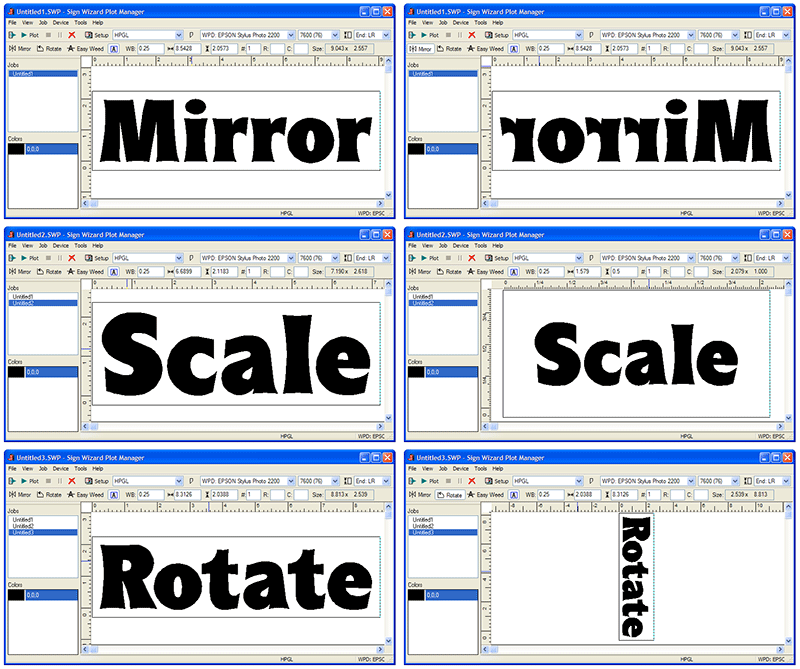
When you bring a design into the Plot Manager, there are several adjustments that you can make before plotting or cutting, including Mirror, Scale, and Rotate. These features are also available in the Layout Window, but here in the Plot Manager they are used for production instead of design purposes. In version 6, convenient icons have been added for Mirror and Rotate.
|
SL |
SS |
SA |
SG |
SP |
NW |
N+ |
NP |
Network Plotting
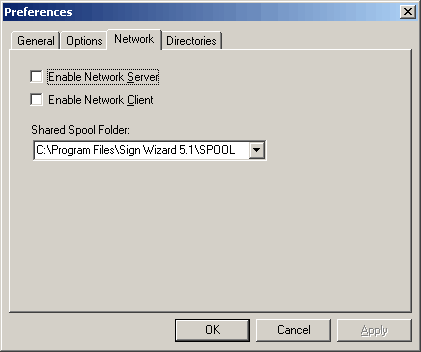
This productivity feature enables you to plot or cut to any machine that is on the network, not just a machine that is attached to the current design computer. You no longer need to design and plot on the same machine with this capability. For a shop with several design stations and/or multiple plotters/cutters, this feature will add significantly to your productivity.
|
SL |
SS |
SA |
SG |
SP |
NW |
N+ |
NP |
Plot to File
|
SL |
SS |
SA |
SG |
SP |
NW |
N+ |
NP |
Print Preview
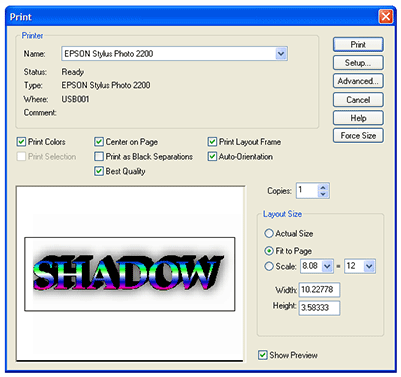
The Print Preview feature lets you see your design before you print, so that you can verify the size and the relative position of the design on the media.
In 6, the Print dialog box has been enlarged.
|
SL |
SS |
SA |
SG |
SP |
NW |
N+ |
NP |
Step and Repeat (Plot Manager)
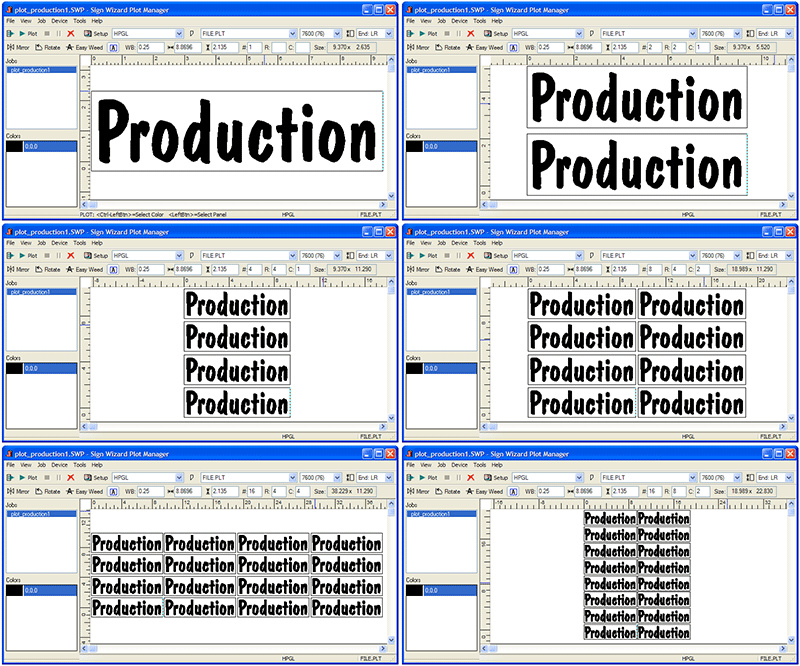
In the Plot Manager, the production module of the software, you may lay out multiple copies of your design using the Step and Repeat function. This is particularly useful if you need to organize the copies on the material in a certain way, because you can specify the X and Y copies of the design. Otherwise, simply enter the number of copies you want, and they will be organized to maximize the use of available material.
In 6, you can now manually specify the the rows and columns of your repeating design, which means the material height is no longer a concern.
|
SL |
SS |
SA |
SG |
SP |
NW |
N+ |
NP |
Streamlined Plot Manager
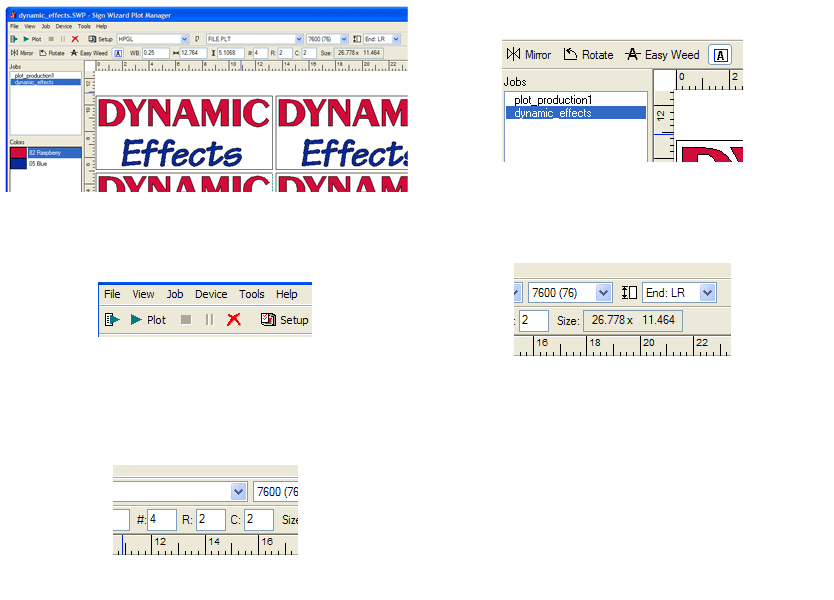
The Plot Manager has been streamlined with a new property bar and menus. These screen shots show various functions of the Plot Manager window, starting with an overall view and proceding to show the new icons for Mirror, Rotate, and Easy Weed, then the Plot, Delete, and Setup buttons, then the new way to set the plot end position, and finally the input fields for Step and Repeat.
|
SL |
SS |
SA |
SG |
SP |
NW |
N+ |
NP |
USB Cutter Support for Summagraphics and Graphtec
|
SL |
SS |
SA |
SG |
SP |
NW |
N+ |
NP |
Weed Border
|
SL |
SS |
SA |
SG |
SP |
NW |
N+ |
NP |
Weed Line Eraser
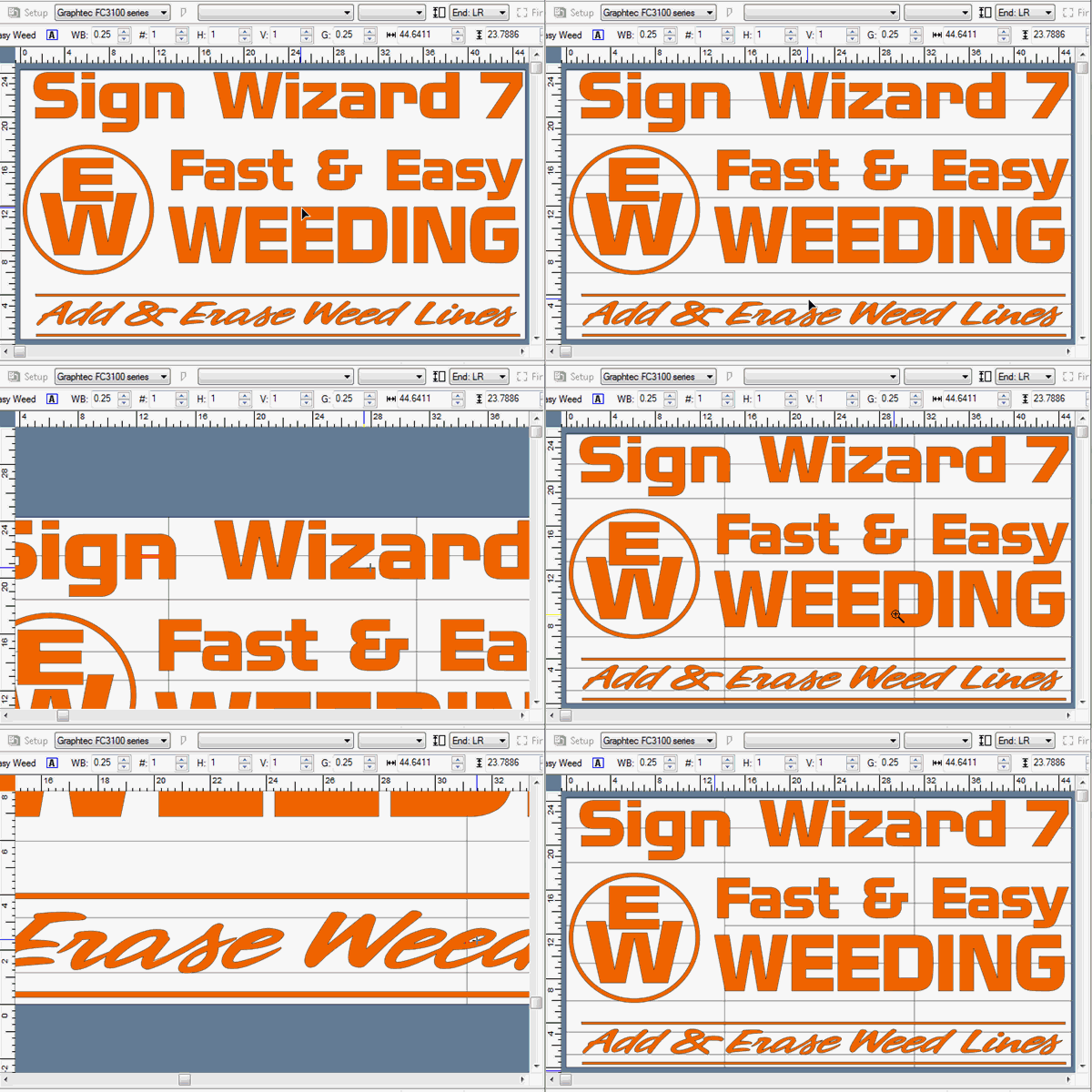
The new Weed Line Eraser tool makes it simple to optimize your weed lines to the specific design, speeding your production and reducing potential problems in weeding.
|
SL |
SS |
SA |
SG |
SP |
NW |
N+ |
NP |
Windows Printer Driver
|
SL |
SS |
SA |
SG |
SP |
NW |
N+ |
NP |
Pen Fill
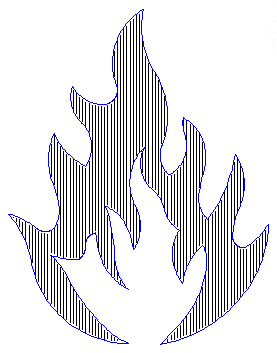
This feature is used with a plotter to fill in areas of a design with a thick pen for a less expensive output option. If a sign is very temporary, or otherwise does not merit using vinyl, this Pen Fill feature makes it easy to create professional paper signs. This example shows an image of a flame that has been filled in. You set the width of the pen and the percentage of the overlap to get the desired effect.
|
SL |
SS |
SA |
SG |
SP |
|
N+ |
NP |
Quick Plot
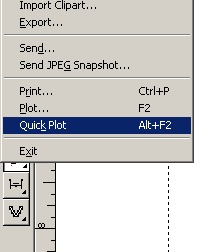
This feature is a handy time saver that enables you to plot directly from the Layout Window to the default plotter, without opening the Plot Manager. You may Quick Plot just a selected object, or the entire layout (assuming it is one color). You must make sure that the Plot Manager is properly configured for your plotter and that your plotter is online before using this feature.
|
|
|
SA |
SG |
SP |
NW |
N+ |
NP |
Vertical Weed Lines in Plot Manager
|
|
|
SA |
SG |
SP |
NW |
N+ |
NP |
Channel Letter Return Patterns
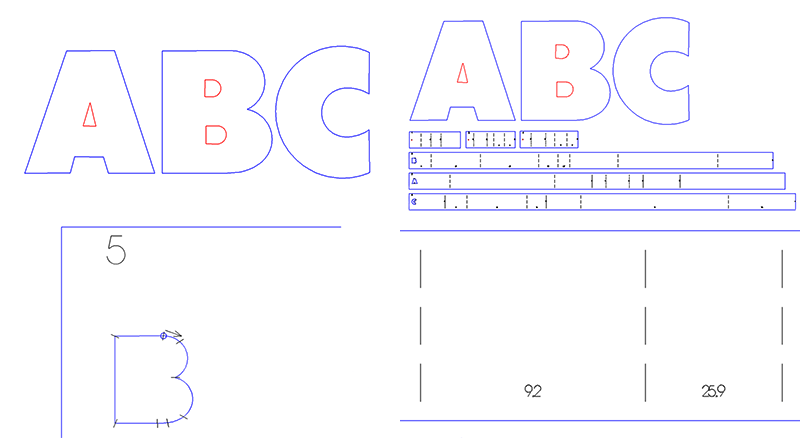
Previously only available as a separate module, this feature automates the tedious process of hand measuring your channel letters for notching and bending the return. It creates a paper pattern with all the appropriate measurements for notches and bends that you simply attach to your return. Why do this by hand when the process can be automated? If you are making channel letters, you can't afford to miss this time saving capability.
This graphic shows a pattern created from the letters "ABC." Each individual loop has an indentifying number and pattern that is nested for plotting. Each pattern contains solid or dotted lines indicating where to notch and bend the return.
This feature is available for $300 in the Advantage Level.
|
|
|
SA |
SG |
SP |
|
N+ |
NP |
Plot by Color
|
SL |
SS |
SA |
SG |
SP |
|
|
|
Easy Weed
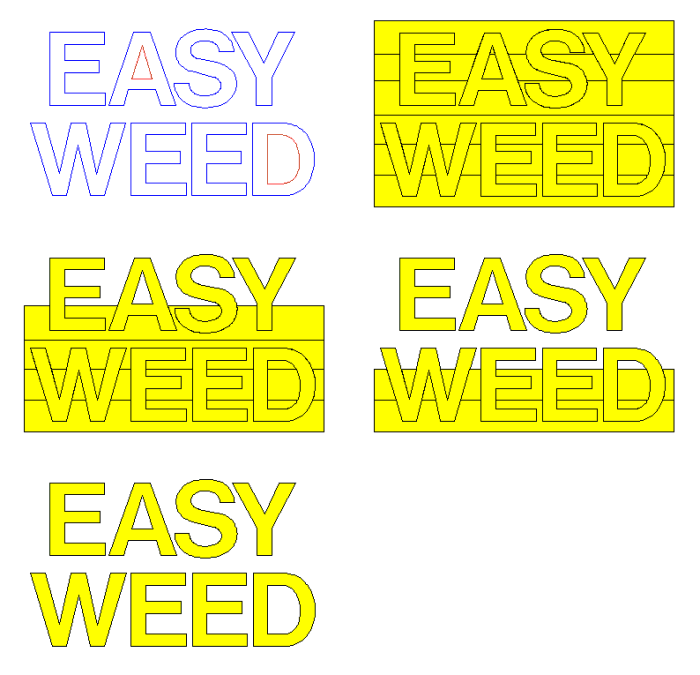
Weeding vinyl signs just got a lot easier! This feature lets you add as many weed lines as you want over the design. The weed lines can be positioned wherever you want and you can reposition them any time prior to clicking on the Plot button.
Take the worry and drudgery out of weeding, eliminate the need for re-cuts and speed up production with this simple, powerful tool.
This tool has been redesigned for Version 6 to be much faster on large jobs.
|
|
|
SA |
SG |
SP |
|
|
|
Routing/Engraving Support
|
|
|
|
|
SP |
|
|
NP |
Productivity Tools
|
| |
Auto Save
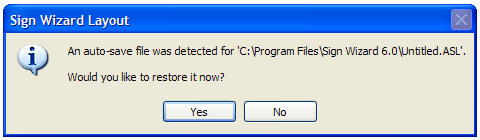
Auto Save has been improved in 7.0 and in the recent updates to 6.5. The system now is able to the save the segments of the layout that are changing and nothing else, resulting in no delays on large files. This feature means that if the computer loses power or Windows crashes, your work is safe and sound.
|
SL |
SS |
SA |
SG |
SP |
NW |
N+ |
NP |
Customizable Toolbar and Icons
|
SL |
SS |
SA |
SG |
SP |
NW |
N+ |
NP |
Email Layout
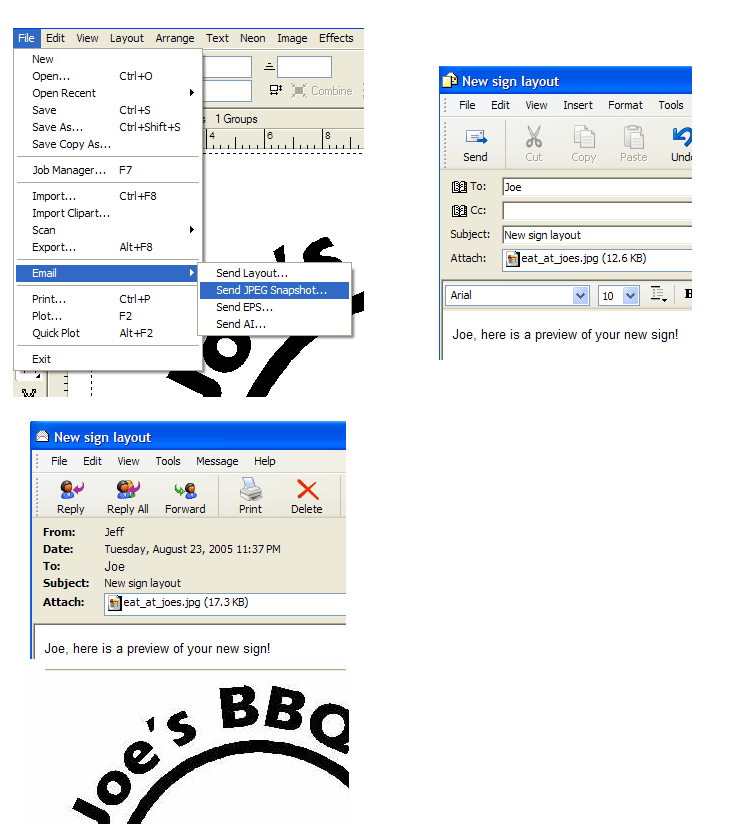
Email a layout, JPG, AI, or EPS file directly to your customer or co-worker from within the program.
|
SL |
SS |
SA |
SG |
SP |
NW |
N+ |
NP |
Online Help
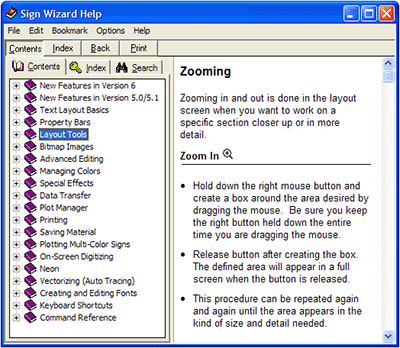
The Sign Wizard Online Help is a valuable resource for learning and operating the software. This help is available at all times by pressing the F1 key or clicking on Help in any dialog box or function. This example below shows some of the description for Zooming in and out.
Similar step-by-step instructions and detailed examples are included for all Sign Wizard features and capabilities.
|
SL |
SS |
SA |
SG |
SP |
NW |
N+ |
NP |
Tool Tips
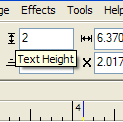
Tool tips are convenient little pop-ups that give you the name of the icon or text box when you move the mouse over it. This is surprisingly useful in operating the program, especially before you know all of the commands. Some of the Tool Tips give you the acceptable range of values for an input field.
|
SL |
SS |
SA |
SG |
SP |
NW |
N+ |
NP |
Unlimited Undo
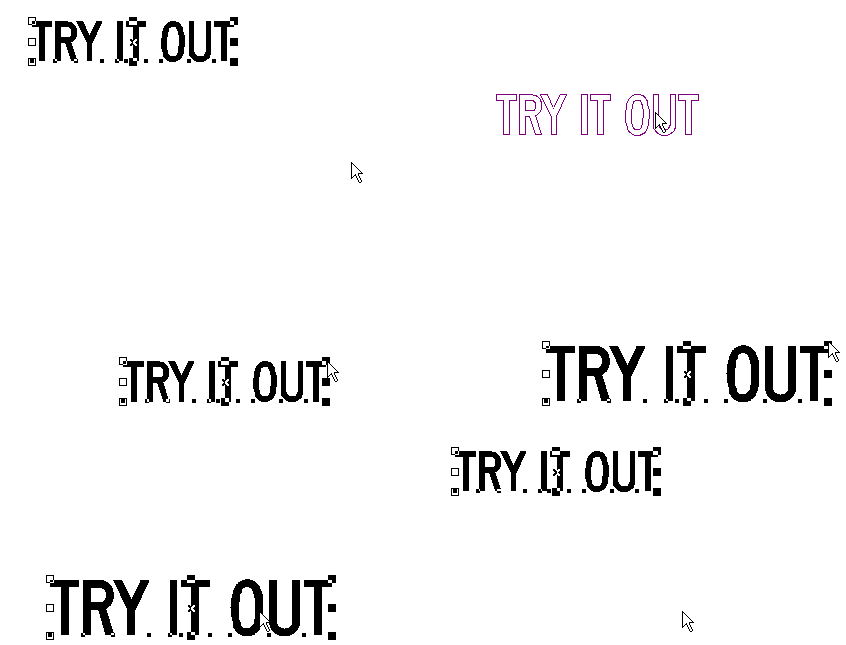
The ability to Undo multiple operations provides increased flexibility in the design process, since you know that you can go back and try something again. This feature enables you to Undo operations all the way back until the last time you saved your design. Simply hit the Backspace key to Undo as many times as you wish in order to experiment with different design ideas.
For 6, Redo has been added, and the Undo mechanism internally redesigned for better reliability.
|
SL |
SS |
SA |
SG |
SP |
NW |
N+ |
NP |
Zooming
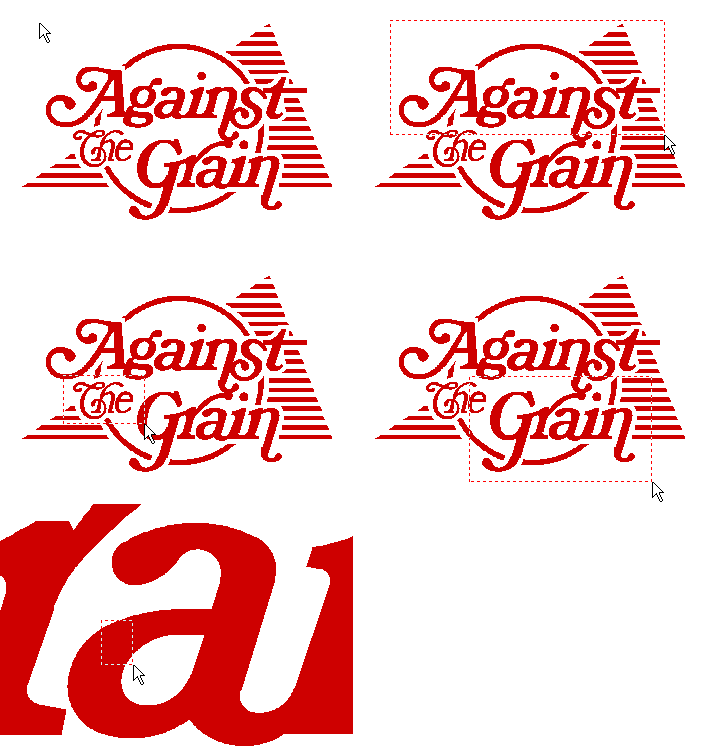
Sometimes it is the little things that make the difference in design productivity. Zooming is a feature that you will use constantly, which is why we made it as easy as possible. Simply draw a box with the right mouse button around what you want to see. There is no tool to select, or special mode to enter. What could be faster or easier?
|
SL |
SS |
SA |
SG |
SP |
NW |
N+ |
NP |
Job Manager
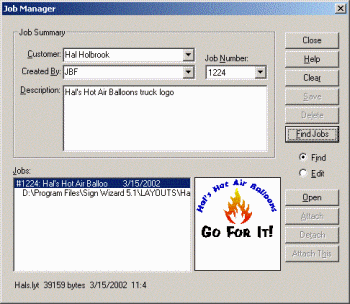
The Job Manager provides everything you need to keep track of your jobs! Never again will you look through files with unintelligible names, with no idea about the job or customer. The Job Manager lets you enter the customer, the designer, a job number, and a description, as well as pertinent information about the file such as when it was created, where it is stored, and its size. You may also attach multiple files to a single job and get a preview of the job when you select it. Finally, you can search on a customer, designer, or job number to find what you're looking for.
This feature helps you stay organized and will save lots of time when you need to find an old job. The Job Manager is especially useful in a larger shop with multiple designers and lots of customers.
|
|
SS |
SA |
SG |
SP |
NW |
N+ |
NP |
Spell Checker

The spell check feature helps you make sure you don't make a costly mistake before production begins...such as misspelling "poinsettia" for a plaque to be prominantly posted at a poinsettia ranch. You can also add words to the dictionary for next time.
|
|
|
SA |
SG |
SP |
NW |
N+ |
NP |
Border Library
|
|
SS |
SA |
SG |
SP |
|
|
|
Programmable Hot Keys
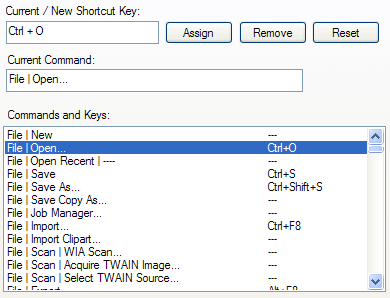
This feature lets you assign your own keys to menu commands, greatly speeding up tasks you perform frequently.
|
|
|
|
SG |
SP |
|
N+ |
NP |
Neon Design Tools
|
| |
Add Blackouts
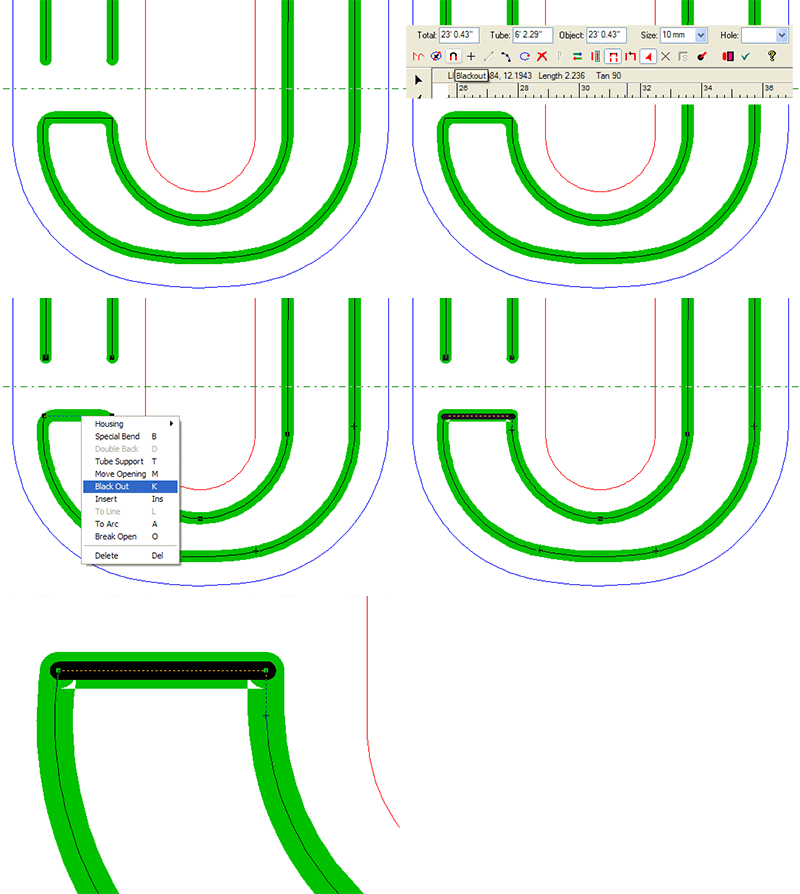
When editing a neon tube, it is easy to add a blacked out section. Simply click on the tube, then click on the Blackout icon or select Blackout from the pop-up menu (both options are shown in the graphic). The tube will now be shown with an inline to indicate that it is blacked out.
The Add Blackout feature is another of the easy neon editing tools designed to put the finishing touches on your pattern.
|
|
|
|
|
|
NW |
N+ |
NP |
Add Common Housings
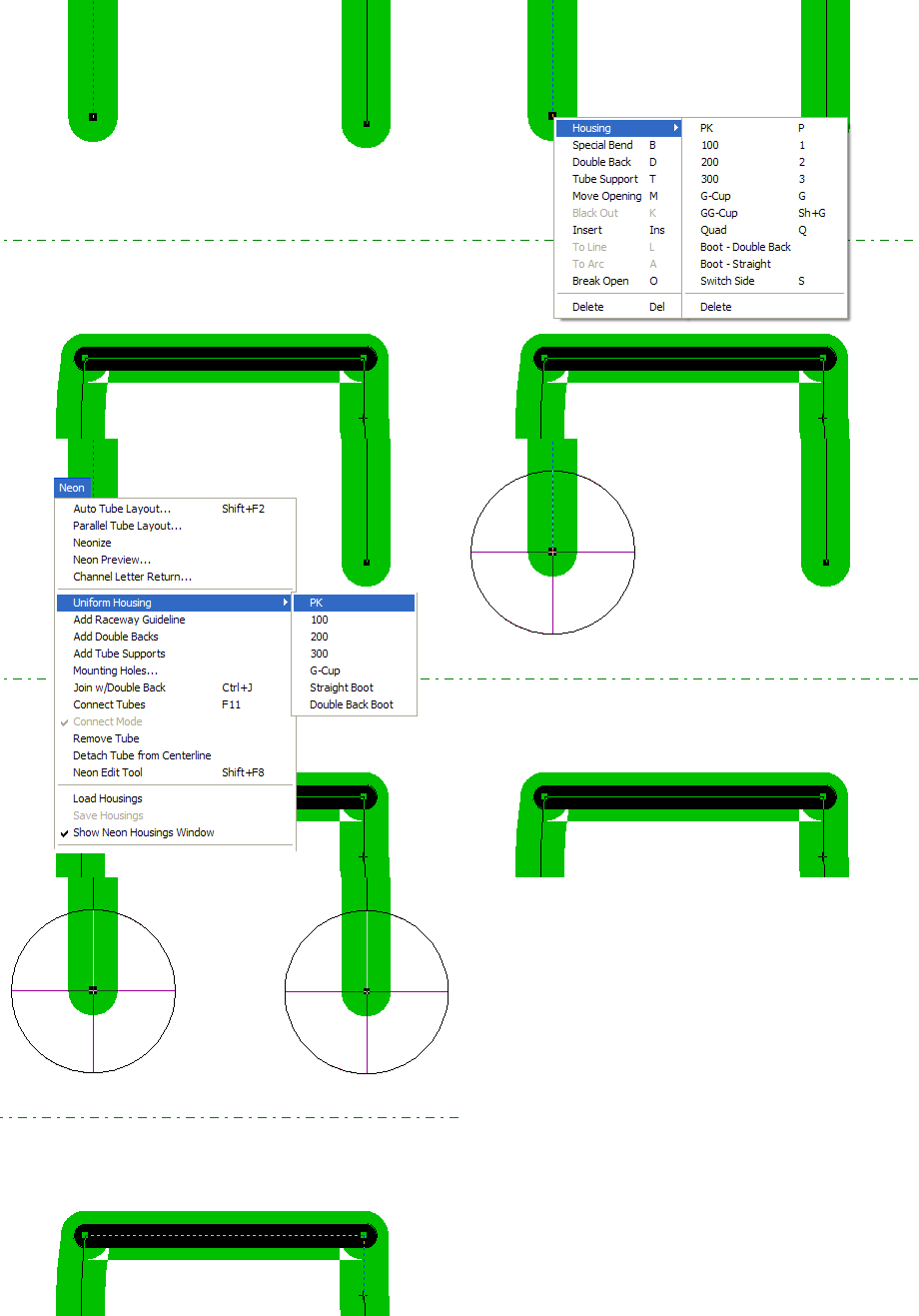
Adding housings to each tube termination is done by just clicking on the termination, then clicking on the appropriate housing icon from the Neon Editing pop_up menu. You can also add the same housing to all terminations in your pattern in one easy step, as shown in the graphic.
The standard housings are PK, 100, 200, 300, G cup, GG cup, Quad, straight boot, and double back boot. You may also add your own custom housings - see Create Custom Housings.
|
|
|
|
|
|
NW |
N+ |
NP |
Add Mounting Holes
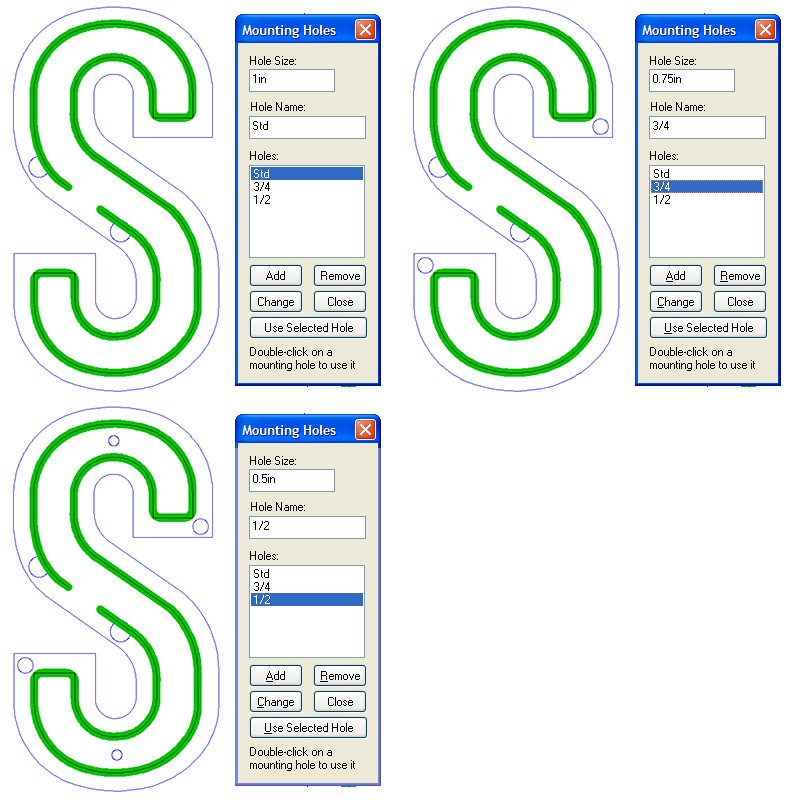
The ability to add mounting holes to your neon design is a very important feature for channel letters and similar applications. You may create custom sized mounting holes, and then place them anywhere on your layout. If you scale the design up or down, the mounting holes will maintain their original size.
Mounting holes can be exported or routed along with some or all of the components of the complete design. See Layers for more information.
|
|
|
|
|
|
NW |
N+ |
NP |
Add Tube Supports
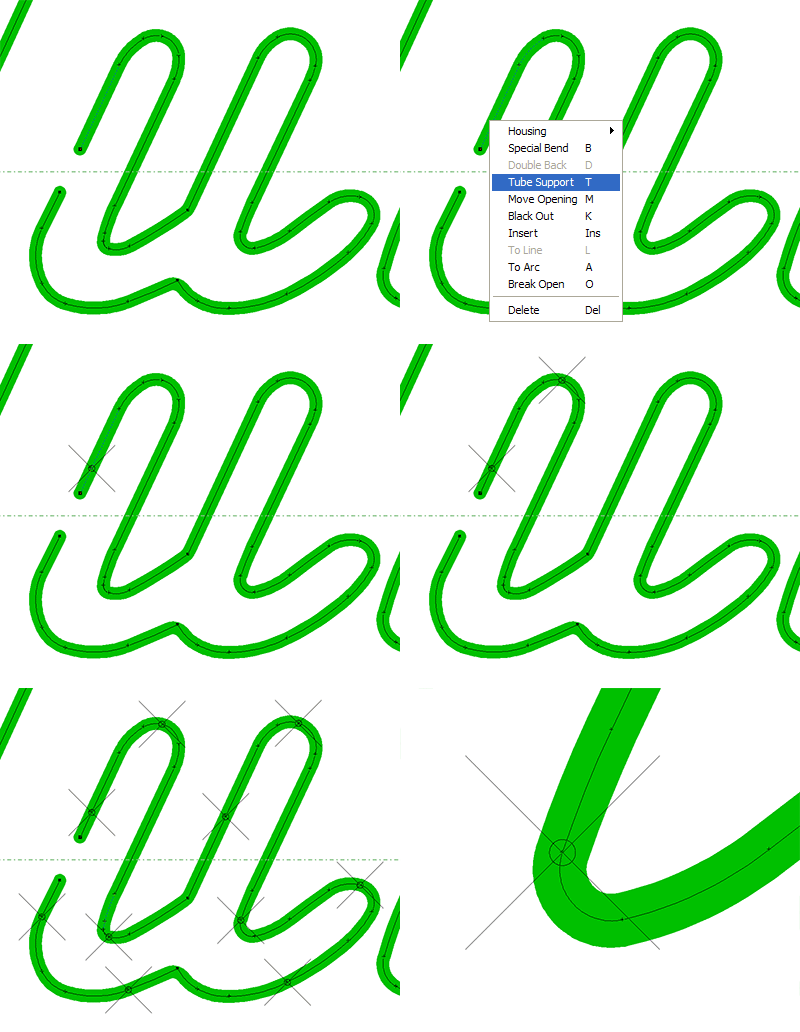
Another of the time saving neon editing features is adding tube supports to your pattern. All you have to do is click on the tube where you want the support, then click on the Tube Support icon from the Neon Editing toolbar or select it from the opo-up menu. The support will be shown on your pattern as a small "X" across the tube. You'll also notice from the graphic that the tube support holes are automatically drawn. These are put on a separate layer that can then be exported to your router.
|
|
|
|
|
|
NW |
N+ |
NP |
Auto Tube Layout
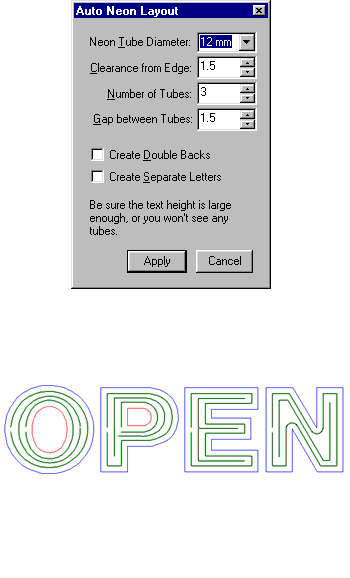
Neon Wizard can easily create channel letter layouts with any number of tubes, including single tube, using the Auto Tube Layout feature. You specify the tube diameter, the number of tubes, the clearance from the edge of the channel letter, and the gap between tubes (if two or more tubes).
In version 6, this tool has been improved with new capabilities (see Neon Auto Spacing and Neon Auto Tube Count) and made much easier to use by utilizing a property bar.
|
|
|
|
|
|
NW |
N+ |
NP |
Change Neon Tube Diameter Only
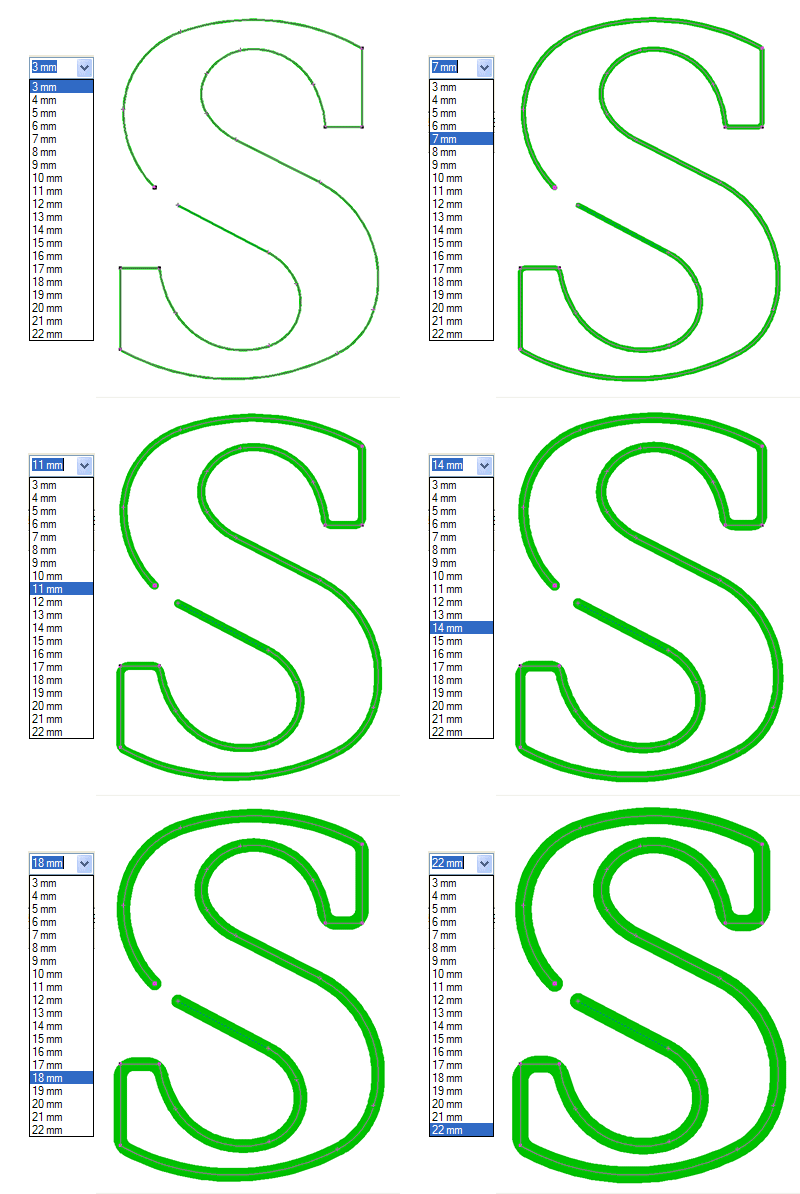
When editing neon tubes, sometimes you need to change the tube diameter only, without changing the design. This is done in one easy step in Neon Wizard. Any subsequent changes that you make to the overall design, including scaling it up or down, will NOT affect the tube diameter - this will stay constant according to the setting you entered. The tube diamaters available go from 3mm to 22mm.
|
|
|
|
|
|
NW |
N+ |
NP |
Connect Tubes
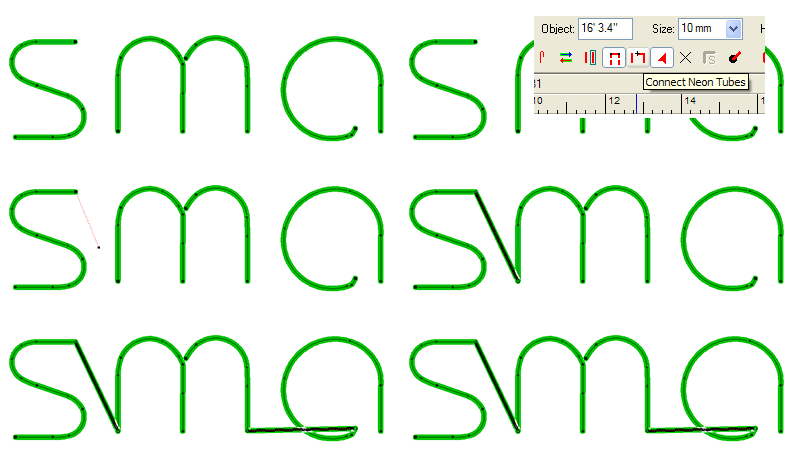
The ability to easily connect neon tubes from different letters or different parts of a design is an important Neon Wizard benefit. This is done in three short mouse operations - click on the end of the first tube, click on the tool, then click on the beginning of the second tube. A new tube will be drawn connecting them that you can then black out. That's it!
|
|
|
|
|
|
NW |
N+ |
NP |
Create Custom Housings
|
|
|
|
|
|
NW |
N+ |
NP |
Current Tube/Total Length Display

One of the most important metrics in a neon design is the amount of glass you are using. Neon Wizard provides a constantly updated measure of tube length - both the current tube that you are working on and the total length of all the tubes in the design.
Use the current tube information to decide where to break a tube, and the total length information for quoting/job costing and as an input to the transformer choice. This is a simple but extraordinarily useful feature!
In 6, the length information is merged with the Neon toolbar into a single property bar that appears as needed, reducing screen clutter dramatically. See also Neon Summary for tube lengths per letter.
|
|
|
|
|
|
NW |
N+ |
NP |
Insert Doublebacks
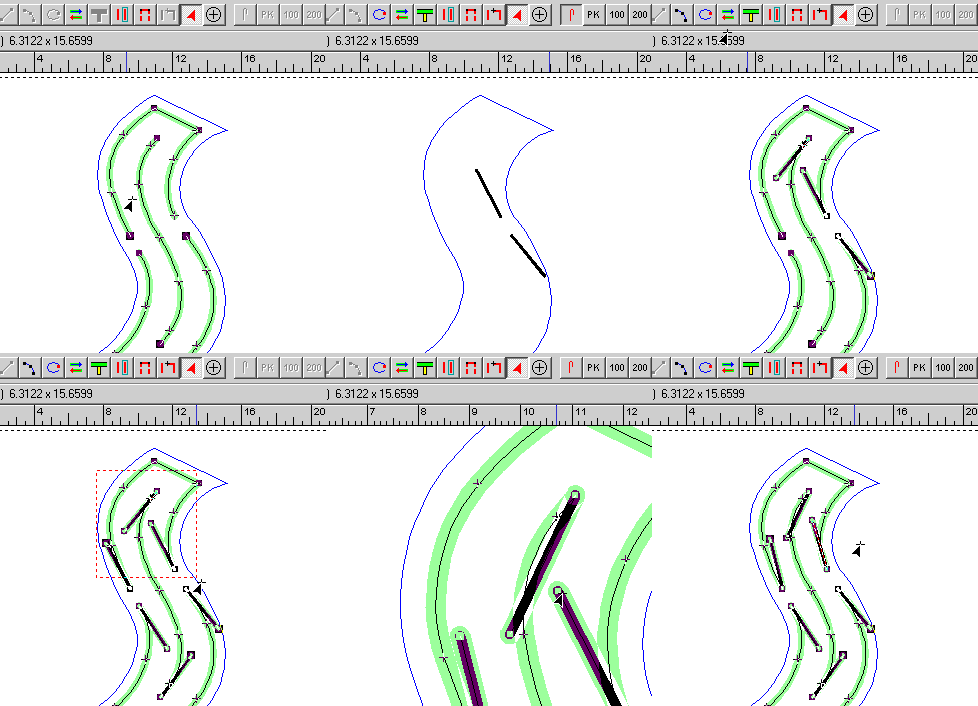
Adding double backs to each termination is a simple neon editing function. You can add the double backs to each termination individually, either using the icon or the pop-up menu for neon editing, or you can add them all terminations at once. A standard length is enforced (default is 3 inches), but you can easily adjust the position.
|
|
|
|
|
|
NW |
N+ |
NP |
Maximum Tube Length
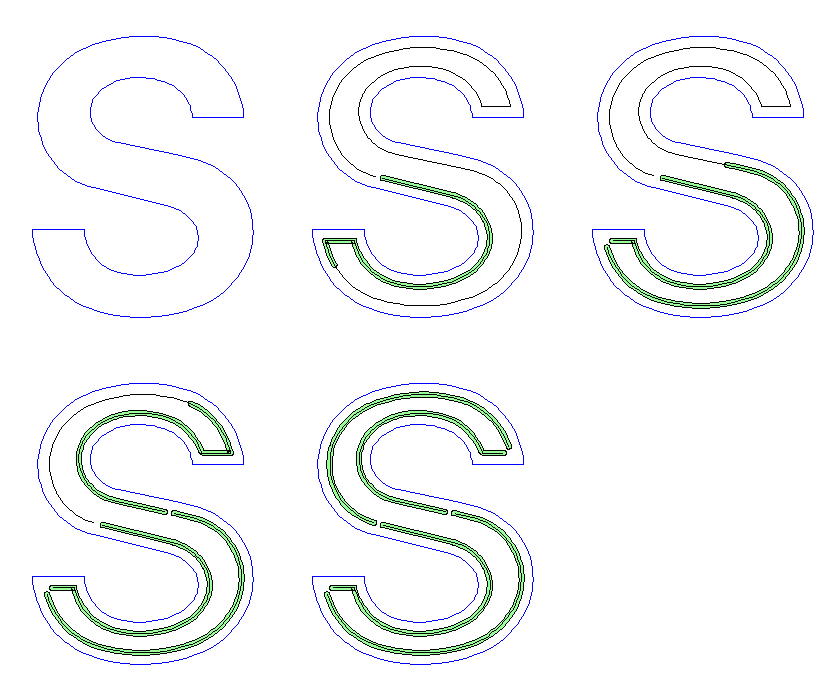
You can now specify the maximum length you want for each tube element in a neon design.
With Limit Tubes to Max Length checked (Tools menu/Options/Neon), for any tube whose length is longer than the setting you have entered (e.g. 96 inches), the first 96 inches are displayed in green and for the rest of the tube only the centerline is shown. You can then double click and select Break Open at the end of the green section (e.g. at 96 inches) or at any point prior to where the green section ends to start the next element ? such as at the last bend. (Breaking the tube at a point less than the full 96 inch length will, of course, make the first tube shorter than 96 inches, but it may be a more practical place for the break - depending on the details of the design.) If the tube is initially more than twice as long as the maximum setting you entered, you can repeat the Break Open process as many times as needed to make all the tubes equal to or shorter than the specified length. If doublebacks are to be added later, their lengths should be subtracted from the Maximum Length setting you enter.
|
|
|
|
|
|
NW |
N+ |
NP |
Move Opening, Break Tube Open
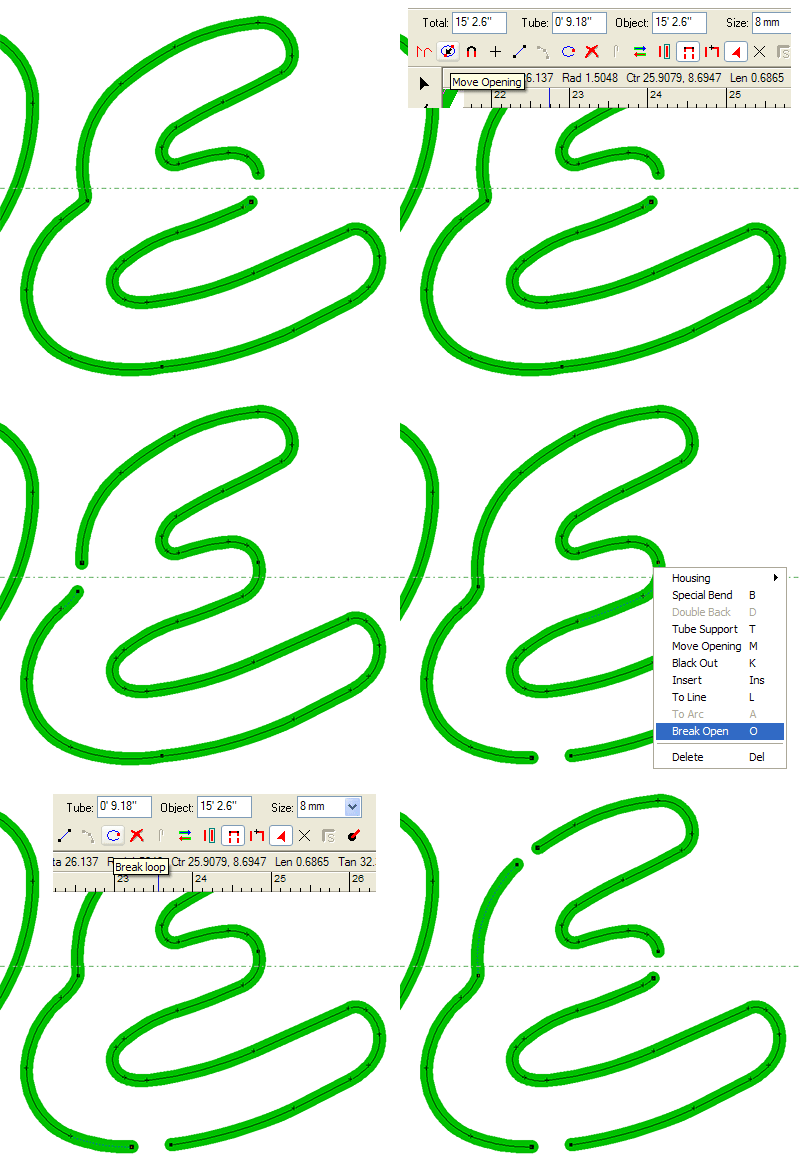
Moving the opening on a neon tube to a new location and breaking the tube open at a certain point are both important neon editing requirements. These capabilities are as simple as clicking on the tube and then clicking on the appropriate icon. You may also select the function from the neon editing pop-up menu. Both options are shown in this example.
|
|
|
|
|
|
NW |
N+ |
NP |
Neonize
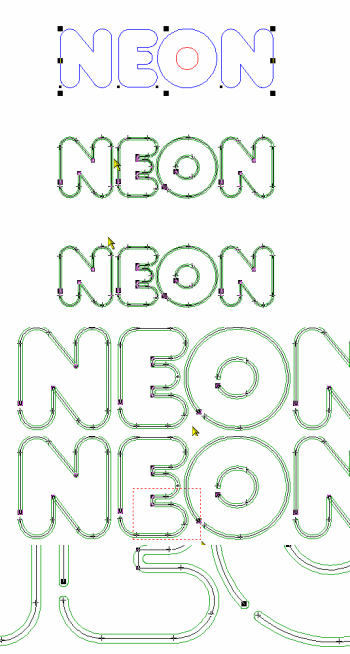
\\"Neonize\\" is a term that we came up with to describe converting a regular vector into a neon tube. This feature will instantly make your regular design into a neon design.
Neonize is used mostly to create exposed neon lettering and designs. After you have created the neon tubes, you then add double backs, housings, tube supports, etc. to complete the neon pattern.
|
|
|
|
|
|
NW |
N+ |
NP |
Neon Summary
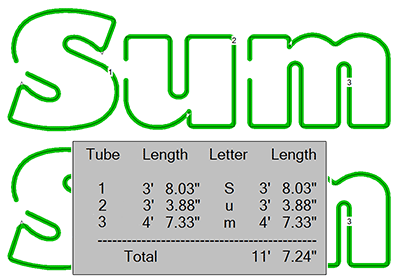
Neon Summary takes the next step in displaying tube length information by presenting a table of tube lengths per letter.
This table is automatically generated and can be printed along with the layout as a proof, internal work order, or customer copy.
The example here shows the letters "Sum" and the associated Neon Summary table showing the individual letter tube lengths and the total length. Note that the tubes are numbered for easy reference on the original neon layout.
|
|
|
|
|
|
NW |
N+ |
NP |
Raceway Support
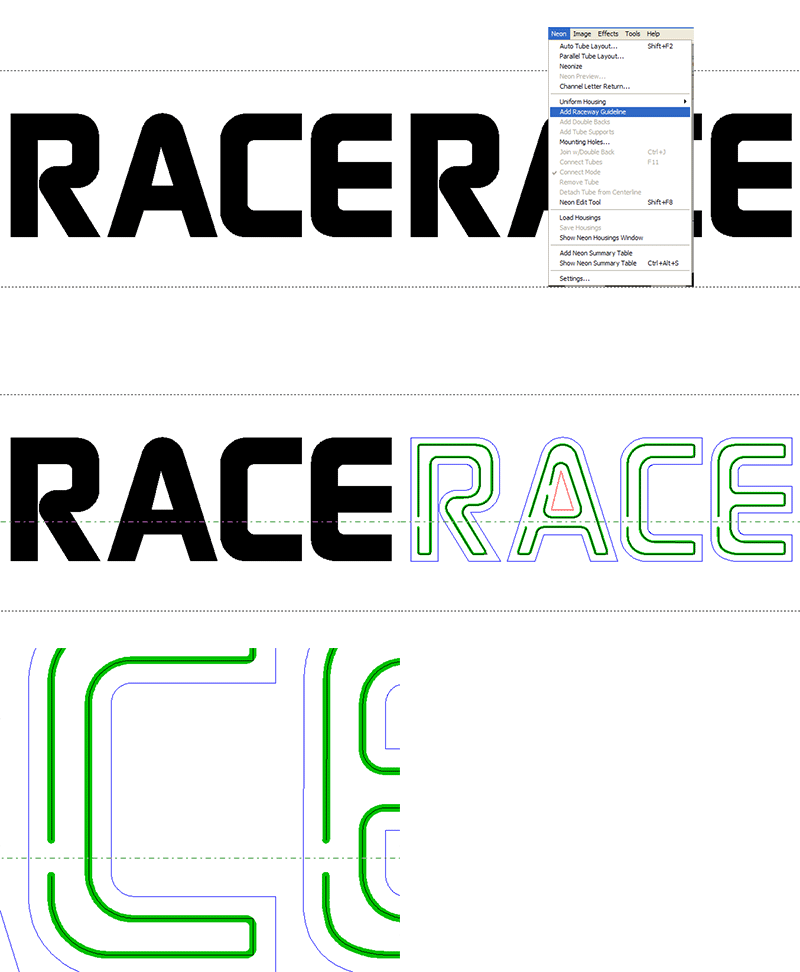
When making channel letters, you often want to line up your neon housings along a raceway. Neon Wizard enables you to position the raceway, and then when you use the Auto Tube Layout or Neonize feature, the tube openings will automatically be created along this raceway guideline.
|
|
|
|
|
|
NW |
N+ |
NP |
Switch between drop/flat blend
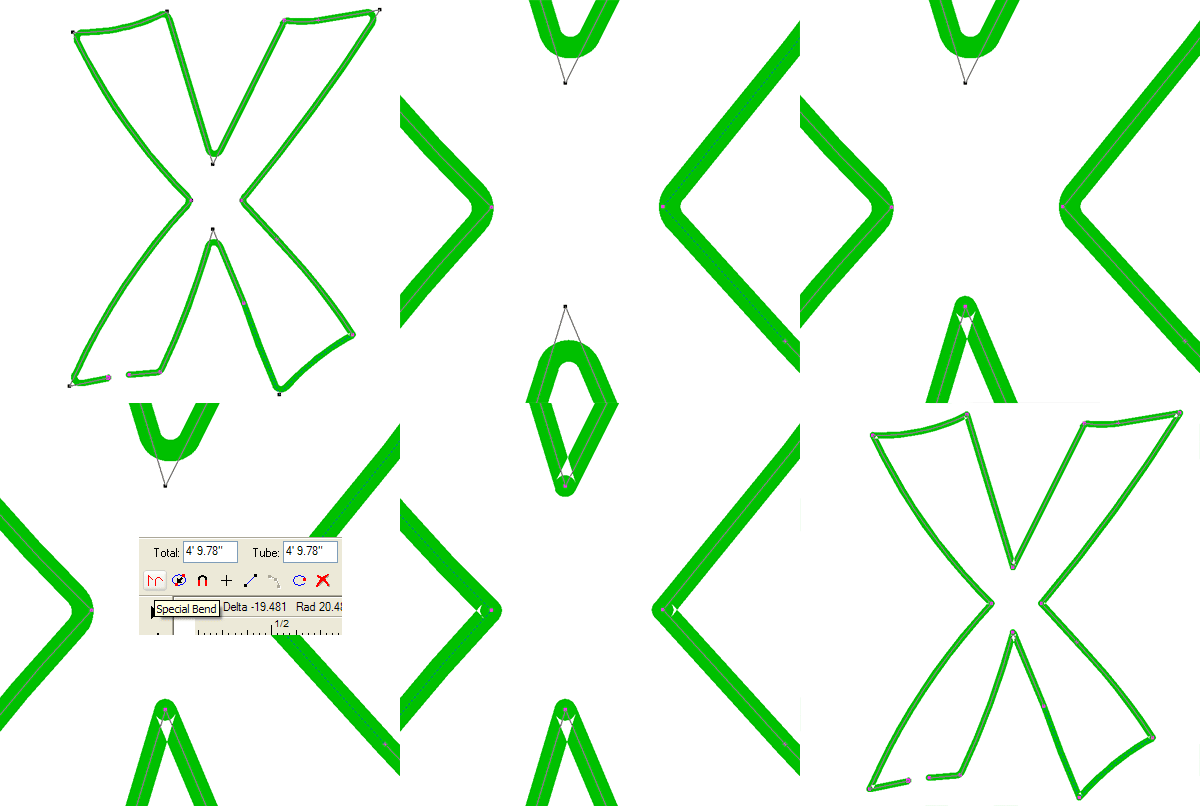
A neon tube bend will be displayed as a flat bend or a drop bend depending on the angle of the two tubes (you set the default angle). You may change any bend from one type to the other just by clicking on the Special Bend icon or by using the neon editing pop-up menu.
|
|
|
|
|
|
NW |
N+ |
NP |
Tube End Gap
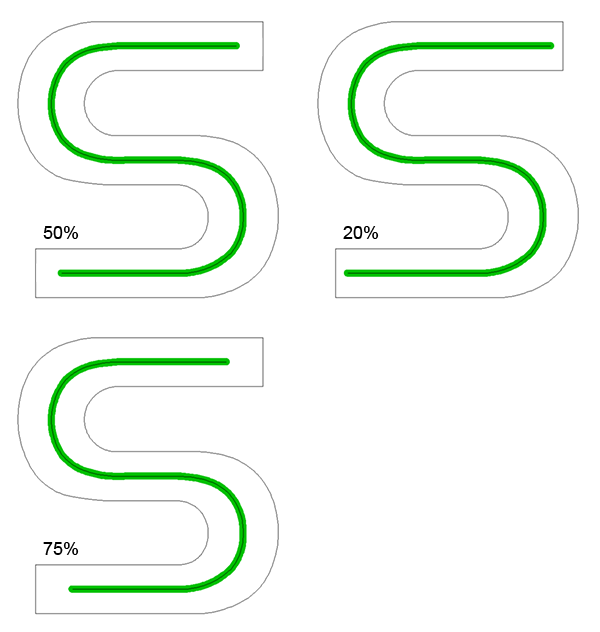
This allows you to set a standard distance from the end of a tube to the inside edge of a channel letter, based on a percentage of the stroke width. The default is 50%, which puts the end of the tube an equal distance from the three edges of the letter. This graphic also shows 20% and 75% for comparison.
|
|
|
|
|
|
NW |
N+ |
NP |
Tube Support Holes
|
|
|
|
|
|
NW |
N+ |
NP |
Neon Auto Spacing
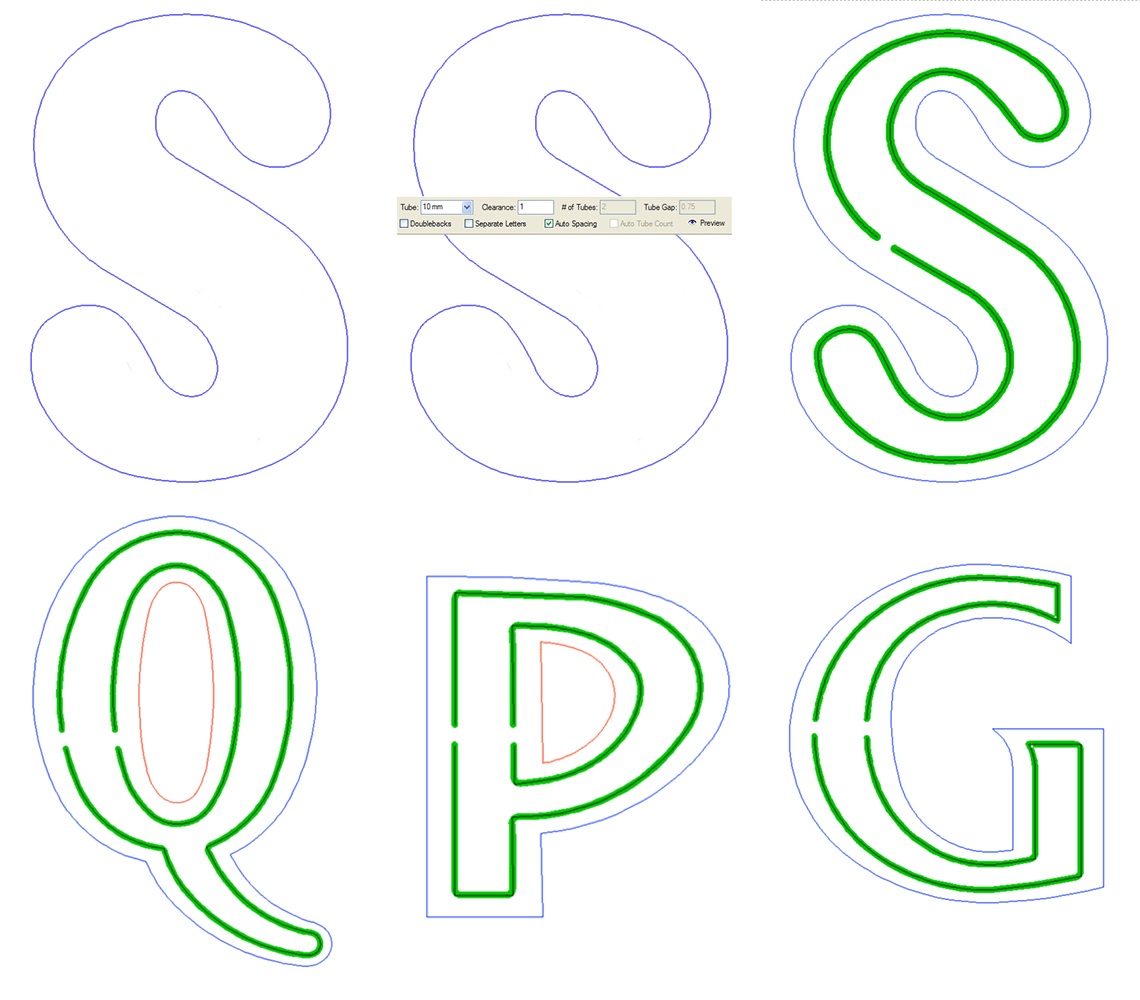
For evenly lighted double tube channel letters, the new Auto Spacing capability with Auto Tube Layout is all you need. For variable stroke letters, the tubes will be placed closer to the edge on the thin strokes and closer to the middle on thick strokes.
|
|
|
|
|
SP |
|
|
NP |
Neon Auto Tube Count
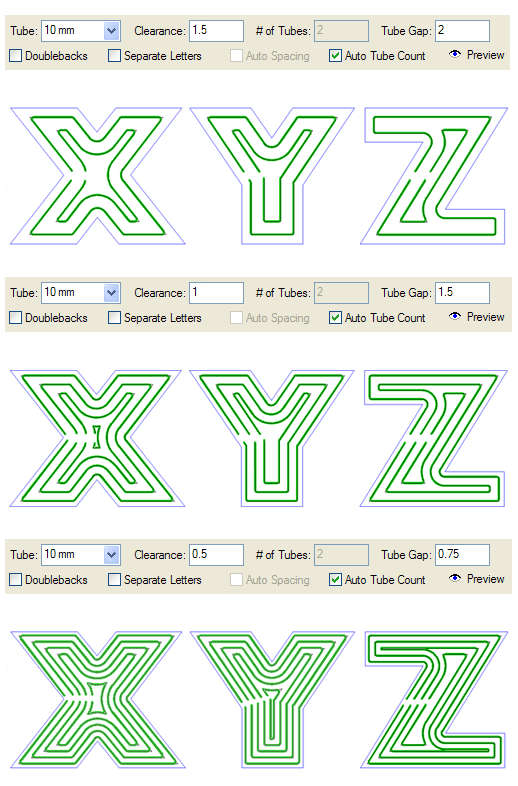
Take the guesswork out of your neon layouts! Auto Tube Count will determine the correct number of tubes based on the Tube Size, Clearance, and Tube Gap values you enter in Auto Tube Layout. These examples show 25" letters with various values and number of tubes.
|
|
|
|
|
|
|
N+ |
NP |
Neon Preview
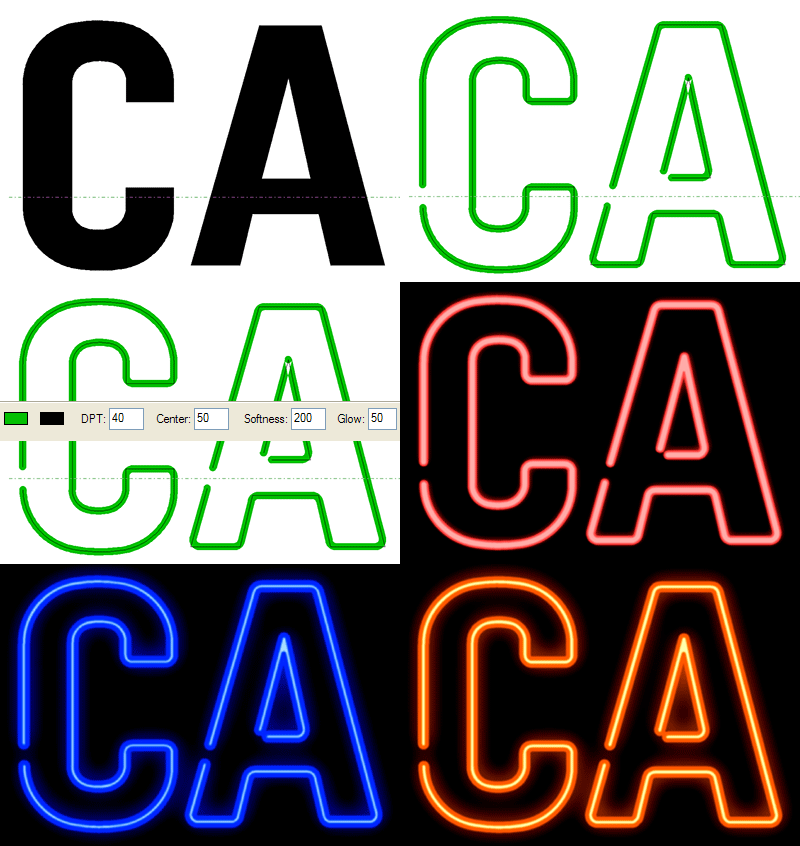
The new Neon Preview gives you amazingly realistic looking previews of what your neon sign will look like. This has been totally redesigned for version 6, and now has several options for fine-tuning the preview. These examples show a few variations on the options, including the Color, Center, Softness, and Glow options in the property bar.
|
|
|
|
|
|
|
|
NP |
Neon Preview enhanced to work with Groups
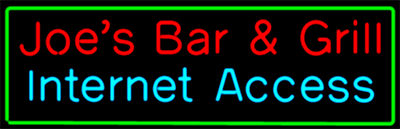
This enhancement to Neon Preview means you can now preview an entire group of neon graphics.
|
|
|
|
|
|
|
|
NP |
Parallel Tube Layout
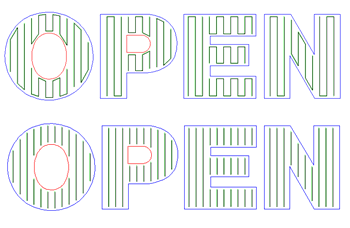
Here\\'s a feature that will save you tremendous time and money on big channel letters. Parallel Tube Layout enables you to drop in a whole set of neon tubes inside your letters all at once. You set the angle, the distance from the edge, and the distance between tubes. You can even connect all the tubes together in one easy step. This feature alone more than pays for the software on one big job!
|
|
|
|
|
|
|
|
NP |
Wide Format Printing
|
| |
CMYK and HSV Support
|
SL |
SS |
SA |
SG |
SP |
NW |
N+ |
NP |
New Bitmap Filters: GIF, TIFF LZW
|
SL |
SS |
SA |
SG |
SP |
NW |
N+ |
NP |
Stroke Support
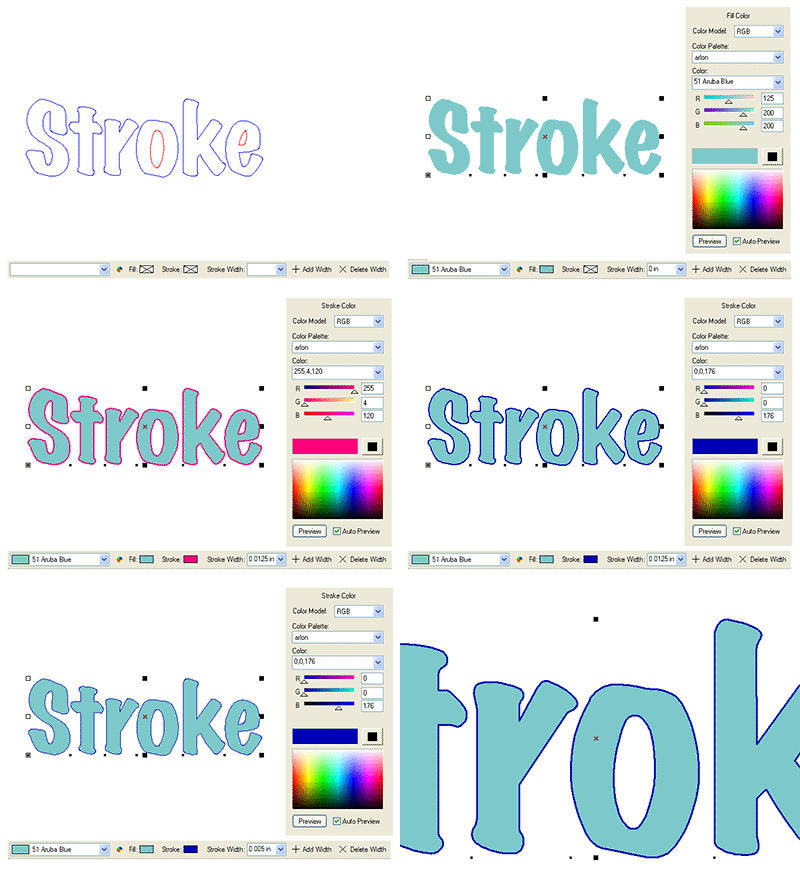
Adding a Stroke to a vector path basically thickens it up for better viewing and printing. This does not change a vector path whatsoever; it is purely a bitmap effect.
In this example, the lettering has been given a stroke, and then the color and width of the stroke are changed using the Job Color Toolbar and the new Color tab.
|
SL |
SS |
SA |
SG |
SP |
NW |
N+ |
NP |
Windows Image Acquisition
|
|
|
SA |
SG |
SP |
|
N+ |
NP |
Image Resampling
|
|
|
|
SG |
SP |
|
N+ |
NP |
Enhanced RIP Integration
|
|
|
SA |
SG |
SP |
|
|
|
External Image Edit
|
|
|
|
SG |
SP |
|
|
NP |
ICC Profile Support
|
|
|
SA |
SG |
SP |
|
|
|
Registration Marks
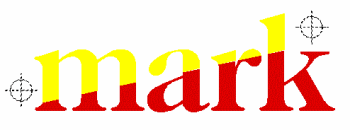
Registration Marks are very useful in lining up multiple colors, especially in screenprinting, and in print and cut jobs. When the design is sent to the Plot Manager for production, the registration marks are automatically plotted with each color so that the final design can be easily lined up.
For print and cut, registration marks placed outside the design are used to align the print with the contour cut path sent to the vinyl cutter.
|
|
|
SA |
SG |
SP |
|
|
|
Send to RIP w/Onyx Integration
|
|
|
SA |
SG |
SP |
|
|
|
Alpha Channels
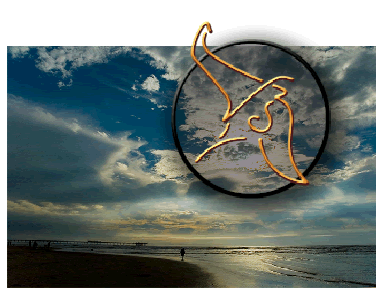
You can now use 32-bit bitmaps containing alpha channels, which function like vector graphics with transparent sections. In the above example, the Sign Wizard logo is a 32-bit image from Photoshop where the outer section is feathered transparency, and the inner section is a flat transparency, letting about 70% of the background show through.
|
|
|
|
SG |
SP |
|
|
|
Photomask
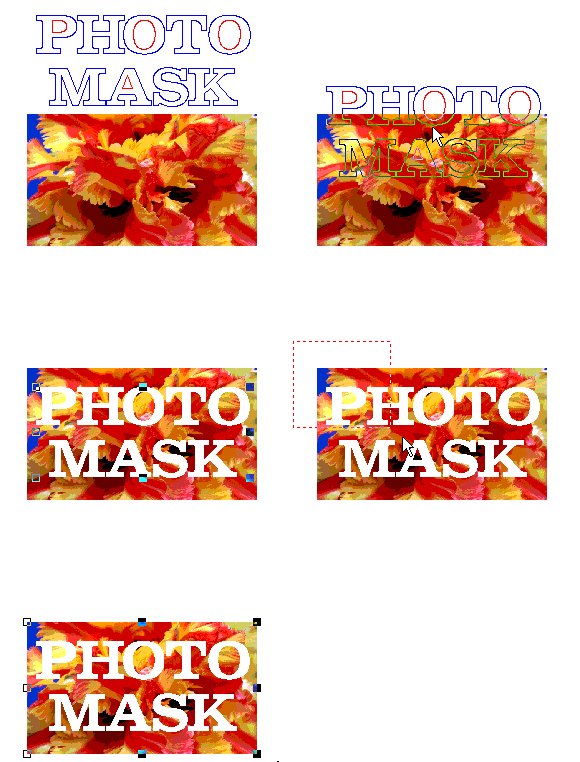
The Photomask feature has been enhanced with a Shift option to more precisely position the underlying bitmap, and a Scale option, allowing you precisely set the size of the bitmap relative to the clipping vector path.
|
|
|
|
|
SP |
|
|
NP |
Contour Cut tool
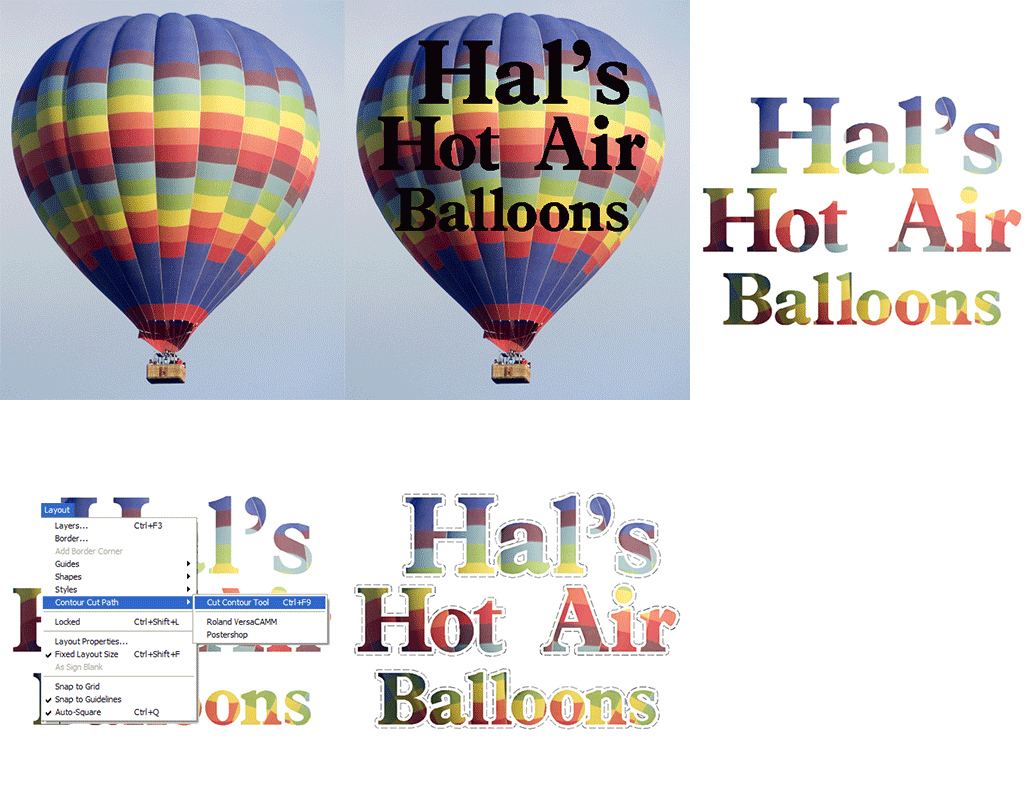
This tool creates a contour cut path from any vector path so that you can print and cut your designs. There is an optional gap if you want your printed graphic to have a border or blend into another color.
The Contour Cut tool can be used in conjunction with Clipping Path, Photomask, On-Screen Digitizing, Transparency, Feather, and more to create stunning printed graphics.
In this example, the lettering was filled with the balloon pattern using Clipping Path, and then a Contour Cut was created with a small border.
Version 7 adds a simple way to select the type of contour cut to be created, which varies with your particular printer/cutter combo.
|
|
|
|
|
SP |
|
|
|
Dynamic Contour Cut Paths
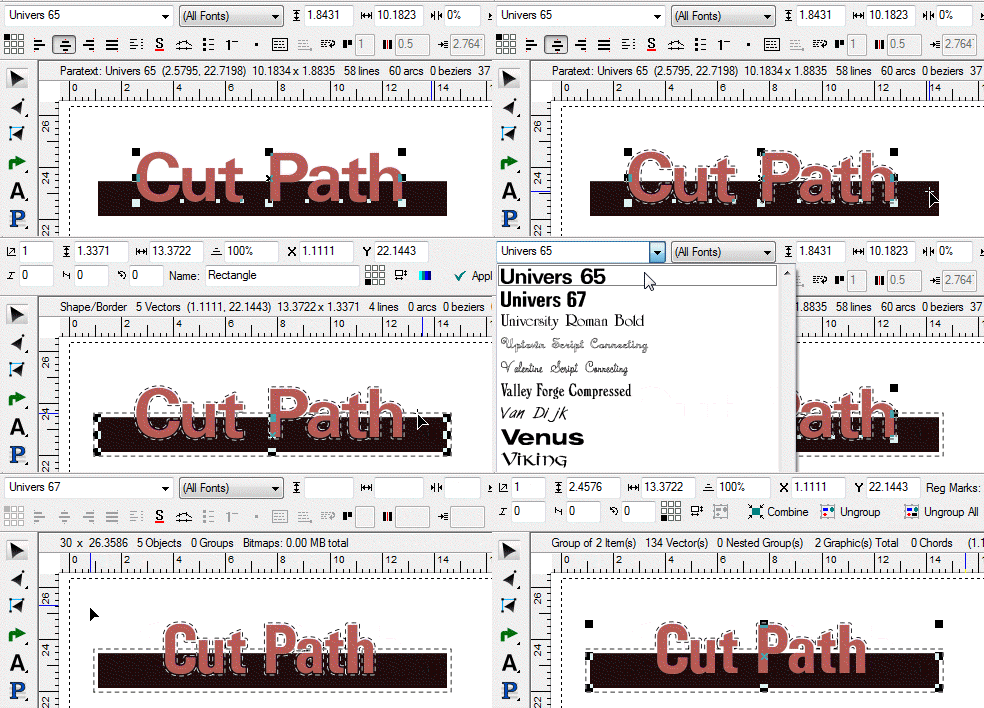
|
|
|
|
|
SP |
|
|
|
Print and Cut
|
|
|
|
|
SP |
|
|
|
Print/Cut Registration Mark Support
|
|
|
|
|
SP |
|
|
|
Rasterize w/Transparency
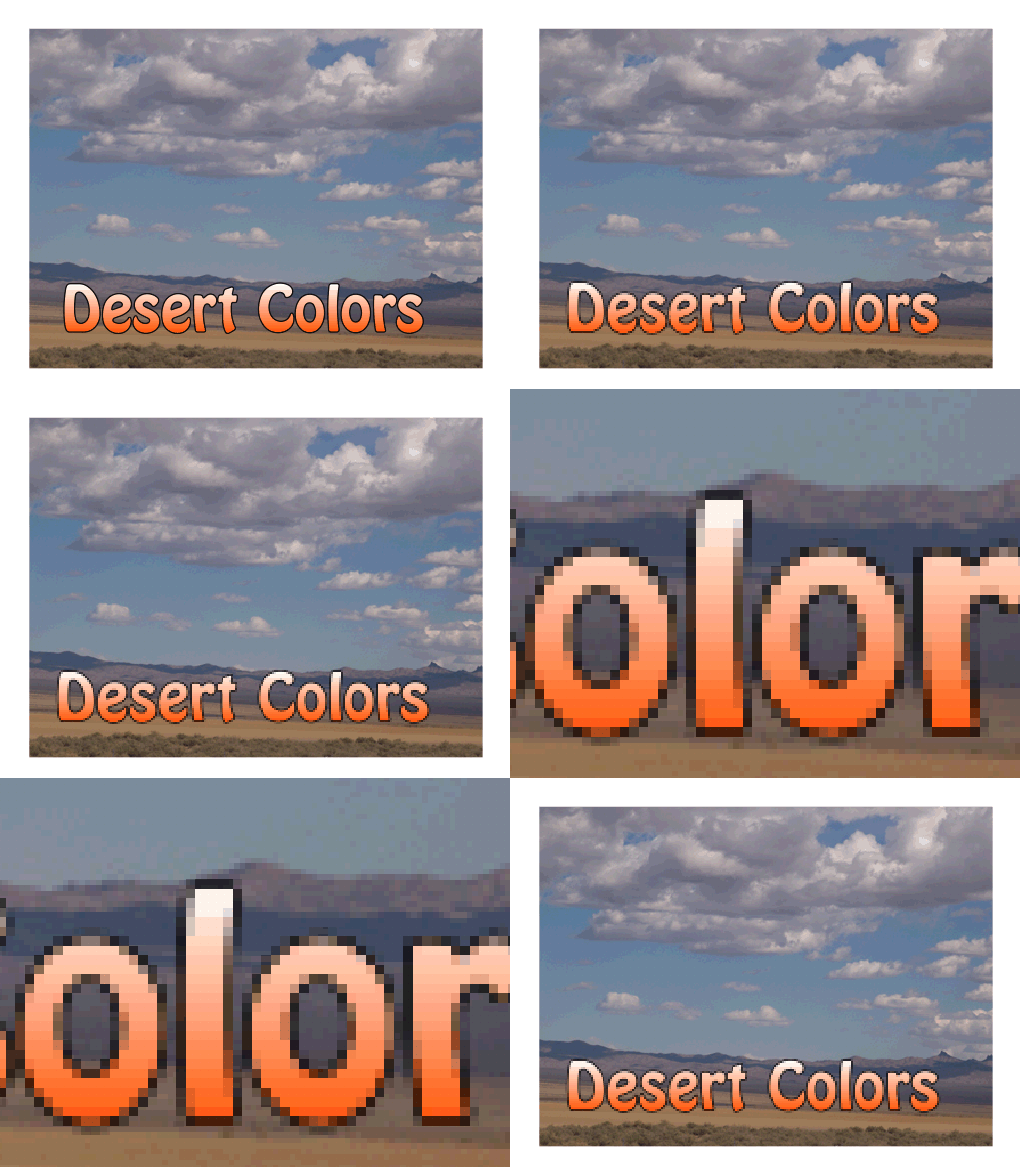
This is a great tool for compositing complex designs, when you don't want to use the memory and time required for complex elements to redraw as you zoom in and out or output to printers. It converts all vector graphics into a single bitmap. It can also be used to create graphics in Sign Wizard and go easily back and forth to Photoshop or other image editors in order to use specialized filters, all the while preserving transparency. This example is intentionally low resolution to show the bitmap that is created.
|
|
|
|
|
SP |
|
|
|


;)
;)
;)
;)
;)
;)
;)
;)
;)
;)
;)
;)
;)
;)
;)
;)
;)
;)
;)
;)
;)
;)
;)
;)
;)
;)
;)
;)
;)
;)
;)
;)
;)
;)
;)
;)
;)
;)
;)
;)
;)
;)
;)
;)
;)
;)
;)
;)
;)
;)
;)
;)
;)
;)
;)
;)
;)
;)
;)
;)
;)
;)
;)
;)
;)
;)
;)
;)
;)
;)
;)
;)
;)
;)
;)
;)
;)
;)
;)
;)
;)
;)
;)
;)
;)
;)
;)
;)
;)
;)
;)
;)
;)
;)
;)
;)
;)
;)
;)
;)
;)
;)
;)
;)
;)
;)
;)
;)
;)
;)
;)
;)
;)
;)
;)
;)
;)
;)
;)
;)
;)
;)
;)
;)
;)
;)
;)
;)
;)
;)
;)
;)
;)
;)
;)
;)
;)
;)
;)
;)
;)
;)
;)
;)
;)
;)
;)
;)
;)
;)
;)
;)
;)
;)
;)
;)
;)
;)